Schema Editor
Edit table structure from the browser without hand-writing ALTER TABLE. Open any table in the Data Browser and switch to Structure: every column shows its type, nullability, and default, with the available actions next to it.
The rule for every operation is the same: you see the exact SQL first, nothing runs until you click Execute, and what executes is byte-for-byte the SQL you previewed. The server never runs SQL from the browser: the client sends structured parameters, and the SQL it echoes back is only compared. The server generates the statement.
Since 1.2.0; wider dialog with autoscroll while dragging since 1.3.0.
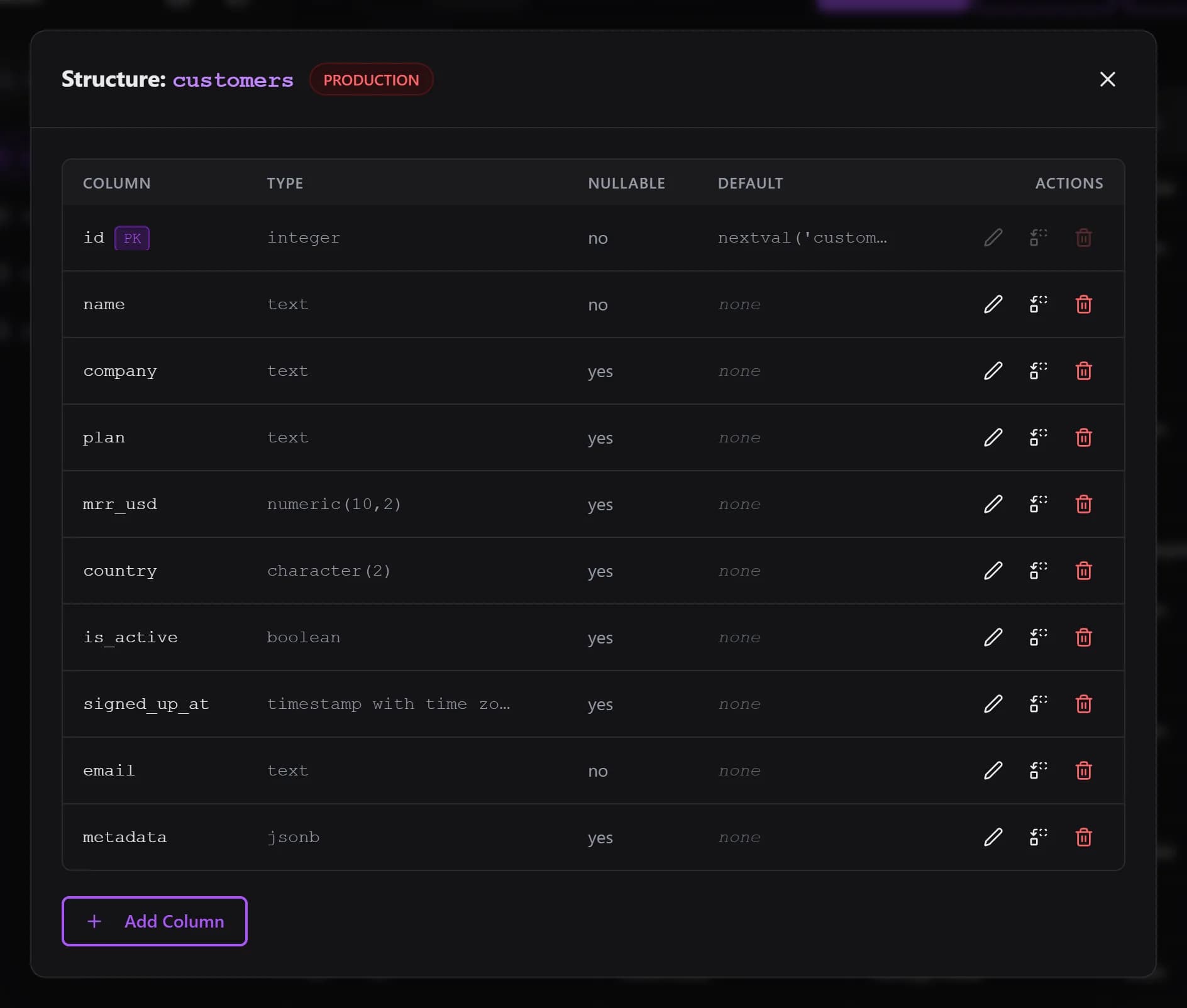
Column Operations
Add Column
Name, type, nullability, and default. Types come from a per-dialect allowlist, so a typo can never become arbitrary SQL.
Engines: All engines
Rename Column
RENAME COLUMN on every engine that supports it. On MySQL that means 8.0+, on MariaDB 10.5+.
Engines: All engines (version note for MySQL/MariaDB)
Change Column Type
On MySQL/MariaDB the statement restates nullability and default explicitly, because MODIFY COLUMN resets what it does not restate. The preview shows exactly that. CockroachDB restricts some conversions; an unsupported one fails with the database error.
Engines: PostgreSQL, MySQL, MariaDB, CockroachDB, TimescaleDB (SQLite has no in-place type change)
Drop Column
Requires typing the column name to confirm. Never cascades: QueryGlow will not silently take dependent objects down with the column.
Engines: All engines
Reorder Columns
Drag the grip handle at the start of a row to a new spot, or click it to pick a position from a form (First / After a column). The list scrolls while you drag a column to its top or bottom edge.
Engines: MySQL and MariaDB only
Preview, then Execute
Fill in the form, click Preview SQL, read the statement, click Execute. For a drag-and-drop reorder the preview appears automatically after the drop, so a reorder is one drag plus one click.
Enforced, not just promised
On Execute, the client sends the previewed SQL along as an assertion. The server regenerates the statement from the live schema and compares. If the table changed in between and the SQL would differ, the server refuses (HTTP 409) and asks you to preview again. It only ever runs its own regenerated statement.
Guard rails
Destructive operations (change type, drop) require typing the column name, and on connections marked as Production their button reads Execute on Production with a red warning. Executed statements land in your Query History like any other query.
Schema editing is a human-only feature: agent tokens can never run DDL, and the public demo does not allow schema changes.
How Reordering Works (MySQL/MariaDB)
MySQL and MariaDB can move a column in place with MODIFY COLUMN ... FIRST | AFTER. The catch: MODIFY COLUMN resets every attribute it does not restate. So QueryGlow reads the column's current definition from information_schema and restates all of it. A reorder never strips an attribute.
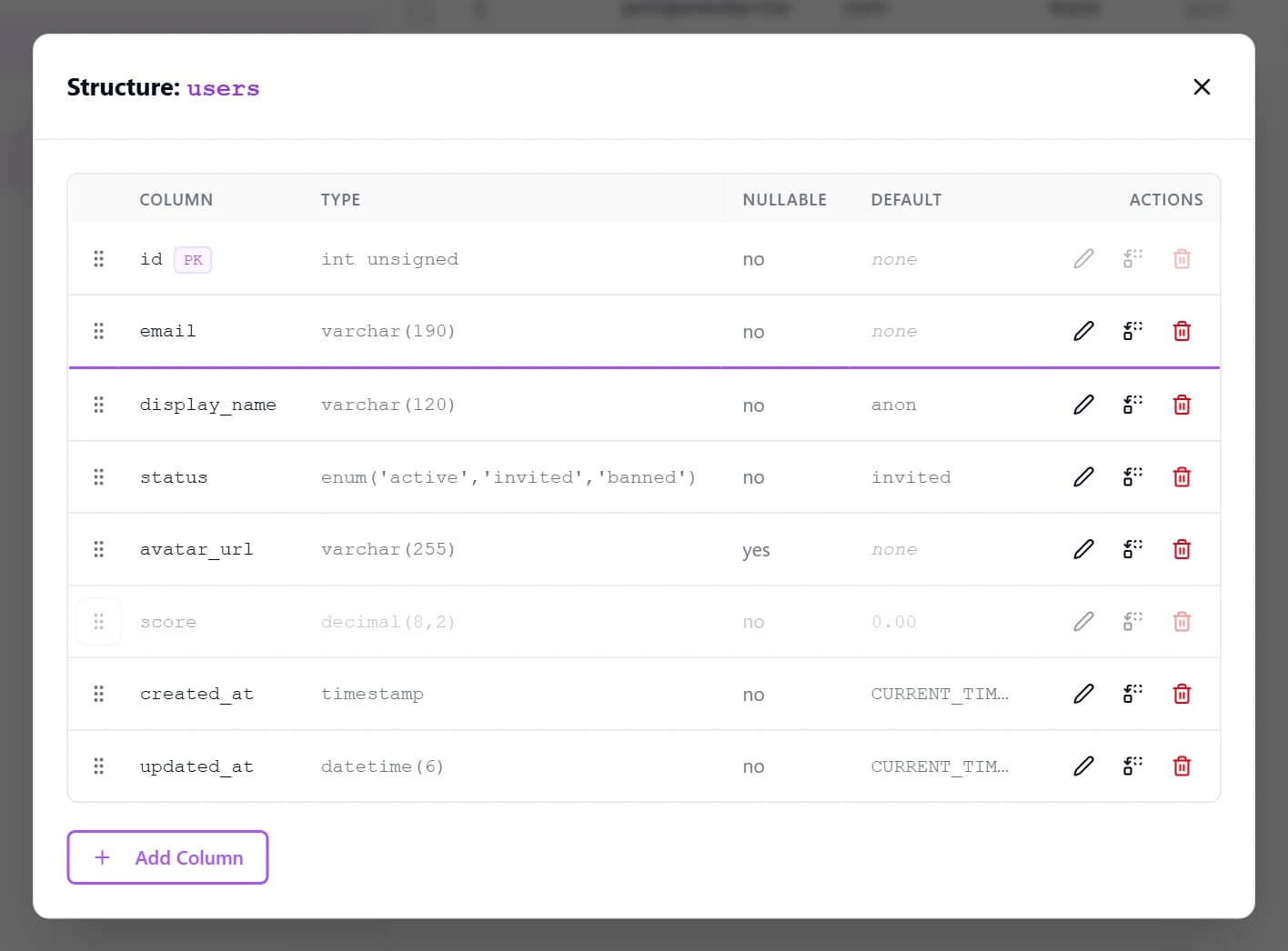
mrr_usd is being moved to sit right after name. The insertion line marks the drop slot. Note the primary key row: its rename, retype, and drop actions are disabled, but its grip handle is live.Two ways to move
Drag the grip handle to a new row position (an insertion line shows where it lands), or click the handle to open the Move Column form and choose First or After a specific column. The click path also works on touch devices and with a keyboard.
What gets restated
Type verbatim, character set and collation, NULL / NOT NULL, DEFAULT (including fractional-second timestamps), ON UPDATE, AUTO_INCREMENT, INVISIBLE, and COMMENT. Primary key columns can be moved too; it is the one operation allowed on them, because it changes position only.
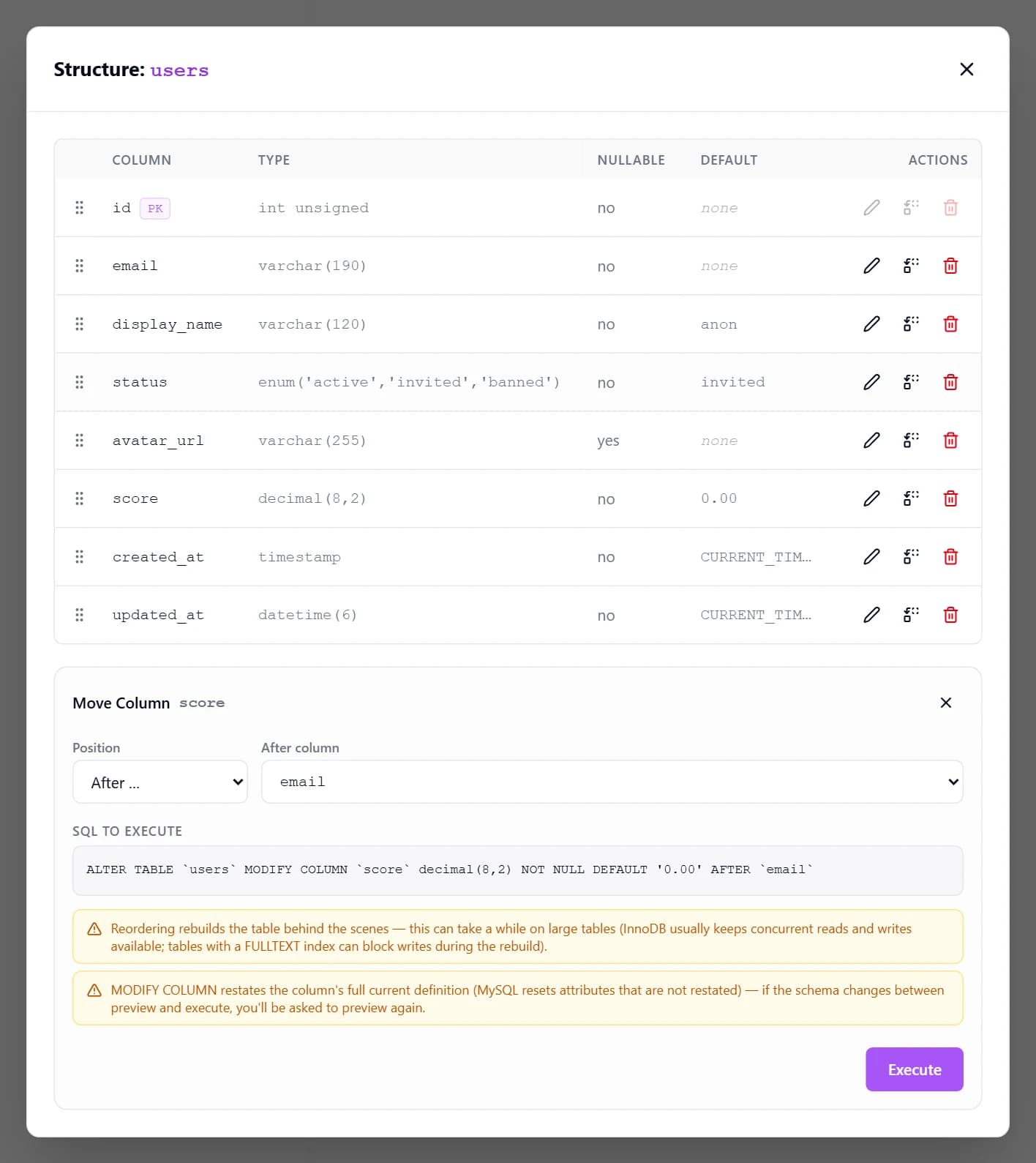
A more attribute-heavy example
ALTER TABLE `events` MODIFY COLUMN `updated_at` datetime(6) NOT NULL DEFAULT CURRENT_TIMESTAMP(6) ON UPDATE CURRENT_TIMESTAMP(6) AFTER `created_at`Refused with a message
When a definition cannot be restated safely, QueryGlow refuses the reorder instead of guessing, and points you to the Query Editor:
- Generated columns (their expression cannot be restated safely)
- Spatial columns (their SRID attribute cannot be restated safely)
- Columns with unusual expression defaults
- On MariaDB: columns with a column-level CHECK constraint, which includes every MariaDB JSON column (MySQL JSON columns reorder fine)
- On MySQL: BINARY/VARBINARY columns that carry a default (MySQL does not report the default bytes faithfully)
Good to Know (Current Limitations)
Primary key columns cannot be renamed, retyped, or dropped. Reordering is the one exception, because it is a position-only change.
Reordering is MySQL/MariaDB only. PostgreSQL, CockroachDB, TimescaleDB, and SQLite store column order physically and offer no in-place reorder (it would need a full table rebuild), so the drag handles do not appear there.
Reordering rebuilds the table behind the scenes. On large tables it can take a while; InnoDB usually keeps concurrent reads and writes available, but tables with a FULLTEXT index can block writes during the rebuild.
SQLite cannot change column types in place. Adding a NOT NULL column on SQLite needs a constant default.
MySQL does not allow defaults on TEXT, BLOB, or JSON columns (MariaDB does). MySQL columns with expression defaults such as (uuid()) cannot be retyped.
On PostgreSQL, the Structure dialog edits tables in the public schema only.
Dropping a column never cascades.