Honest Comparison

QueryGlow vs Supabase Studio

Self-hosting Supabase? Supabase Studio is built around your Supabase project's database: self-hosted Supabase runs as a single project. QueryGlow is a general-purpose, multi-database GUI you self-host: manage your self-hosted Supabase Postgres and your other Postgres, MySQL, MariaDB, SQLite, CockroachDB and TimescaleDB databases from one interface on your own server.

Try the live demo
  • “Beautiful interface and very intuitive.”
    Jean-Francois, Mildor Violon, verified customer
https://db.your-company.com
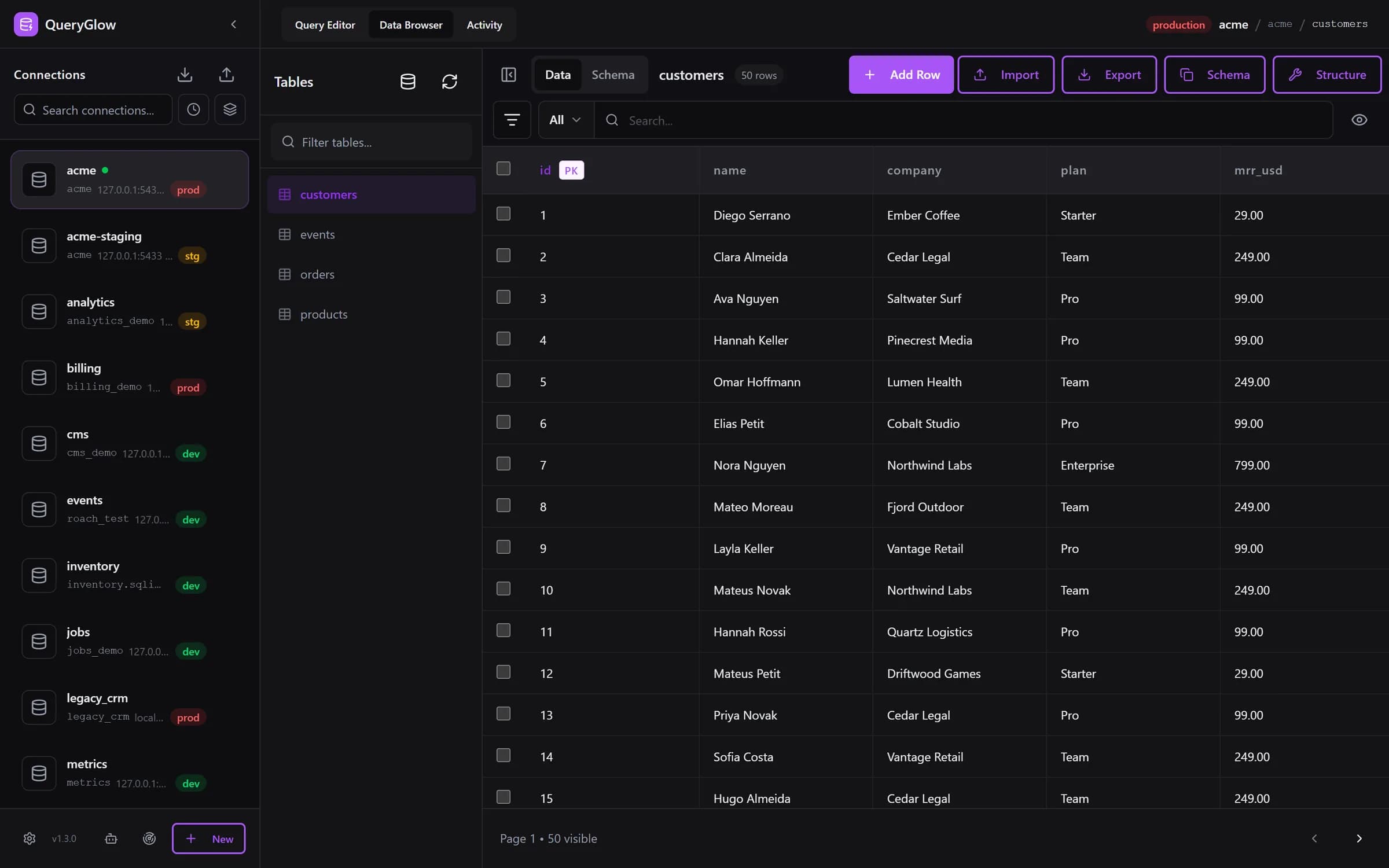
QueryGlow Data Browser showing a customers table on a production PostgreSQL connection

A single-project console vs a general-purpose client

Both are great at what they are built for. Here is the honest difference.

Supabase Studio

Single-project Postgres console

Supabase Studio is the dashboard for your Supabase project: a polished way to work with that project's Postgres, alongside Supabase's Auth, Storage and APIs. It is built around that one database. Supabase's self-hosting docs put it this way: “Self-hosted Supabase runs as a single project which means that Studio doesn't support multiple organizations or projects.”

QueryGlow

General-purpose, multi-DB, self-hosted

QueryGlow is a general-purpose database GUI you self-host with Docker. Point it at the Postgres behind your self-hosted Supabase, and at your other Postgres, MySQL, MariaDB, SQLite, CockroachDB and TimescaleDB databases, and manage them all from one interface on your own server, with a full SQL editor, AI, a visual EXPLAIN plan and self-host security.

See it before you pay

Open the live demo (read-only sample database, AI switched off), no signup. If it fits, buy once for your whole team.

Try the live demo

Stripe checkout. You'll enter your GitHub username for the repo invite. No refunds, so try the read-only demo first.

What QueryGlow brings to the table

Everything below is built into QueryGlow today.

Your Supabase Postgres + five more engines

Paste the connection string of the Postgres behind your self-hosted Supabase, list the databases that login can open and add them in one go. Your other Postgres, MySQL and MariaDB databases on RDS, Railway or local sit in the same sidebar, grouped by host.

Six engines, self-hosted

PostgreSQL, MySQL, MariaDB, SQLite, CockroachDB and TimescaleDB: one GUI you run with Docker on your own infrastructure, for the whole team behind one shared login.

Built for Postgres data

JSON, JSONB and array columns are readable and editable as JSON text. timestamptz values show in your time zone and date format; the stored value stays untouched.

A full SQL editor

A Monaco editor (the VS Code engine) with schema-aware autocomplete for tables and columns, Ctrl+Enter to run, and shortcuts you can set yourself for run, explain, Ask AI and save.

AI text-to-SQL, schema-only

Describe a query in plain English and QueryGlow drafts the SQL. Ask AI sends your database type, table and column names with their types, and your prompt. Never rows. Your own OpenAI, Anthropic or Google key, entered in the app (stored encrypted on your server) or set in .env.

A visual EXPLAIN plan

A visual EXPLAIN/ANALYZE plan tree that flags sequential scans and missing indexes, with concrete CREATE INDEX suggestions.

Layered self-host security

Encrypted credentials (AES-256-GCM), SSH tunnels with pinned host keys, optional server certificate verification (sslmode=verify-ca or verify-full in a pasted URL turns it on; providers that use their own certificate authority, such as Supabase, CockroachDB Advanced or Amazon RDS, need Verify server certificate turned off after pasting), Safe Mode, a confirmation before writes on production, and Basic Auth.

Agent Access with an activity log

Let AI agents query your databases through QueryGlow with per-connection tokens, read-only by default and enforced by the database. The Activity tab shows every call, and one click pauses an agent.

QueryGlow manages your database: it is not a Supabase replacement

Supabase gives you authentication, storage, edge functions and auto-generated REST/GraphQL APIs. QueryGlow does none of those, and does not try to. It is the GUI you point at your Postgres (self-hosted Supabase or anything else) and your other databases. Keep using Supabase for the platform; use QueryGlow as the multi-database client on your own server.

Which one fits you?

Supabase is a great fit if…

  • You want a full backend platform: Auth, Storage, Edge Functions, auto-generated APIs
  • You are happy managing a single Supabase project and its database
  • The built-in Studio covers your day-to-day database work

Consider QueryGlow if…

  • You self-host Supabase and want a GUI that also reaches your other databases
  • You want the connection string Supabase gives you to work as is
  • You want a general-purpose, multi-database client you run on your own infrastructure
  • You want a visual EXPLAIN plan to find and fix slow queries
  • You want AI text-to-SQL with your own key, sending only your schema

Frequently Asked Questions

Does QueryGlow replace Supabase?
No. Supabase is a full backend platform: authentication, storage, edge functions and auto-generated APIs. QueryGlow does not replace those. It is a database GUI you point at your Postgres (including the Postgres behind a self-hosted Supabase instance) and your other databases. Many teams use both: Supabase for the platform, QueryGlow as the multi-database GUI on their own server.
Can QueryGlow manage my self-hosted Supabase database?
Yes. QueryGlow connects to any PostgreSQL database with standard credentials, including the Postgres behind a self-hosted Supabase instance, plus MySQL, MariaDB, SQLite, CockroachDB and TimescaleDB, all from one self-hosted interface. Paste the Postgres connection string Supabase gives you and the form fills itself; sslmode=verify-full in the URL switches certificate verification on. Providers that use their own certificate authority (Supabase, CockroachDB Advanced, Amazon RDS) need Verify server certificate turned off after pasting.
How is QueryGlow different from Supabase Studio?
Supabase's own docs say self-hosted Supabase runs as a single project, so Studio does not support multiple organizations or projects. QueryGlow is a general-purpose, multi-database client you self-host: it manages your Supabase Postgres and the other PostgreSQL, MySQL, MariaDB, SQLite, CockroachDB and TimescaleDB databases you run, with AI text-to-SQL, a visual EXPLAIN plan and self-host security.

One GUI for your Supabase Postgres and five more engines

A general-purpose, multi-database client you self-host. $79 once, on your own infrastructure, with every 1.x update.

Try the live demo

Try the live demo first: the real app on a sample database, read-only, AI switched off, no signup.

Compare QueryGlow with Others

See how we stack up against the alternatives.

Prefer nothing to install on your laptop? QueryGlow is a web-based SQL client: installed on your server with one command, then Postgres, MySQL, MariaDB, SQLite, CockroachDB and TimescaleDB from any browser.