Desktop App per Machine
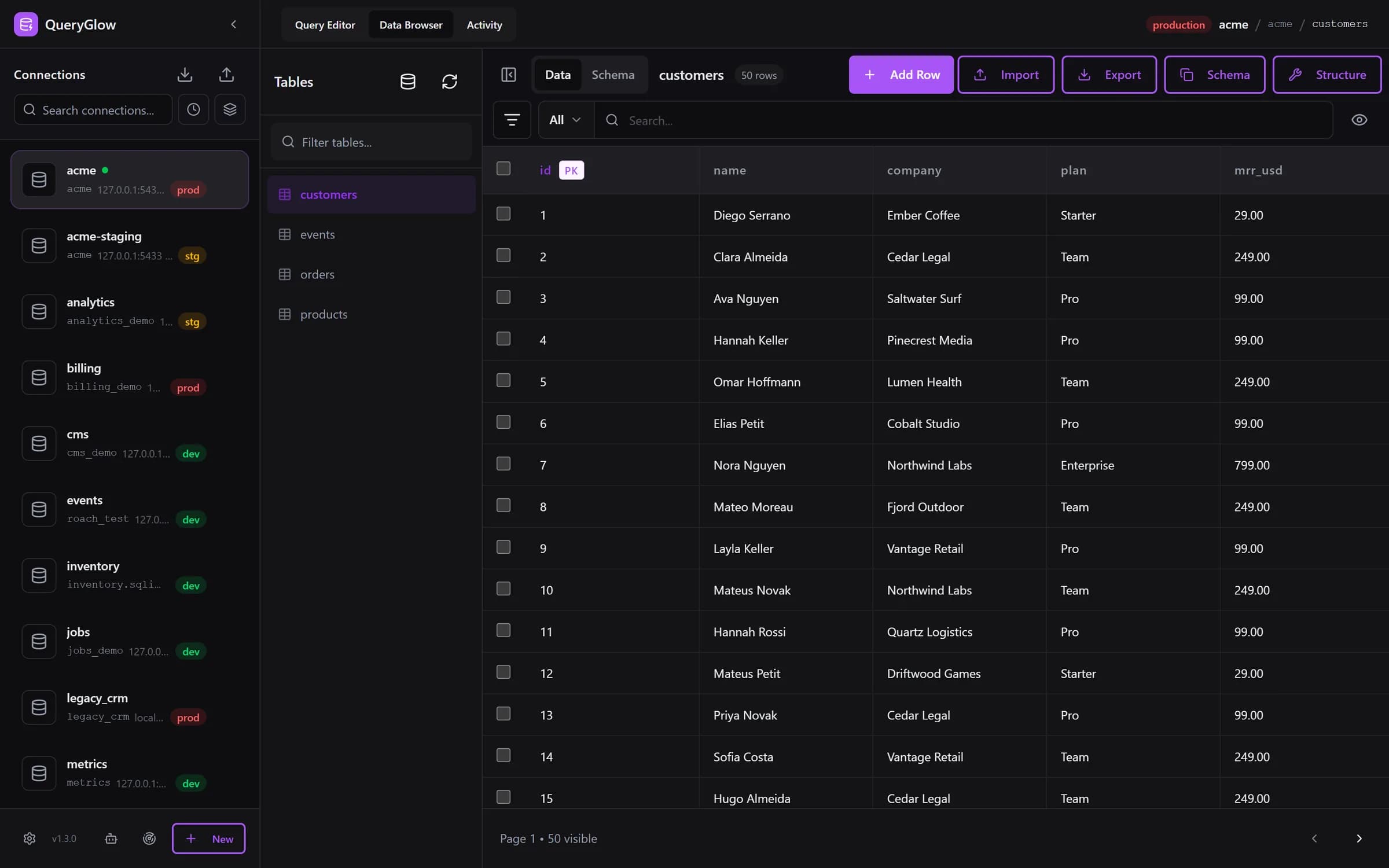
pgAdmin runs as a desktop app on each machine, or as a web app you deploy yourself. QueryGlow installs with one command on your server and the whole team opens the same URL.
pgAdmin is the free, official PostgreSQL admin tool. QueryGlow is a PostgreSQL GUI your whole team opens in a browser, with schema-only AI, Safe Mode and a check before writes on production.
The live demo is the real app on a sample database (read-only, AI switched off, no signup).
Less than DataGrip's first year ($109, individual) or a year of DBeaver Lite ($113 per user per year, as of September 2026). $79 once: source code included, every 1.x update, every server you run, your whole team.
“Beautiful interface and very intuitive.”
pgAdmin is free and covers a lot of ground. These are the points that matter for day to day development.
pgAdmin runs as a desktop app on each machine, or as a web app you deploy yourself. QueryGlow installs with one command on your server and the whole team opens the same URL.
In pgAdmin's Query Tool a DROP TABLE runs as typed. QueryGlow refuses it by default and asks before any write on a production connection.
pgAdmin added an AI Assistant in 9.13. QueryGlow's Ask AI sends only the schema (table and column names with their types), never rows, with your own key.
pgAdmin covers administration and monitoring; QueryGlow focuses on browsing, querying and editing data.
What you get in the browser tab.
No desktop client to launch, nothing to install per machine. Open the URL and work. One ./queryglow update on the server updates everyone.
Ask AI drafts PostgreSQL from plain English with your own OpenAI, Anthropic or Google key. It sends table and column names with their types and your prompt, never rows. Enter the key in the app (stored encrypted on your server) or set it in .env.
Open your PostgreSQL databases from any modern browser. Your whole team uses the same install behind one shared login.
Reach PostgreSQL in private networks. Paste your private key into the connection form. The host key is pinned on first connect; a server that presents a different key is refused.
Mark a connection as production and it shows in red in the sidebar and header. The Query Editor shows the statement and asks before any INSERT, UPDATE, DELETE or DDL runs on it.
JSON and JSONB columns show as JSON text in the Data Browser and in query results, and you can edit them.
Add, rename, retype and drop columns. You see the exact ALTER statement first, and what runs is exactly what you saw.
Paste a postgres:// URL from Supabase, Neon or RDS and the form fills itself. Find databases on this server lists every database your login can open and adds them in one go.
Import with INSERT, UPSERT (ON CONFLICT) or REPLACE. Detects the delimiter; you pick the encoding. Export streams up to 100,000 rows per file by default.
Visual query plan analysis with color-coded nodes. Warnings flag sequential scans and suggest CREATE INDEX statements.
Schema-aware completions for tables, columns, keywords, and functions. Type table. to see columns with data types.
Give Claude Code or Cursor a read-only token instead of a connection string. Every agent call shows up in the Activity tab, and you can pause one agent or all of them.
Dark or light theme, six accent colors, rows per page up to 500, NULL display, time zone and date format, and your own keyboard shortcuts.
| Feature | pgAdmin | QueryGlow |
|---|---|---|
| How it opens | Desktop app, or a web app you deploy (server mode or container) | Browser tab, one install on your server for the whole team |
| Query guard | No statement guard (Auto commit can be turned off) | Refuses DROP TABLE, TRUNCATE and unfiltered UPDATE/DELETE by default; asks before writes on production |
| AI data boundary | AI Assistant (since 9.13) | Ask AI: schema only, never rows, your own OpenAI, Anthropic or Google key |
| SSH Tunnels | Yes (identity file or password) | Yes, key pasted in the form, host key pinned |
| Installation | Installer per machine, or server mode | Docker on your server: ./queryglow install, then ./queryglow update (backup, automatic rollback) |
| Focus | Administration, development and monitoring | Browsing, querying and editing data |
| Inline Cell Editing | Yes | Yes |
| Query History | Yes | Yes, per connection (last 1,000 queries) |
| Server Monitoring | Yes (advanced) | No |
| Price | Free | $79 once, whole team |
pgAdmin
Desktop app, or a web app you deploy (server mode or container)
QueryGlow
Browser tab, one install on your server for the whole team
pgAdmin
No statement guard (Auto commit can be turned off)
QueryGlow
Refuses DROP TABLE, TRUNCATE and unfiltered UPDATE/DELETE by default; asks before writes on production
pgAdmin
AI Assistant (since 9.13)
QueryGlow
Ask AI: schema only, never rows, your own OpenAI, Anthropic or Google key
pgAdmin
Yes (identity file or password)
QueryGlow
Yes, key pasted in the form, host key pinned
pgAdmin
Installer per machine, or server mode
QueryGlow
Docker on your server: ./queryglow install, then ./queryglow update (backup, automatic rollback)
pgAdmin
Administration, development and monitoring
QueryGlow
Browsing, querying and editing data
pgAdmin
Yes
QueryGlow
Yes
pgAdmin
Yes
QueryGlow
Yes, per connection (last 1,000 queries)
pgAdmin
Yes (advanced)
QueryGlow
No
pgAdmin
Free
QueryGlow
$79 once, whole team
pgAdmin facts as of September 2026 (pgAdmin 4 v9.18), from pgadmin.org.
Honest note: pgAdmin is free and has advanced DBA features like server monitoring and backup tools. If you're a full-time DBA managing clusters, pgAdmin might be the better choice. QueryGlow is for developers who browse and query data every day and want a query guard and schema-only AI in the browser. Its table list and autocomplete cover the public schema.
See it on a real database before you decide
$79 once for your whole team, every 1.x update included.
Stripe checkout. You'll need a GitHub account for the repo invite. No refunds, so try the read-only demo first.
QueryGlow uses the native pg driver. CockroachDB and TimescaleDB are PostgreSQL-compatible.
All three use the same pg driver and the same UI; EXPLAIN output differs by engine.
Your $79 license includes all six databases with unlimited connections.
$79 once. Safe Mode. Schema-only AI. All six databases included.
One-time payment. No subscription. Try the demo first.