CockroachDB Support

The CockroachDB GUI You Access From Anywhere

Browse and query your CockroachDB databases from any browser, with Safe Mode and schema-only AI, all self-hosted.

The CockroachDB console is free. QueryGlow is $79 once, for the whole team, with Safe Mode on by default.

Try the live demo

The live demo is the real app on a sample database (read-only, AI switched off, no signup).

$79 once: source code included, every 1.x update, every server you run, your whole team.

  • Web-Based
  • Schema-only AI
  • SSH Tunnels
  • PostgreSQL Compatible
  • “Beautiful interface and very intuitive.”
    Jean-Francois, Mildor Violon, verified customer
https://db.your-company.com
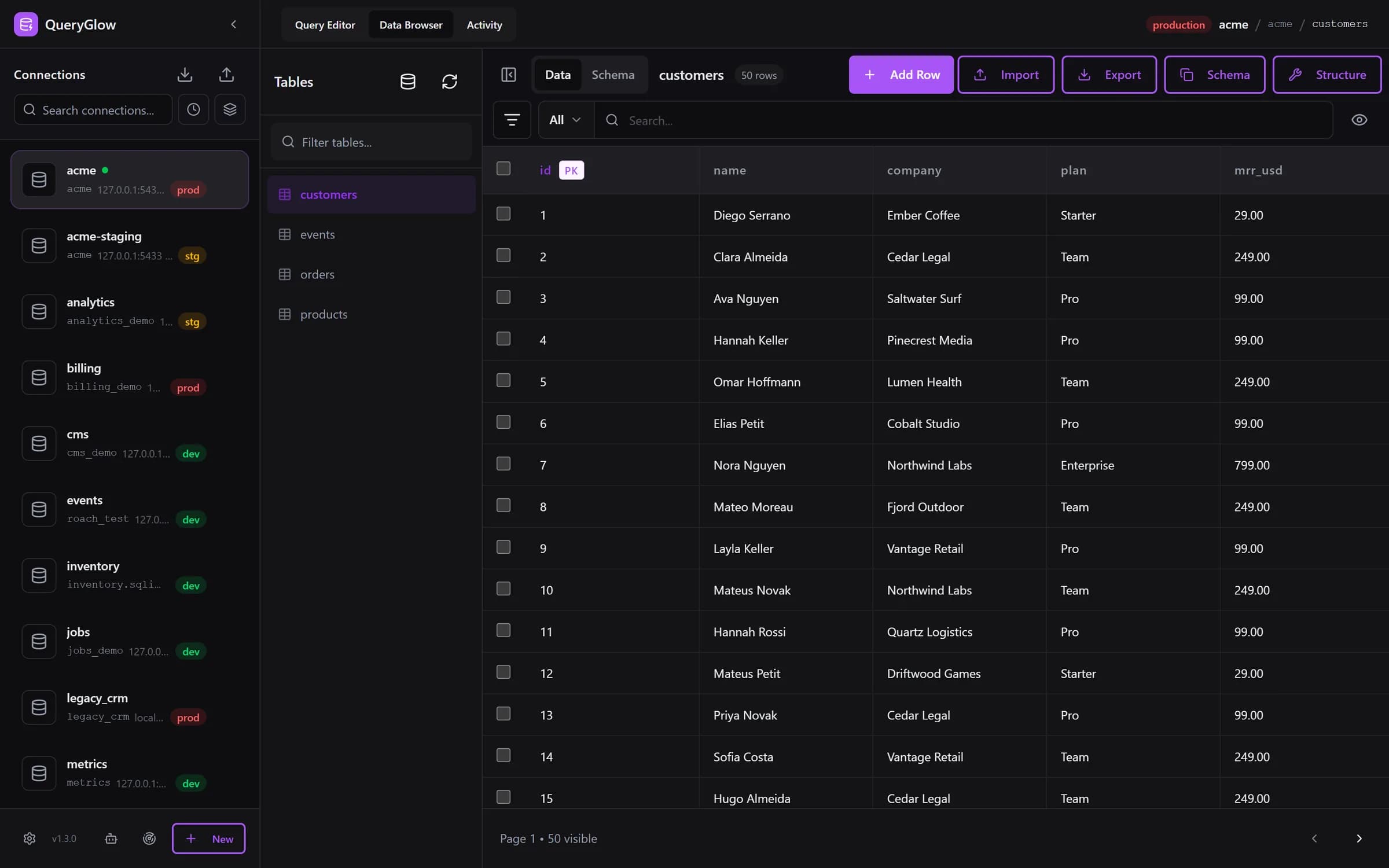
QueryGlow Data Browser showing a customers table on a production PostgreSQL connection

What QueryGlow Adds for CockroachDB

A general SQL GUI on your own server, next to the tools Cockroach Labs ships.

Cloud SQL Shell Limits

As of September 2026, the Cloud SQL Shell has no transaction control and no sessions, and it only reaches Cloud clusters. QueryGlow is a full SQL GUI for Cloud and self-hosted clusters alike.

DROP TABLE Runs as Typed

A DROP TABLE typed into a SQL editor usually runs as typed. QueryGlow refuses it by default and asks before any write on a production connection.

AI That Sees the Schema Only

Ask AI drafts CockroachDB SQL from your schema with your own key. It sends table and column names with their types, never rows.

Tool Fragmentation

Different tools for PostgreSQL, MySQL, CockroachDB. QueryGlow covers six engines in one install.

Everything You Need for CockroachDB

The same pg driver and the same UI as the PostgreSQL pages; EXPLAIN output differs by engine.

Cloud and Self-Hosted Clusters

Connect over TLS on port 26257 to CockroachDB Cloud (Basic, Standard, Advanced) or your own cluster. Test Connection answers promptly and shows your CockroachDB version (fixed in 1.3.0, no more 30 second wait).

Paste a Connection URL

Paste a cockroachdb:// URL and the form fills itself; sslmode=verify-full also turns on certificate verification. Providers that use their own certificate authority (Supabase, CockroachDB Advanced, Amazon RDS) need Verify server certificate turned off after pasting. Find databases on this server lists every database your login can open.

Schema-Only AI SQL

Ask AI drafts CockroachDB SQL from plain English with your own OpenAI, Anthropic or Google key. It sends table and column names with their types and your prompt, never rows. Enter the key in the app (stored encrypted on your server) or set it in .env.

Web-Based Access

Browse and query your CockroachDB databases from any modern browser. No desktop app to install; your whole team uses the same install.

JSONB Cells

JSONB columns show as JSON text in the Data Browser and in query results, and you can edit them.

Visual Column Editing

Add, rename, retype and drop columns. You see the exact ALTER statement first, and what runs is exactly what you saw.

Asks Before Writes on Production

Mark a connection as production and it shows in red in the sidebar and header. The Query Editor shows the statement and asks before any INSERT, UPDATE, DELETE or DDL runs on it.

SSH Tunnels Built-In

Reach self-hosted clusters in private networks with a pasted private key; the host key is pinned on first connect. QueryGlow turns SSL off inside a tunnel, so the cluster must accept SQL connections without TLS there.

CSV Import and Export

Import with INSERT, UPSERT, or REPLACE strategies. Detects the delimiter; you pick the encoding. Export streams up to 100,000 rows per file by default.

EXPLAIN Visualizer

The plan from EXPLAIN ANALYZE (VERBOSE) as a tree with color-coded nodes, so you can see where a query spends its time.

SQL Autocomplete

Schema-aware completions for tables, columns, keywords, and functions. Type table. to see columns with data types.

Agent Access with Activity

Give Claude Code or Cursor a read-only token instead of a connection string. Every agent call shows up in the Activity tab, and you can pause one agent or all of them.

See it on a real database before you decide

$79 once for your whole team, every 1.x update included.

Try the live demo

Stripe checkout. You'll need a GitHub account for the repo invite. No refunds, so try the read-only demo first.

Web Access and Safety Rails

Open CockroachDB from any browser, with Safe Mode on by default.

Web-Based Access

  • Browse and query from any modern browser
  • Find local servers finds a cluster on port 26257 on the QueryGlow host
  • Your whole team on one install, one shared login
  • No desktop app to install or update

Always Blocked (Cannot Override)

  • DROP DATABASE

Blocked by Default

  • DROP TABLE, TRUNCATE
  • DELETE or UPDATE without WHERE
  • Asks before writes on production connections

Works with the PostgreSQL Ecosystem

QueryGlow uses the native pg driver. CockroachDB and TimescaleDB are PostgreSQL-compatible.

All three use the same pg driver and the same UI; EXPLAIN output differs by engine.

One License, Six Databases

Your $79 license includes all six databases with unlimited connections.

CockroachDB FAQ

Does QueryGlow support CockroachDB?
Yes. QueryGlow supports CockroachDB using the PostgreSQL pg driver on port 26257. Schema-only AI SQL, Safe Mode, CSV import and export, inline editing, visual column editing and query history work the same way as on PostgreSQL. Test Connection answers promptly and reports your CockroachDB version (fixed in 1.3.0).
Does QueryGlow have Safe Mode for CockroachDB?
Yes. Safe Mode always refuses DROP DATABASE. By default it also refuses DROP TABLE, TRUNCATE, and DELETE or UPDATE without WHERE (QUERYGLOW_ALLOW_DESTRUCTIVE=true lifts these), and adds LIMIT 1000 to a SELECT without one. Safe Mode is on in a fresh install and covers the Query Editor and AI agents. On a connection marked production, the Query Editor also asks before any INSERT, UPDATE, DELETE or DDL.
Can I connect to CockroachDB Cloud?
Yes. QueryGlow connects to CockroachDB Cloud (Basic, Standard, Advanced) and self-hosted clusters over TLS on port 26257. Paste the connection URL and the form fills itself; turn on Verify server certificate when the cluster's certificate comes from a public authority. SSH tunnels work for self-hosted clusters that accept SQL connections without TLS inside the private network, because QueryGlow turns SSL off inside a tunnel (the tunnel encrypts).
Does QueryGlow work with PostgreSQL, CockroachDB, and TimescaleDB?
Yes. All three databases are PostgreSQL-compatible and use the same pg driver. One tool for PostgreSQL, CockroachDB and TimescaleDB.
How does the AI feature work with CockroachDB?
Ask AI sends your database type, table and column names with their types, and your prompt. Never rows. The SQL lands in the editor and you review it before running. Use your own OpenAI, Anthropic or Google key, entered in the app (stored encrypted on your server) or set in .env. Ask AI is switched off in the public demo.
Can AI agents query my CockroachDB cluster safely?
Agent Access gives Claude Code, Cursor or another MCP client a token instead of a connection string. Tokens are per connection and read-only by default, enforced by the database with a read-only transaction. Every call, including refused ones, shows up in the Activity tab, and you can pause one agent or all of them.
Is QueryGlow secure for production CockroachDB clusters?
Connection passwords, SSH keys and AI keys are encrypted at rest with AES-256-GCM. Safe Mode refuses destructive statements by default. Connections marked production show a red badge in the sidebar and the header, and the Query Editor shows the statement and asks before any write runs on them. SSH host keys are pinned, and SSL connections can verify the server certificate. Your rows never leave your server; Ask AI sends only the schema, and only to the provider whose key you entered. No telemetry, no tracking.
How do I install and update QueryGlow?
You need a Linux server with Docker (512 MB RAM minimum, 1 GB recommended), a domain pointing at it for HTTPS, and a non-root user with sudo. Run ./queryglow install once. Later, ./queryglow update backs up first, checks that the new version is serving and rolls back on its own if not. Every 1.x update is included in the $79.

Ready for a CockroachDB GUI with Safety Built In?

$79 once. Safe Mode. Schema-only AI. All six databases included.

Try the live demo

One-time payment. No subscription. Try the demo first.