Per-Device Desktop Installs
HeidiSQL is a native desktop app: every teammate installs it and configures connections locally. Nothing to share, no URL to open from a phone.
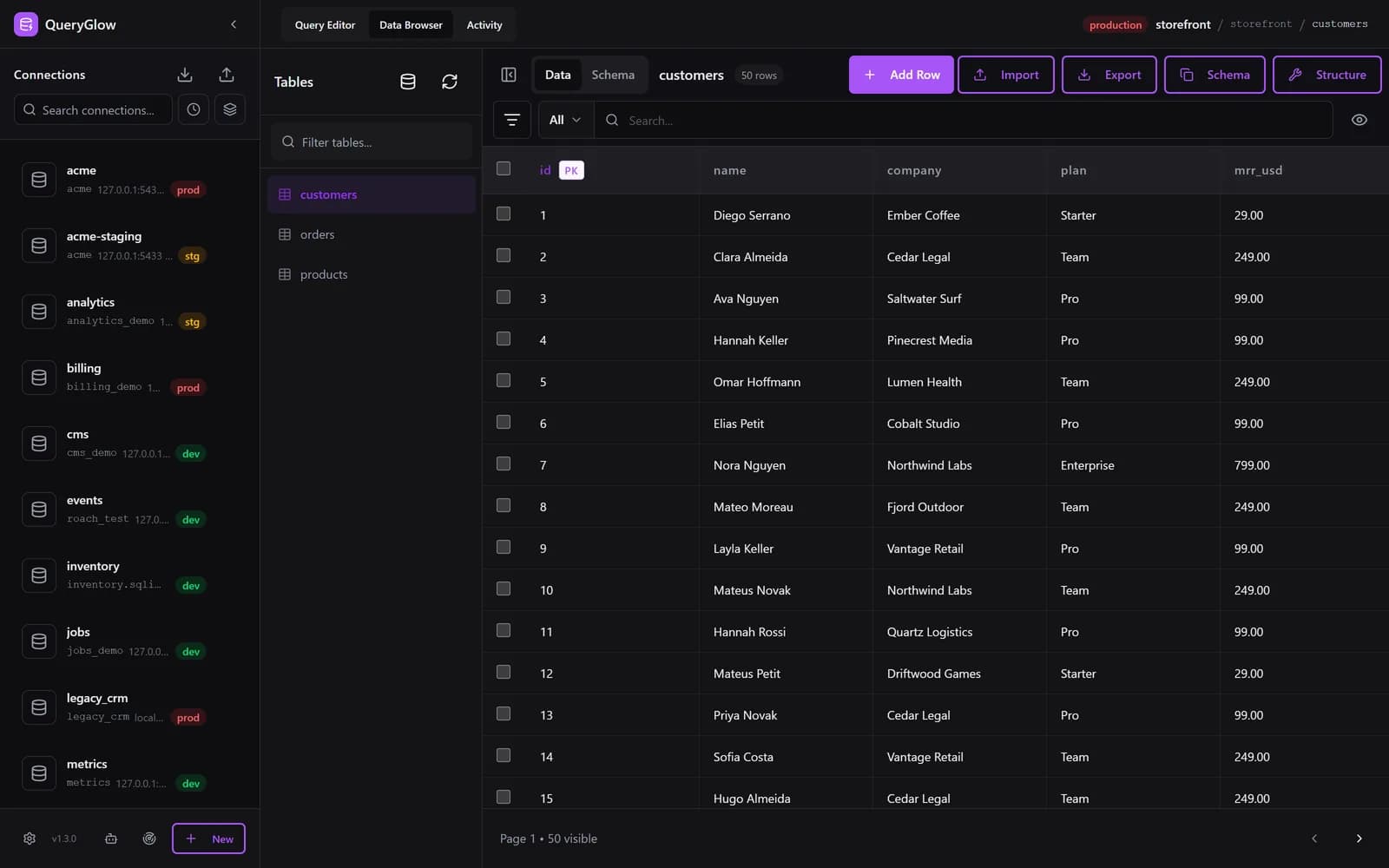
QueryGlow runs on your server and opens in any browser, so your whole team works from one install. With schema-only AI, Safe Mode and SSH tunnels, on any OS, from one shared URL.
The live demo is the real app on a sample database (read-only, AI switched off, no signup).
Less than DataGrip's first year ($109, individual) or a year of DBeaver Lite ($113 per user per year, as of September 2026). $79 once: source code included, every 1.x update, every server you run, your whole team.
“Beautiful interface and very intuitive.”
“The installation was really simple.”
HeidiSQL is free, with builds for Windows, Linux and macOS. It is also a desktop install on every device.
HeidiSQL is a native desktop app: every teammate installs it and configures connections locally. Nothing to share, no URL to open from a phone.
HeidiSQL warns on UPDATE or DELETE without WHERE. QueryGlow also refuses DROP TABLE and TRUNCATE by default and asks before any write on a production connection.
HeidiSQL has no AI assistant (as of September 2026). QueryGlow's Ask AI drafts MariaDB SQL from plain English with your own key and sends only the schema, never rows.
Find databases on this server lists every database your MariaDB login can open and adds the ones you tick in one go. Sidebar search, sort and group by host keep a long list manageable.
What you get with QueryGlow.
Runs on your server with Docker and opens from any browser on Mac, Windows and Linux. No per-device install; one ./queryglow update on the server updates everyone.
Ask AI drafts MariaDB SQL from plain English with your own OpenAI, Anthropic or Google key. It sends table and column names with their types and your prompt, never rows. Enter the key in the app (stored encrypted on your server) or set it in .env.
Open your MariaDB databases from any modern browser. Your whole team uses the same install behind one shared login.
Reach MariaDB in private networks. Paste your private key into the connection form. The host key is pinned on first connect; a server that presents a different key is refused.
Mark a connection as production and it shows in red in the sidebar and header. The Query Editor shows the statement and asks before any INSERT, UPDATE, DELETE or DDL runs on it.
Add, rename, retype, drop and drag columns into a new order (MariaDB and MySQL only). You see the exact ALTER statement first, and what runs is exactly what you saw.
JSON columns show as JSON text in the Data Browser and in query results, and you can edit them.
Dark or light theme, six accent colors or your own, rows per page up to 500, NULL display, time zone and date format, and your own keyboard shortcuts.
Import with INSERT, UPSERT (ON DUPLICATE KEY) or REPLACE. Detects the delimiter; you pick the encoding. Export streams up to 100,000 rows per file by default.
Visual query plan analysis with color-coded nodes. Warnings flag full table scans on large tables.
Schema-aware completions for tables, columns, keywords, and functions. Type table. to see columns with data types.
Give Claude Code or Cursor a read-only token instead of a connection string. Every agent call shows up in the Activity tab, and you can pause one agent or all of them.
Open MariaDB from any browser, add every database on a server at once, and work with safety rails on by default.
| Feature | HeidiSQL | QueryGlow |
|---|---|---|
| OS Support | Windows, Linux, macOS (native, per device) | Any OS with a browser |
| Query guard | Asks before UPDATE/DELETE without WHERE | Refuses DROP TABLE, TRUNCATE and unfiltered UPDATE/DELETE by default; asks before writes on production |
| AI SQL assistant | No working AI SQL assistant (as of Sep 2026) | Ask AI: schema only, never rows, your own OpenAI, Anthropic or Google key |
| App type | Delphi/Lazarus desktop app | React web app on your server |
| SSH Tunnels | Yes | Yes, key pasted in the form, host key pinned |
| Team Access | No (desktop app) | Yes: whole team on one install, one shared login |
| Installation | Desktop app you install per machine | Docker on your server: ./queryglow install, then ./queryglow update (backup, automatic rollback) |
| Inline Cell Editing | Yes | Yes |
| Column Edits (add, rename, retype, drop, reorder) | Yes (table designer) | Yes, with exact SQL preview before execute |
| Query History | Yes | Yes, per connection (last 1,000 queries) |
| Credentials | Can prompt for credentials instead of saving them | Saved passwords encrypted with AES-256-GCM |
| Price | Free | $79 once, whole team |
HeidiSQL
Windows, Linux, macOS (native, per device)
QueryGlow
Any OS with a browser
HeidiSQL
Asks before UPDATE/DELETE without WHERE
QueryGlow
Refuses DROP TABLE, TRUNCATE and unfiltered UPDATE/DELETE by default; asks before writes on production
HeidiSQL
No working AI SQL assistant (as of Sep 2026)
QueryGlow
Ask AI: schema only, never rows, your own OpenAI, Anthropic or Google key
HeidiSQL
Delphi/Lazarus desktop app
QueryGlow
React web app on your server
HeidiSQL
Yes
QueryGlow
Yes, key pasted in the form, host key pinned
HeidiSQL
No (desktop app)
QueryGlow
Yes: whole team on one install, one shared login
HeidiSQL
Desktop app you install per machine
QueryGlow
Docker on your server: ./queryglow install, then ./queryglow update (backup, automatic rollback)
HeidiSQL
Yes
QueryGlow
Yes
HeidiSQL
Yes (table designer)
QueryGlow
Yes, with exact SQL preview before execute
HeidiSQL
Yes
QueryGlow
Yes, per connection (last 1,000 queries)
HeidiSQL
Can prompt for credentials instead of saving them
QueryGlow
Saved passwords encrypted with AES-256-GCM
HeidiSQL
Free
QueryGlow
$79 once, whole team
Honest note: HeidiSQL is free and a solid per-device desktop client. If you do not need a shared URL, schema-only AI or a query guard that also stops DROP TABLE, it is a fine choice. QueryGlow is for teams that want one browser tool on their own server.
See it on a real database before you decide
$79 once for your whole team, every 1.x update included.
Stripe checkout. You'll need a GitHub account for the repo invite. No refunds, so try the read-only demo first.
Eight common ways to work with MariaDB, on the desktop and in the browser. Prices and platforms checked on each vendor's site in October 2026.
Desktop app. Windows, Linux, macOS
Free
Native app with a table designer, installed on each machine.
Desktop app (Java). Windows, Linux, macOS
Free (paid editions from $113 per year)
Covers MariaDB and 100+ other databases. Browser access needs CloudBeaver.
Desktop app or web app in Docker. Windows, Linux, macOS, browser
Free (Premium $120 per year)
MariaDB works in the free Community edition.
Desktop app. Windows, Linux, macOS
Free for small companies (paid from $9 per user per month, billed yearly)
The Community edition is free for companies under 10 employees or $1m revenue.
Web app (PHP). Browser, runs on your server
Free
The classic web GUI for MySQL and MariaDB.
Web app (one PHP file). Browser, runs on your server
Free
One file on a PHP server. Protect it with an IP allowlist or a password at the web server.
Desktop app. Windows, Linux, macOS
Free
Built and tested for MySQL. It connects to MariaDB, but MariaDB is not one of its supported servers.
Web app, self-hosted. Browser, runs on your Linux server
$79 once, whole team
Safe Mode, SSH tunnels with host key pinning, schema-only Ask AI with your own key.
Not an official one. MariaDB does not ship its own workbench. MySQL Workbench connects to MariaDB because both speak the MySQL protocol, but Oracle builds and tests it for MySQL, and MariaDB is not one of its supported servers.
Most MariaDB users pick HeidiSQL or DBeaver on the desktop. When the database lives on a server and several people need it, a web GUI such as phpMyAdmin, Adminer or QueryGlow saves installing a client on every machine.
Your $79 license includes all six databases with unlimited connections.
$79 once. Safe Mode. Schema-only AI. Mac, Windows, Linux.
One-time payment. No subscription. Try the demo first.