Changelog
QueryGlow is one developer's product. Every 1.x release is included in the $79 license. You update with ./queryglow update: it backs up first, checks that the new version is serving, and rolls back on its own if not (installs before 1.3.0: run ./update.sh once, see How updating works). Many recent changes started as emails from people who bought it; they are marked below.
QueryGlow 1.3.0
Preferences, accent colors and one-command updates
- One command on your server: ./queryglow update backs up first, validates the nginx config, checks that the new version is serving and returns to the previous release on its own if it is not. The same command also covers install, status, doctor, backup, restore and rollback.asked for by a customer
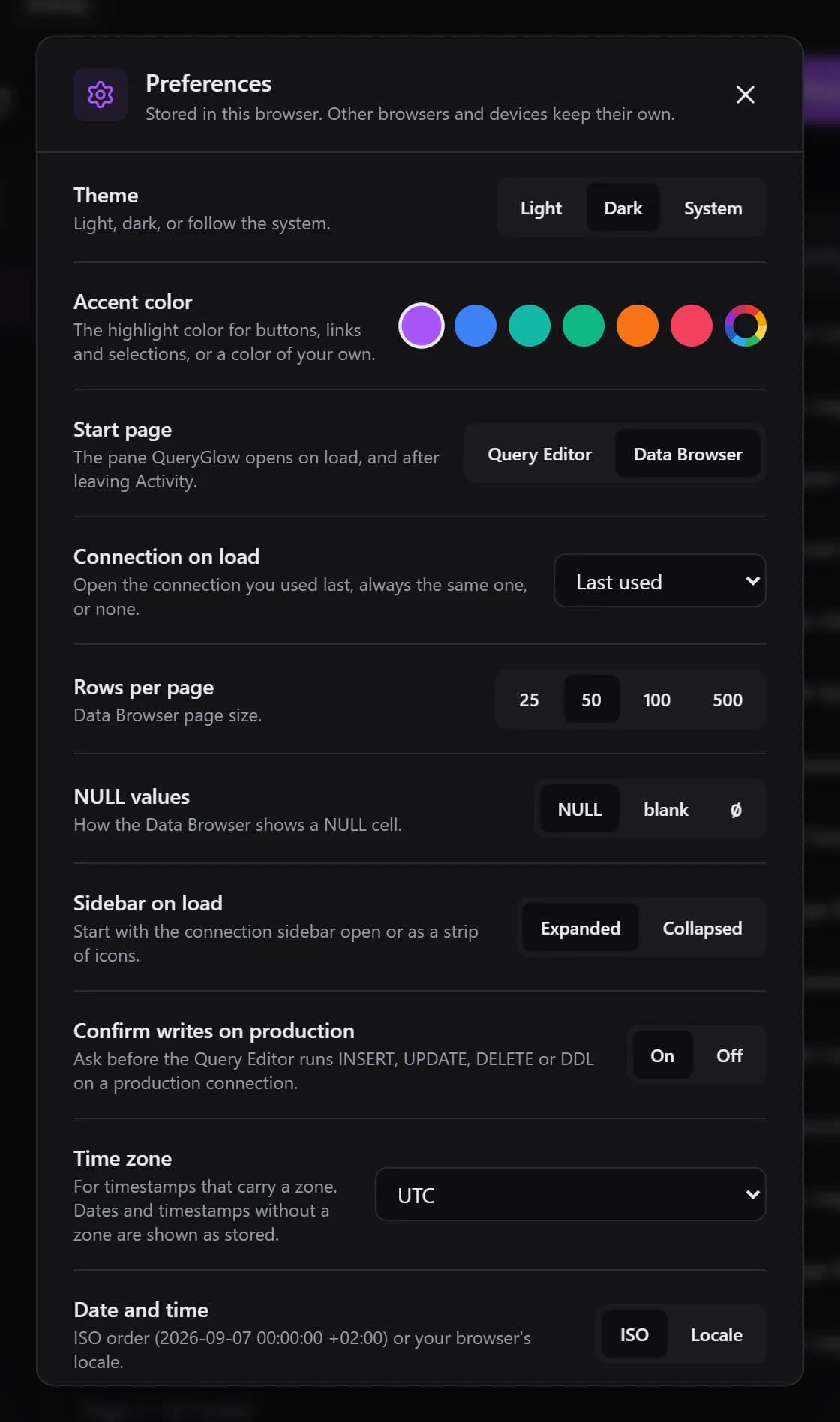
- Preferences behind the gear icon in the sidebar: theme, start page, connection on load, rows per page, NULL display, time zone, date and number format, auto refresh every 10, 30 or 60 seconds, and your own keyboard shortcuts for Run, Explain, Ask AI and Save. Stored in your browser, nothing is sent to the server.asked for by a customer
- Accent color: purple, blue, teal, green, orange or rose.asked for by a customer
- Or any accent color of your own, from your device's color picker or a hex value.
- The Query Editor shows the statement and asks before it runs an INSERT, UPDATE, DELETE or DDL on a connection marked production. On by default, can be turned off in Preferences.asked for by a customer
- AI provider keys and models can be entered in the app. They are stored encrypted on your server, and a Test button checks each provider.asked for by a customer
- The refresh button above the table list reloads the open table as well, and the Structure dialog is wider and scrolls while you drag a column.asked for by a customer
- The Data Browser loads a page in fewer round trips; pages over 100 rows render only the rows near the viewport. It reopens the table you last used on a connection.
- SSH host keys are pinned on first use and a changed key is refused. SSL connections can verify the server certificate.
- JSON, JSONB and array cells show their JSON text instead of [object Object], and editing them works.
https://db.your-company.com
QueryGlow 1.2.1
Agent activity, server discovery and a new sidebar
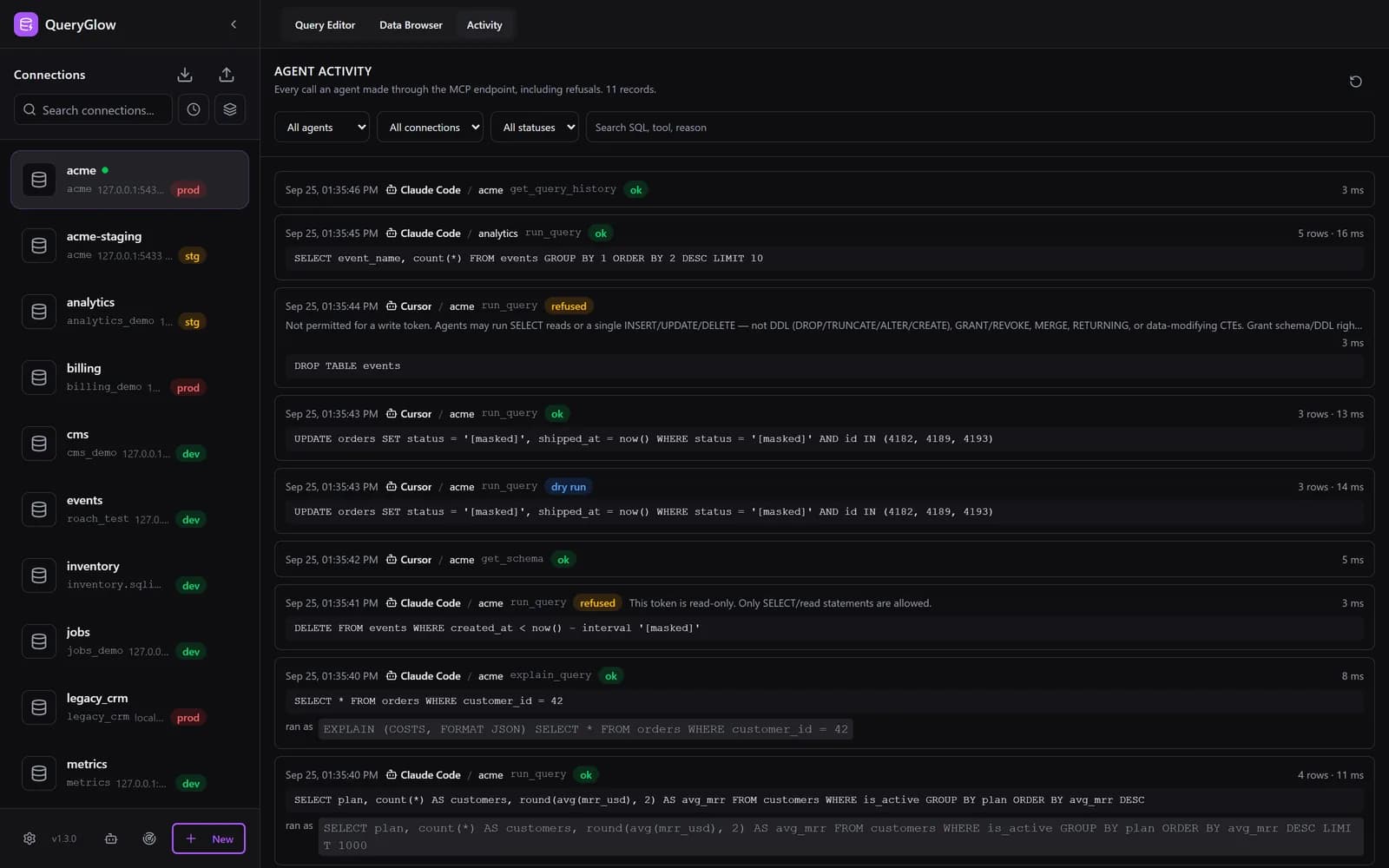
- Activity tab: every tool call an agent made through Agent Access, with time, agent, connection, redacted SQL, row count, duration and outcome, plus filters, search and an unread badge.asked for by a customer
- Agent tokens can be paused one at a time or all at once. Every call with a paused token is refused and recorded.asked for by a customer
- Find local servers checks this machine for the common database ports and opens the connection dialog.asked for by a customer
- Find databases on this server lists the databases your credentials can open and adds the ones you pick in one step.asked for by a customer
- Paste a connection URL into the dialog and it fills in the form.asked for by a customer
- Sidebar: drag to resize, search, sort by name or recently used, and group by host.asked for by a customer
- Header breadcrumb with environment, connection, database and table, and the installed version in the sidebar footer.asked for by a customer
- update.sh backs up your settings and data before it changes anything, validates the nginx config and waits for the health check.asked for by a customer
- deploy.sh can be run again: it keeps your existing secrets, port and mode and adds only missing settings.asked for by a customer
https://db.your-company.com
QueryGlow 1.2.0
Agent Access and visual schema editing
- Agent Access: an MCP endpoint so AI agents query your databases through QueryGlow. Tokens per connection, read-only by default; write tokens are opt-in, never run DDL and roll back above a row cap.
- Visual schema editing: add, rename or drop columns and change types, with the exact SQL shown before it runs.
- Reorder columns by dragging on MySQL and MariaDB.asked for by a customer
- update.sh: a one-command update for standalone installations.
- The app binds to localhost only and nginx no longer shows its version.
QueryGlow 1.1.0
EXPLAIN visualizer and SQL autocomplete
- EXPLAIN visualizer with a node tree, color coding, warnings and index hints.
- Schema-aware SQL autocomplete in the editor.
- Connects to your last connection on load.
- CSV exports stream, with a row cap (100,000 by default) and a warning when the cap cuts the export.
- nginx hardening: Content Security Policy, Permissions-Policy and rate limits on every location.
QueryGlow 1.0.0
First release
- Data Browser with filters, search, sorting, pagination and inline editing.
- Query Editor with history and saved queries.
- AI assistant with your own OpenAI, Anthropic or Google key.
- CSV import and export, SSH tunnels and encrypted credentials.
- Docker deployment with nginx and Let's Encrypt, for PostgreSQL, MySQL, MariaDB, SQLite, CockroachDB and TimescaleDB.
Try the live demo
Stripe checkout. You'll enter your GitHub username for the repo invite. No refunds, so try the read-only demo first.