Pay once. Own it forever. $79

Open a URL. You're in your database.
Self-hosted database GUI for Postgres, MySQL and four more.

Your whole team browses, queries and edits from a browser on your own server. No desktop app to install, no seats, no subscription: $79 once, source code included.

DBeaver Lite: $113/yr. DataGrip: $109/yr. Navicat Premium: $799.99/yr. QueryGlow: $79. Once.

  • Beautiful interface and very intuitive.
    Jean-Francois, Mildor Violon, verified customer
  • I was looking at DBeaver and yours looked a little easier for what I was looking for.
    Mike, verified customer

Using pgAdmin or DBeaver for free? Fair. Here's what the friction costs.

  • Runs on your server. No telemetry, no tracking.
  • AI reads your schema, never your rows.
  • Blocks DROP TABLE and mass deletes by default.
  • Postgres, MySQL, MariaDB, SQLite, CockroachDB, TimescaleDB.
  • $79 once. Whole team, every server you run.

Every database tool makes youdepend on something.

Your desk. A vendor. A SQL expert. QueryGlow removes all three.

Tied to your desk

Desktop tools like DBeaver and TablePlus only work on the machine where they're installed. Server down and no laptop in reach? Tough luck.

QueryGlow: Open a URL from any device

Tied to a vendor

Cloud tools like Supabase Studio are modern, but your data flows through their servers. Good luck with your GDPR audit.

QueryGlow: Runs on your infrastructure

Tied to SQL expertise

Your PM needs a number from the database. They file a ticket. You context-switch, write the query, they wait. Three tickets a week at 20 minutes each is an hour of engineering time every week, spent copy-pasting SELECT statements.

QueryGlow: AI writes SQL from plain English

Customer story

One of our first customers,
in his own words.

Jean-Francois runs an online music school and manages its database himself. He tried Adminer, TablePlus, and the subscription tools — then ChatGPT recommended QueryGlow. A week after buying, he sent us this 2:45 video.

“It's the simplest and the most beautiful interface that you can have.”

Jean-Francois, Mildor Violon · verified customer

“You want to edit a cell, you click that cell, you edit”“The last database viewer and editor you will likely want to use”

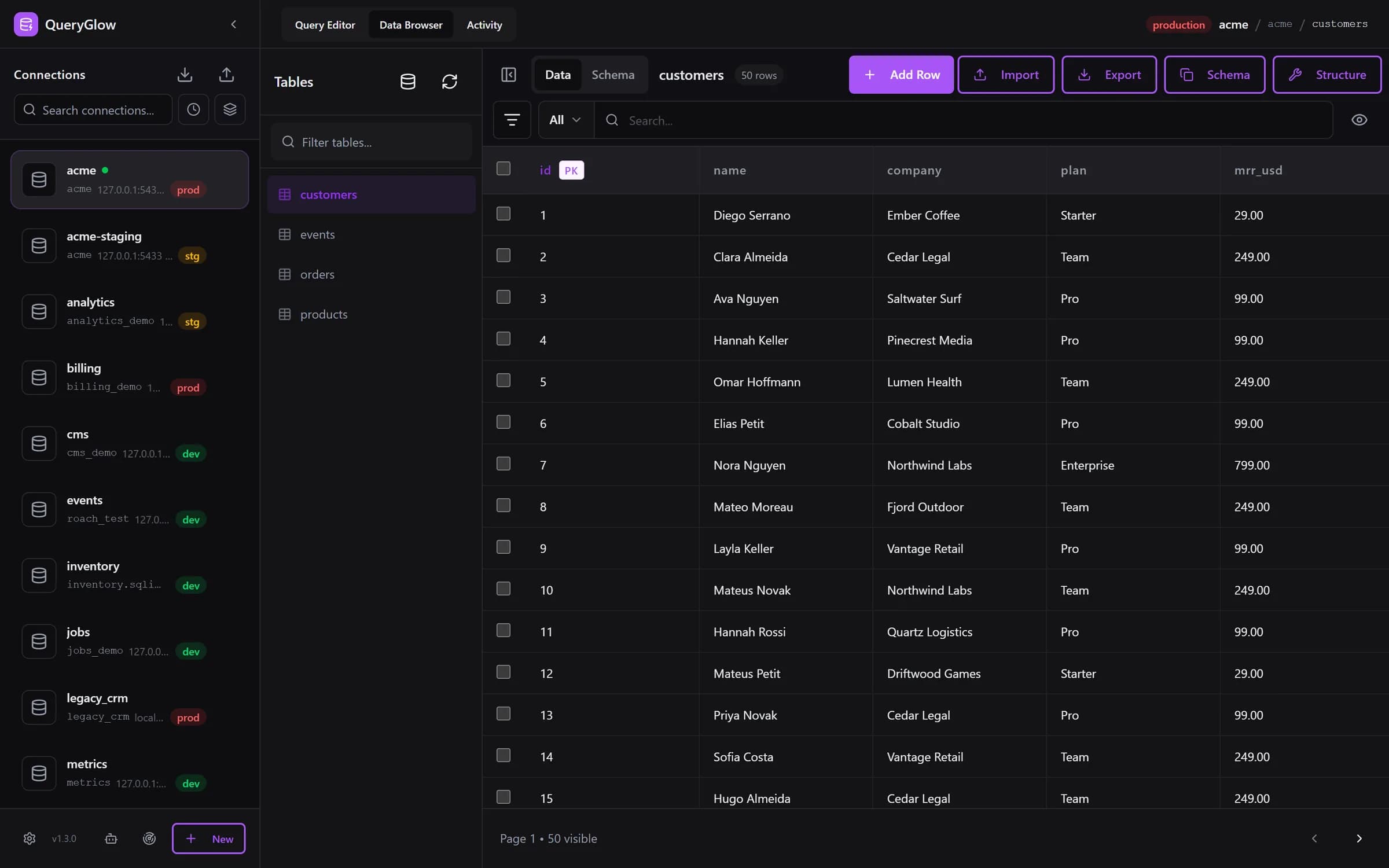
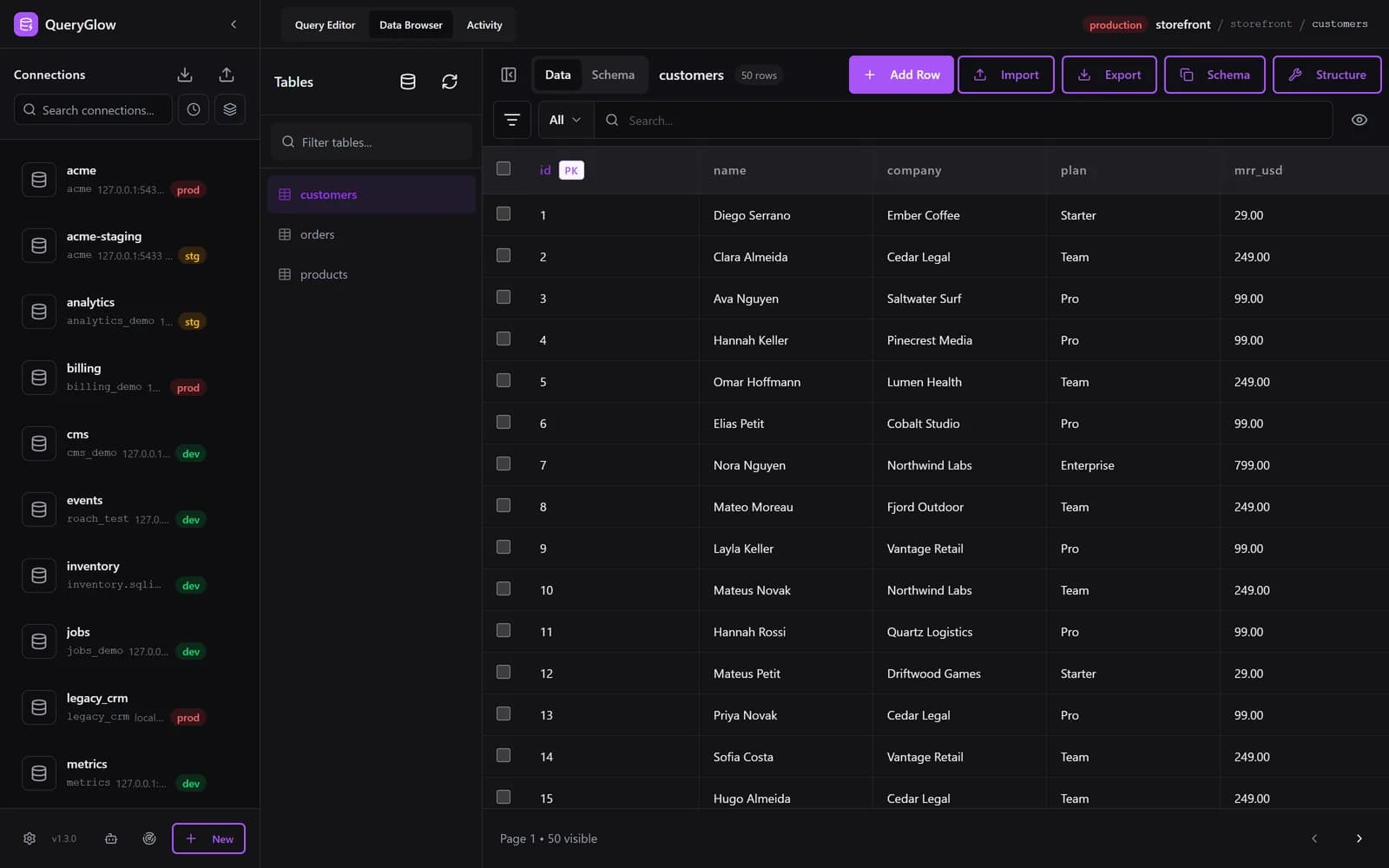
See the interface he's describing — try the live demo. Real database, no signup.

Or go straight to pricing — $79 once.

How it started

“I want Supabase-grade UI, but I DON'T want all the underlying tooling. Literally just the UI so I can inspect my DBs and do queries. […] This doesn't exist? Who's gonna create it? I'd pay for this on a lifetime deal.”

Simon Høiberg on X, November 2025

6 database engines
One command to deploy
$0 recurring costs
Web-Based

Send your team the URL.

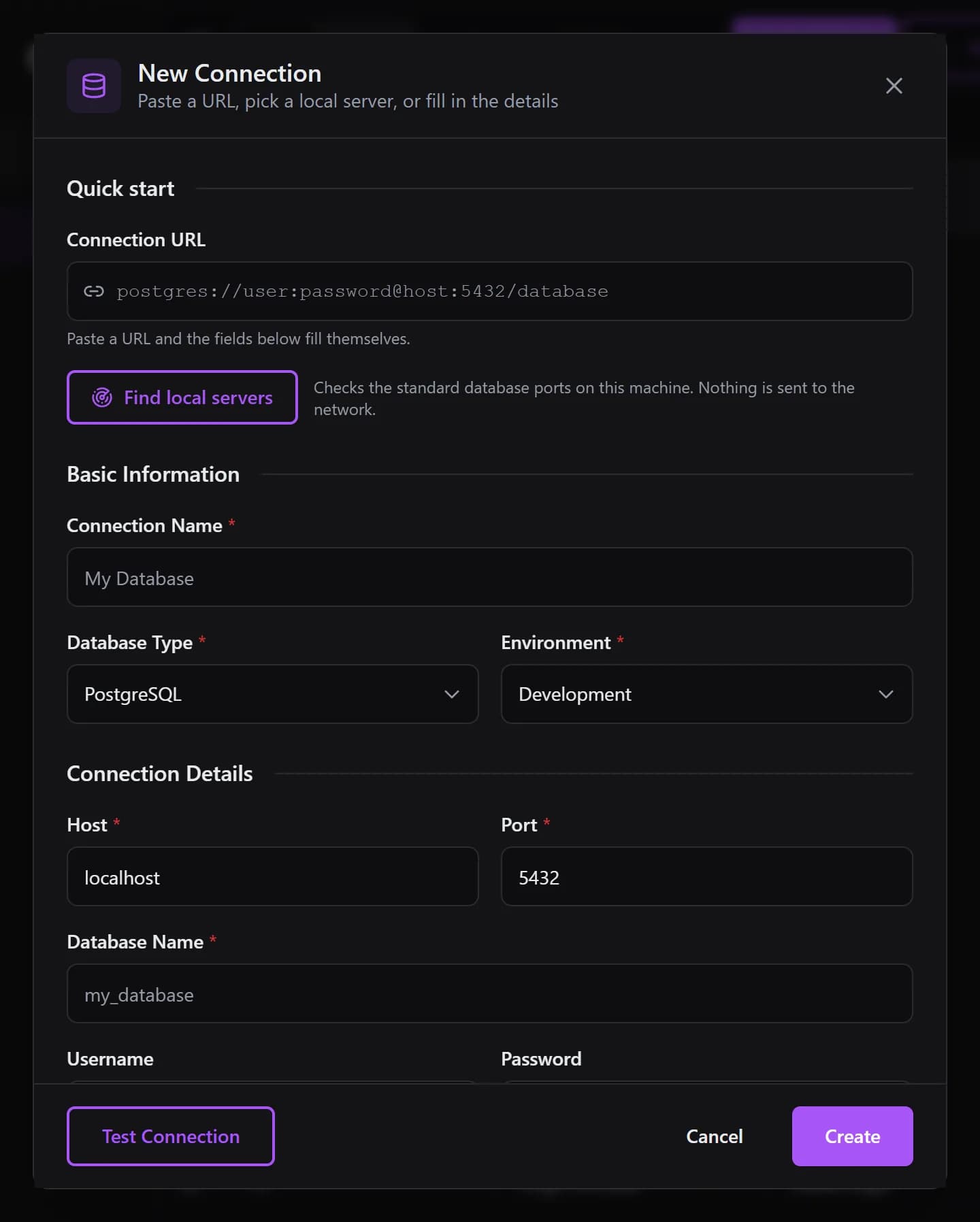
No download, no Java runtime, no version conflicts — QueryGlow is a web-based SQL client that opens in any browser. Share the URL with your team — zero onboarding. Fix production incidents from any browser.

  • Any Device, Any BrowserIf it has a browser, you have access to your database. No desktop client to install.
  • Zero OnboardingNew team member? Send them the URL and the shared password. That's it. No installer, no “which version do you have?”
  • Instant AccessOpen the URL and start working. Jean-Francois calls it fast and responsive.
100% Self-Hosted

Your data. Your server.
Zero phone-home.

QueryGlow runs as a Docker container inside your VPC or on localhost. No data ever leaves your infrastructure. No telemetry. No tracking. No compliance discussions with your CTO. Get the full picture of what a self-hosted database GUI changes for your security posture.

Encrypted Credentials

AES-256-GCM at rest

SSH Tunnels

Built-in, one-click

No Telemetry

Zero tracking

One Command

Guided ./deploy.sh setup

git clone && ./deploy.sh

One command. HTTPS, auth, and SSL certificates included.

What ever leaves your server? Exactly one thing.

The complete data boundary — drawn out, nothing hidden.

Your infrastructureNo telemetry — 0 bytes phone home

QueryGlow

Docker, on your server

Your database

Postgres, MySQL & more

table & column names and types — never a row of data

AI provider

OpenAI · Claude · Gemini

your own API key
When you use the AI assistant, QueryGlow sends your schema — table and column names and types, plus your request — never a row of data — to the provider you chose, with your own key. Don't use the AI? Nothing from your database crosses the boundary.
AI-Powered (BYOK)

Everyone on your team
can query the database.

No more Googling “Postgres date diff syntax.” Type what you want in plain English: “Users who haven't logged in for 30 days.”

QueryGlow reads your schema and writes the query. Choose OpenAI, Claude, or Gemini. Use your own API key — no middleman, no markups.

Bring Your Own KeySchema Only. Rows Never Sent.
New · Agent Access (MCP)

Let AI agents query your databases. On a leash.

The same boundary that keeps your rows away from the AI provider now governs Claude Code, Cursor, and any MCP client — enforced by the database, not by a prompt. That is what agent-ready means here.

Read-only by default

Every agent token starts read-only and reaches only the connections you put on its allowlist. An empty allowlist reaches nothing. Revoke any token, any time.

Enforced in the database

Read-only transactions and single-statement execution are enforced by the database and driver — not a text filter, not a system prompt. The token cannot write; the database makes sure of it.

Writes on a leash

Opt-in write tokens run one INSERT, UPDATE, or DELETE per call — never DDL. Writes above the row cap are rolled back by the database, and dry-run previews the affected rows without committing anything.

One audit trail

Every agent query lands in the same Query History your team uses — including the blocked attempts. You always know what an agent did, and what it tried.

Works with Claude CodeWorks with CursorAny MCP clientAll 6 databases
How Agent Access works

The tools you need to stay in flow

Autocomplete, query analysis, safety guardrails — all built in. No plugins, no setup.

SQL Autocomplete

Schema-aware. Type film. and see every column with data types. Context-aware: suggests tables after FROM, columns after SELECT.

  • Dot-notation with data types
  • 30+ keywords & functions
  • Auto-refresh after DDL

EXPLAIN Visualizer

Click “Explain” next to “Run”. Get a visual node tree color-coded by execution time. Smart warnings and index suggestions included.

  • Color-coded node tree
  • Index suggestions with CREATE statements
  • Estimated vs actual row comparison

Safe Mode & DX

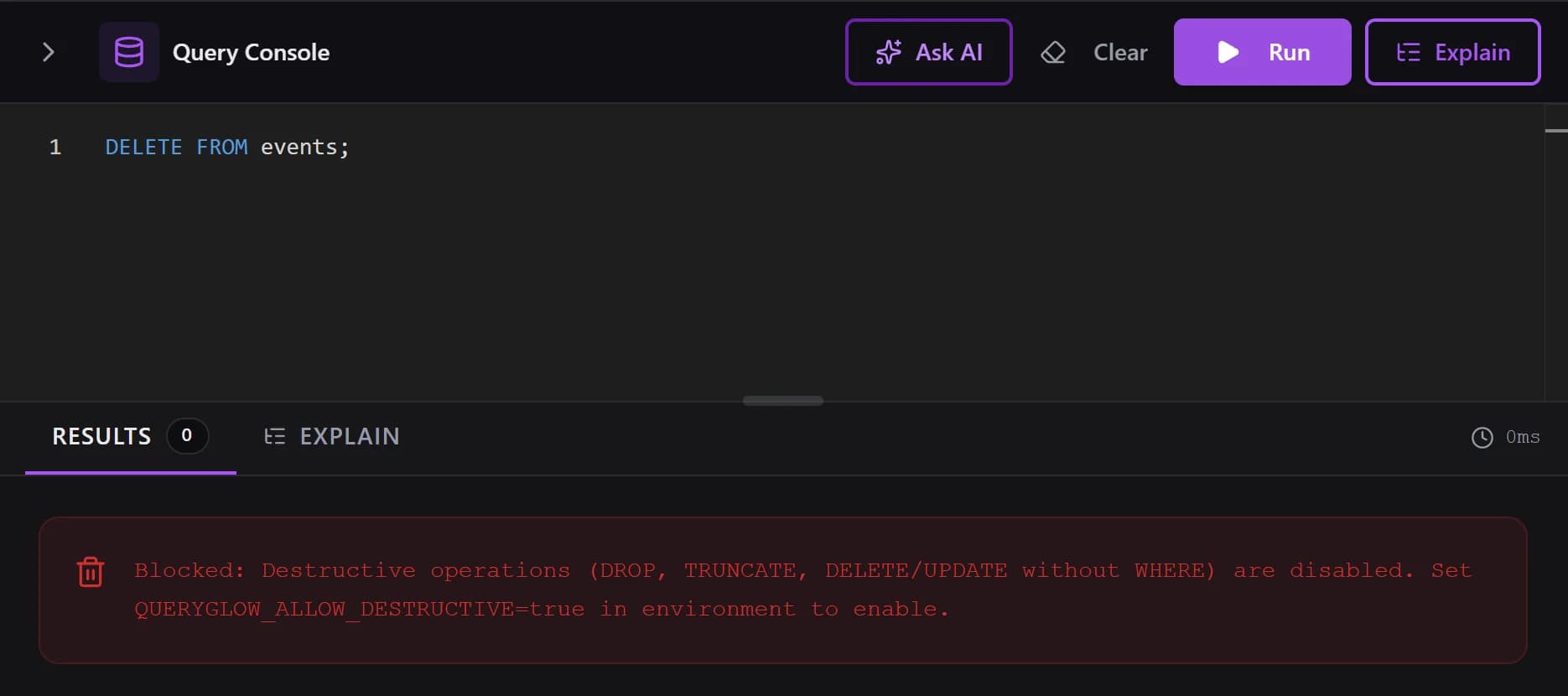
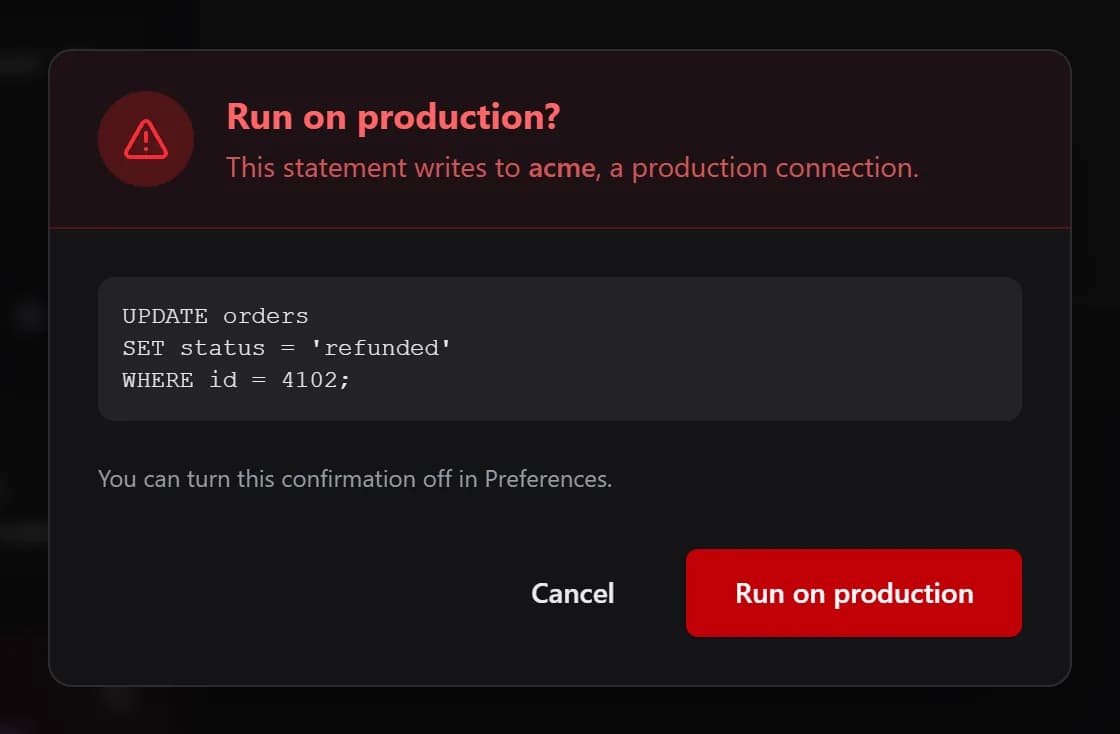
Safe Mode blocks DROP DATABASE, prevents DELETE without WHERE, auto-limits queries. Production DBs get a red indicator and a typed-DELETE confirmation. Every query auto-saved.

  • Destructive query blocking (on by default)
  • 9 filter operators, query history
  • Smart CSV import (insert, upsert, replace)

Up and running in three steps

No complex setup. No config files to wrestle with.

1

Deploy

Clone the repo and run one command. Docker handles the rest.

./deploy.sh
2

Connect

Add your database credentials. SSH tunnels built in for remote servers.

PostgreSQL, MySQL, SQLite & more
3

Query

Browse tables, run AI-powered queries, edit data inline, export CSV.

AI assistant included

Everything you need. Nothing you don't.

The 20% of features you use 80% of the time — built right.

AI SQL Generation

OpenAI, Claude, or Gemini. Schema-aware. Your rows never sent.

SSH Tunnels

Reach production DBs behind a bastion — paste your key, one-click connect.

6 Databases

One tool for every stack: PostgreSQL, MySQL, MariaDB, SQLite, CockroachDB, TimescaleDB.

Encrypted Credentials

Encrypted at rest with AES-256-GCM — no plaintext database passwords sitting in config files.

CSV Import/Export

Hand your PM the export without writing a script. Insert, upsert, or replace — with formula injection protection.

Saved Queries

Name, describe, tag. Build a library of reports your whole team can rerun.

Max, creator of QueryGlow

Built by Max

Solo developer & kitesurfer

I built QueryGlow because I was tired of being tied to my desk just to check a database. I'm a kitesurfer — I travel, I work from everywhere. When production breaks while I'm at the beach waiting for wind, I need to fix it from my phone, not drive home to open pgAdmin.

Now I open a URL and I'm in. No desktop app, no VPN client, no “I need my laptop for that.”

I fix databases from the beach while waiting for wind. That's what web-based means.

Try the DemoIf it clicks, grab a lifetime license.

One price. Forever yours.

No per-seat pricing. No recurring fees. No surprises next month.

What others charge — every year

DBeaver Lite

$113/yr

DataGrip

$109/yr

Navicat Premium

$799.99/yr

DbGate Premium

$120/yr

Sticking with a free tool? If pgAdmin's friction costs you even 5 minutes a day, that's ~20 hours a year — at $50/hour, more than any subscription above. See the pgAdmin comparison →

One-Time Payment

Lifetime License

Full source code. Deploy on every server you run. Share with your team.

$79once

Save $113/year vs. DBeaver Lite

  • Full source code — audit it, patch it, never wait on a vendor
  • Unlimited servers you run — every project and environment, client work included
  • All 6 database engines — Postgres, MySQL, MariaDB, SQLite, Cockroach, Timescale
  • Self-hosted (Docker) — your server, your data, one container
  • AI assistant (BYOK) — your own API key, pennies instead of a $20/mo AI subscription
  • SSH tunnels built in — reach prod DBs behind a bastion, no config surgery
  • CSV import & export — insert, upsert, or replace in one click
  • Agent Access (MCP) — scoped, read-only-by-default tokens for Claude Code & Cursor
  • Visual schema editing — add, rename, retype, drop, and reorder columns (MySQL/MariaDB) with an exact SQL preview
  • Lifetime v1.x updates — git pull, no subscription
“Quite frankly, for a one-time payment you really can't go wrong.”
Jean-Francois, Mildor Violon · verified customer · watch his video story (2:45)

Alternative Payment Methods

Email replies within 24 hours.

Secure payment via Stripe: card, PayPal, or Amazon Pay. Immediate access to the GitHub repository.

What you won't find:

No monthly feesNo seat limitsNo telemetryNo vendor cloud

Not sure yet? Try the live demo with a real database — no signup, no credit card, no time limit.

“They even reached out to me themselves to make sure that everything went really well with installation.” — Jean-Francois, after setup

See How QueryGlow Compares

Thinking “I'll just docker run adminer”? It works — it's also a bare-bones UI with no Safe Mode and no AI. See the honest comparison →

Frequently Asked Questions

Everything you need to know before ditching pgAdmin.

If they work for you, keep using them — genuinely. QueryGlow is for when free stops being free: a clunky UI that eats 5 minutes a day is ~20 hours a year (about $1,000 of your time at $50/hour), your PM still files a ticket for every number, and when you're tired at 2am, Safe Mode blocks that DELETE without a WHERE clause before it runs.

$79 once pays for itself in under two hours try the live demo first, no signup, no credit card.

Full breakdowns: pgAdmin vs QueryGlow, DBeaver vs QueryGlow.
You get immediate, permanent read-access to the private QueryGlow GitHub repository.
  • Clone the full source code.
  • Build your own Docker images.
  • Deploy on unlimited servers you run.
  • No license keys, no validation servers, no DRM.
It's yours to use, on every server you run.
Yes. QueryGlow is designed with a defense-in-depth security architecture:
  • AES-256-GCM encryption for stored credentials (with tamper detection)
  • Safe Mode blocks dangerous queries (DROP TABLE, TRUNCATE, mass DELETE) by default
  • Network isolation — runs on localhost, only accessible via reverse proxy
  • SSH Tunnel support with passphrase protection for remote databases

It runs entirely on your infrastructure (behind your firewall/VPN). Your data never leaves your network.
QueryGlow supports 6 database engines in one unified interface:
  • PostgreSQL — replaces pgAdmin
  • MySQL — replaces MySQL Workbench
  • MariaDB — full MySQL-compatible support
  • SQLite — replaces DB Browser for SQLite
  • CockroachDB — PostgreSQL-compatible distributed DB
  • TimescaleDB — PostgreSQL extension for time-series
No need to switch tools when switching projects.
QueryGlow reads your database schema and lets you describe what you want in plain English. The AI generates the SQL query for you.

Privacy first: Only schema metadata (table/column names) is sent—your actual row data never leaves your server.

No markup fees. You provide your own API key from one of three providers:
  • OpenAI
  • Anthropic Claude
  • Google Gemini
You pay the provider directly for exactly what you use (usually pennies per month), instead of paying a monthly AI add-on subscription.
Yes. Deploy QueryGlow on your company's internal server (e.g., behind a VPN) and share the URL.

How access works: QueryGlow uses Basic Auth with a single set of credentials. Everyone who needs access shares the same username/password. There's no per-user login system—it's designed for simplicity, not enterprise user management.

One license = deploy on unlimited servers you run.
Safe Mode is a built-in safety feature that's ON by default. It blocks dangerous queries in the Query Editor:
  • DROP TABLE / TRUNCATE
  • DELETE / UPDATE without a WHERE clause

You can disable it if needed, but some operations (DROP DATABASE, filesystem access) are always blocked for security.
Since you have access to the repo, you just run git pull to get the latest features and bug fixes. We release updates regularly, and you have lifetime access to the v1.x branch.
Yes. PayPal is available directly in the checkout: click the Buy button and choose PayPal on the Stripe payment page. Card and Amazon Pay work the same way.

After payment the GitHub invite for the repository is sent automatically to the GitHub username you entered at checkout. If it has not arrived within a few minutes, email [email protected].
Yes! Just email [email protected] and let me know you'd like to pay with Bitcoin. I'll send you the wallet address and payment instructions.

After payment, reply with your GitHub username and I'll grant you access to the repository. Please allow a few hours for access to be granted.
Unfortunately, no refunds are available. Because you receive immediate access to the full source code upon purchase, I cannot reverse that access.

That's why I strongly encourage you to try the live demo before buying. It's the real interface on a sample database (SELECT-only demo mode, AI and editing disabled). Take your time and make sure it fits your workflow.
We encourage you to try the Live Demo first. Because this is a self-hosted product where you get immediate access to the code, we cannot offer refunds once the license is issued. However, we stand by our product and offer priority email support to fix any issues you encounter.