Scoped tokens, per connection
Each agent gets its own Bearer token with an explicit connection allowlist; an empty allowlist reaches nothing. Tokens are read-only by default, revocable at once, and stored only as hashes.
QueryGlow is a self-hosted database GUI with a built-in MCP endpoint. Point Claude Code, Cursor, Codex or any MCP client at it, and your agents inherit the safety layer your team already uses: scoped tokens, read-only by default, every call in the Activity tab.
A raw database MCP server hands agents a connection string. QueryGlow hands them a scoped token. $79 once. Lifetime license.
“Beautiful interface and very intuitive.”
Every tool call an agent makes through QueryGlow lands in the Activity tab, refused and paused ones included. When something looks wrong, pause that token, or every token, with one click.
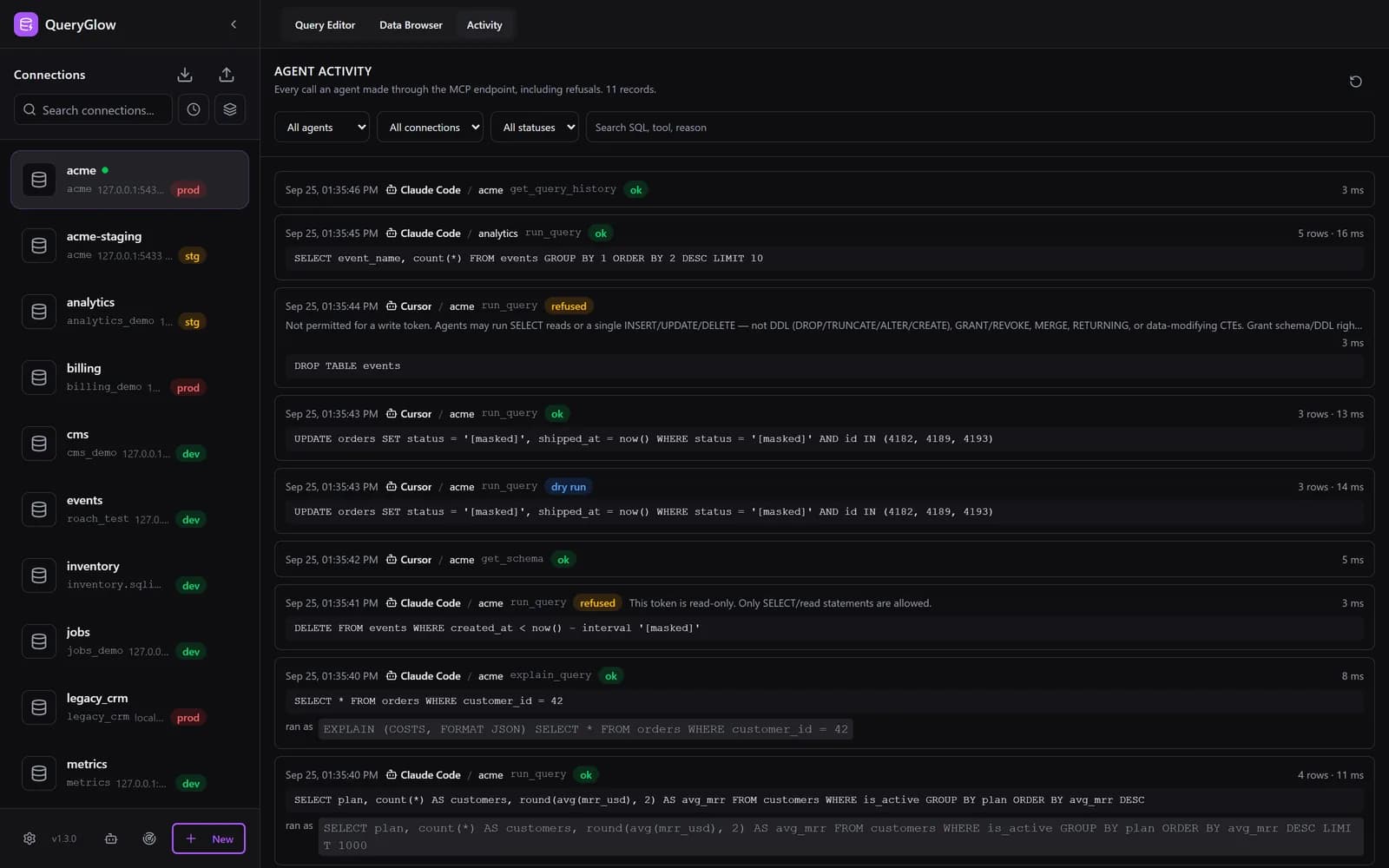
Every call in the Activity tab. Time, agent (token name), connection, tool, the SQL with quoted values masked, rows, duration and outcome: ok, dry run, refused, paused, error, timeout, busy or over cap.
Refusals included, with the reason. A refused statement is evidence, not noise. Filter by agent, connection or status, search the SQL, and an unread badge tells you what is new.
Pause one agent, or all of them. A paused token stays valid and the client stays connected, but every tool call is refused with -32002 and recorded until you resume. No revoking, no broken setup.
Errors are redacted before the agent sees them, so a failed query doesn’t leak hosts, ports, usernames or paths.
The Activity tab keeps the newest 5,000 records or 30 days and covers calls through QueryGlow's MCP endpoint. run_query and explain_query also land in Query History, tagged with the token name. Agent Access shipped in 1.2.0; the Activity tab and pause came in 1.2.1, at a buyer's request.
When engineers discuss giving LLMs database access on Hacker News, the verdicts are blunt, and they're right.
“an insane thing to do”
“In application security, 99% is a failing grade”
“asking an LLM nicely”
The story of an AI agent wiping a production database made the rounds for a reason: when the only thing between an agent and your data is an instruction it was asked to follow, the failure mode is total.
The same threads converge on the accepted answer: schema-only access, read-only enforcement, scoped credentials. QueryGlow ships exactly that pattern as a checkbox, with the enforcement living in the database and the driver, not in a prompt.
Read-only and single-statement rules are enforced by the database and the driver protocol; the rest is enforced by QueryGlow on your server. None of it depends on the agent behaving.
Each agent gets its own Bearer token with an explicit connection allowlist; an empty allowlist reaches nothing. Tokens are read-only by default, revocable at once, and stored only as hashes.
A read-only token executes inside a database-enforced read-only transaction (PRAGMA query_only on SQLite). The database rejects any write no matter how the SQL is phrased.
Every agent statement runs through the driver’s single-statement (prepared) protocol, which rejects multi-command strings. A benign-looking read cannot smuggle a second statement behind it.
A write token may run a single INSERT, UPDATE or DELETE, never DDL. Exceed the row cap (1000 rows by default) and the database rolls the write back. Dry run previews the affected-row count before anything commits.
Every agent statement has a timeout, 30 seconds by default, set with QUERYGLOW_AGENT_STATEMENT_TIMEOUT_MS, on every engine. SQLite queries run in a separate process that is killed on timeout, capped by QUERYGLOW_SQLITE_MAX_WORKERS (default 4). The MCP endpoint is rate-limited.
The enforcement layer is tested against an adversarial suite before every release: statement smuggling, writes hidden inside reads, over-limit writes.
Two token modes. The "never" column doesn't change no matter what the agent asks for.
| Action | Read-Only Token (Default) | Write Token (Opt-In) |
|---|---|---|
| Browse schema (tables, columns) | Yes | Yes |
| Run SELECT queries | Yes, row-capped | Yes, row-capped |
| EXPLAIN a query without running it | Yes | Yes |
| See query history for its connections | Yes | Yes |
| INSERT / UPDATE / DELETE | No, the database rejects it | One statement per call, row-capped |
| DROP, TRUNCATE, or any DDL | Never | Never |
| Chain multiple statements in one call | Never, the driver rejects it | Never, the driver rejects it |
| See hosts, ports, or credentials | Never, names only | Never, names only |
| Reach a connection off its allowlist | Never | Never |
| Keep working while paused | No, every call refused and logged | No, every call refused and logged |
Read-Only (Default)
Yes
Write (Opt-In)
Yes
Read-Only (Default)
Yes, row-capped
Write (Opt-In)
Yes, row-capped
Read-Only (Default)
Yes
Write (Opt-In)
Yes
Read-Only (Default)
Yes
Write (Opt-In)
Yes
Read-Only (Default)
No, the database rejects it
Write (Opt-In)
One statement per call, row-capped
Read-Only (Default)
Never
Write (Opt-In)
Never
Read-Only (Default)
Never, the driver rejects it
Write (Opt-In)
Never, the driver rejects it
Read-Only (Default)
Never, names only
Write (Opt-In)
Never, names only
Read-Only (Default)
Never
Write (Opt-In)
Never
Read-Only (Default)
No, every call refused and logged
Write (Opt-In)
No, every call refused and logged
See the GUI before you pay
Open the live demo (read-only sample database, AI switched off), no signup. Agent Access is disabled there; the setup guide covers the agent layer. One license covers both.
Stripe checkout. You'll enter your GitHub username for the repo invite. No refunds, so try the read-only demo first.
QueryGlow exposes a standard MCP endpoint. Paste the config into any client that speaks MCP over HTTP, and the agent gets exactly five tools, no more surface than the token allows. Run several agents side by side, for example Qwen, Codex, Claude Code and GLM, each with its own token.
Claude Code
claude mcp add --transport http queryglow https://your-domain.com/api/mcp --header "Authorization: Bearer qg_your_token_here"Cursor and other HTTP MCP clients
{
  "mcpServers": {
    "queryglow": {
      "url": "https://your-domain.com/api/mcp",
      "headers": {
        "Authorization": "Bearer qg_your_token"
      }
    }
  }
}
Claude Desktop (via mcp-remote, needs Node.js)
{
  "mcpServers": {
    "queryglow": {
      "command": "npx",
      "args": [
        "-y", "mcp-remote", "https://your-domain.com/api/mcp",
        "--header", "Authorization: Bearer qg_your_token_here"
      ]
    }
  }
}
list_connections
The connections this token may use: names, types and environments, never hosts or credentials.
get_schema
Tables and columns of a connection, so the agent writes correct SQL.
run_query
Runs SQL and returns rows. Read-only tokens: reads only. Write tokens: also a single INSERT, UPDATE or DELETE, with dry-run preview.
explain_query
Returns the query plan without executing anything.
get_query_history
Recent queries, human and agent, for the allowed connections, with quoted values masked.
Honest note: Agent Access is disabled in the public live demo, so you can't poke at it there. The setup guide walks through the full setup. There is no trial: once you own QueryGlow, start with a read-only token against a test database.
You genuinely can. A competent developer can wire up a read-only MCP server against Postgres in an afternoon; people have, and it works. If that's all you need, build it.
The catch is the tail. A hand-rolled server is a weekend project with an unbounded security surface: your own SQL classifier, your own statement-splitting rules, your own row caps, your own activity log. Each one is a thing you now maintain, and each one is a place to be 99% right.
QueryGlow's answer is to make the accepted safety pattern a checkbox instead of a codebase: read-only transactions enforced by the database, single statements enforced by the driver protocol, row-cap rollback, an Activity tab and a pause switch. Already built, tested against an adversarial suite before every release, and attached to a GUI your team uses anyway.
The same token model and enforcement layers work across every engine QueryGlow supports.
One license covers the GUI and the agent layer: $79 once, no subscription, every 1.x update included. The live demo shows the GUI (Agent Access is disabled there); the docs cover the rest.
After you pay: a GitHub invite to the private repository, then ./queryglow install on your server. Every 1.x update is one ./queryglow update away.