Agent Access (MCP)
Give an AI agent (Claude Code, Cursor, Codex, a local model harness or your own scripts) access to your databases through QueryGlow's safety layer instead of handing it a raw connection string. QueryGlow exposes a Model Context Protocol (MCP) endpoint at /api/mcp. The agent gets scoped, read-only by default access through five tools. Every call it makes shows up in the Activity tab, and you pause one agent or all of them with one click.
Read-only is enforced by the database, not a text filter
A read-only token runs inside a database-enforced read-only transaction, and every agent statement goes through the driver's single-statement (prepared or extended) path. An agent cannot smuggle a second statement or slip a write past the guard.
1. Create a Token
- 1Open QueryGlow and click the robot icon in the sidebar footer (Agent Access).
- 2Under Create a token, enter a Name, e.g.
Claude Code. Give every agent its own token, so the Activity tab can tell them apart. - 3Under Allowed connections, tick the connections the agent may use. Each shows its environment, and a production connection is only reachable if you tick it; the dialog then warns "This token includes a production connection."
- 4Tokens are read-only by default (SELECT and other reads only). Tick Allow writes (INSERT / UPDATE / DELETE) to permit single writes, then set Max rows a single write may affect (default 1000). Even a write token cannot run DROP, TRUNCATE or other DDL. In Safe Mode (the default) a DELETE or UPDATE without WHERE is refused, and any single write that affects more rows than the limit is rolled back at the database. A write under the limit runs, so keep the limit below the size of any table the agent must not empty.
- 5Optionally set an Expiration: No expiration (default), 30 days, 90 days or 1 year. An expired token stops authenticating and you issue a new one.
- 6Click Create Token. The raw token (
qg_...) is shown once, together with a ready to paste client config. Copy it now.
Revoke a token any time from the same dialog (trash icon); the agent loses access immediately.
2. Connect a Client
Every client uses the same URL and the same Authorization header; only the place where the config lives differs. Replace your-domain.com with your QueryGlow domain and qg_your_token_here with the token you copied.
Cursor
Paste this block into .cursor/mcp.json:
{
  "mcpServers": {
    "queryglow": {
      "url": "https://your-domain.com/api/mcp",
      "headers": { "Authorization": "Bearer qg_your_token_here" }
    }
  }
}
Claude Code
One command; the tools are then available in every session:
claude mcp add --transport http queryglow https://your-domain.com/api/mcp --header "Authorization: Bearer qg_your_token_here"Claude Desktop
claude_desktop_config.json only starts local (stdio) servers, and the Connectors screen expects OAuth, not a Bearer header. Bridge the endpoint with mcp-remote (needs Node.js on the machine running Claude Desktop):
{
  "mcpServers": {
    "queryglow": {
      "command": "npx",
      "args": [
        "-y", "mcp-remote", "https://your-domain.com/api/mcp",
        "--header", "Authorization: Bearer qg_your_token_here"
      ]
    }
  }
}
Codex CLI
Codex reads the token from an environment variable instead of the file:
# ~/.codex/config.toml
[mcp_servers.queryglow]
url = "https://your-domain.com/api/mcp"
bearer_token_env_var = "QUERYGLOW_TOKEN"

# in the shell that starts Codex
export QUERYGLOW_TOKEN=qg_your_token_here
A local harness or your own scripts
Point the harness's MCP client (Qwen, GLM, Llama and others behind an OpenAI compatible API) at the same URL with the same header. Anything that can POST JSON-RPC with a Bearer header is a valid client; nothing is installed on the QueryGlow side.
The endpoint speaks the MCP Streamable HTTP transport (JSON-RPC over HTTP). It is stateless: no session setup, one request per call.
Tools the agent gets
| Tool | What it does |
|---|---|
| list_connections | The connections this token may use: names, types, environments. Never hosts or credentials. |
| get_schema | Tables and columns of a connection, so the agent writes correct SQL. |
| run_query | Runs a SQL query and returns rows. Read-only tokens: SELECT and other reads only. Write tokens: also a single INSERT, UPDATE or DELETE. Results are row-capped; over-limit writes are rolled back. Pass dry_run: true to preview a write's affected-row count without committing. |
| explain_query | Returns the query plan (EXPLAIN) without executing. |
| get_query_history | Recent queries (human and agent) for the allowed connections, with string literals and comments masked. |
3. The Safety Model
Enforcement is layered, and the authoritative guarantees live at the driver and the database, not in a regex:
Read-only transactions, enforced by the database
Read-only tokens execute inside a TRANSACTION READ ONLY (PostgreSQL, MySQL) or with PRAGMA query_only (SQLite). The database rejects writes no matter how the SQL is phrased; even a write hidden inside a function call (SELECT wipe_and_reload()) is rejected, also on a write token.
Single statement, at the driver
Every agent statement runs through the driver's prepared or extended protocol, which rejects any string containing more than one command. A harmless leading read cannot carry a second statement (SELECT 1; DROP ...).
Never DDL
Agents can never run DROP, TRUNCATE or other DDL, GRANT or REVOKE, MERGE, data modifying CTEs, file or command execution SQL, or server-side file and network functions (pg_read_file, dblink, ...), even on a write token. DDL stays refused for agents even in Power Mode.
Write row cap with rollback, plus dry run
A write token may run only a single INSERT, UPDATE or DELETE without RETURNING. Any write whose real affected-row count exceeds the token's limit is rolled back at the database. A write under the limit still runs (in Power Mode even without WHERE), so keep the limit below the size of any table the agent must not empty. dry_run previews the impact first. On PostgreSQL and SQLite the cap counts cascade and trigger rows too; on MySQL and MariaDB only the statement's own rows are measured. For cascade-heavy MySQL schemas, or for production, point a write token at a dedicated database login (grants scoped to the tables you allow, no DDL) or a read replica.
Every call is recorded, including blocked ones
Every tool call, including refusals, timeouts and calls while the token was paused, is recorded in the Activity tab (section 4). run_query and explain_query also land in Query History tagged with the token's name; the robot toggle in the History tab filters to agent runs.
Error redaction
Driver errors returned to the agent are redacted (no host, IP, port, username, path or values), and get_query_history masks all string literals and comments of human queries, so an agent cannot harvest secrets a human typed.
Rate limits, timeouts and caps
- In the app, in both deployment modes: 240 requests per minute per IP (
QUERYGLOW_MCP_RATE_MAX) and 2000 per minute in total (QUERYGLOW_MCP_GLOBAL_RATE_MAX). In standalone mode nginx also caps/api/mcpat 120 requests per minute per IP. - Every statement has a timeout, 30 seconds by default (
QUERYGLOW_AGENT_STATEMENT_TIMEOUT_MS), on every engine. SQLite agent queries run in a separate process that is stopped on timeout; at most 4 run at once (QUERYGLOW_SQLITE_MAX_WORKERS). - Other engines run up to 10 agent queries at once and queue 200 more; beyond that a call ends as
busy. - Result sets are capped at 50,000 rows in the driver. A read without LIMIT gets one; a read that cannot be bounded before it runs is rejected.
4. Watch and Pause Your Agents
The Activity segment in the header, next to Query Editor and Data Browser, lists every call that went through the MCP endpoint, across all connections. While you work elsewhere, the Activity label carries a badge with the number of calls since you last looked.
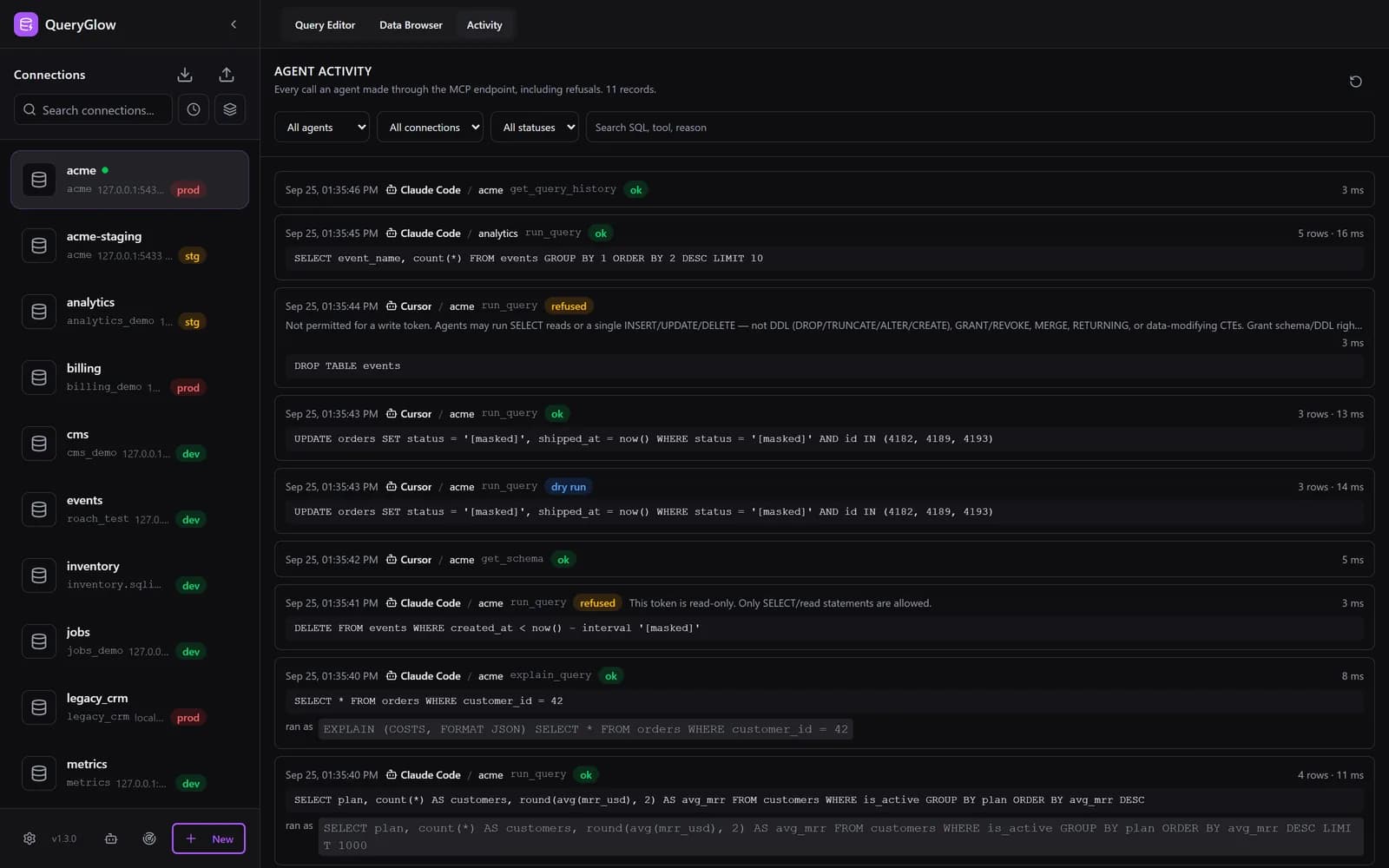
The Activity tab
- One row per tool call, newest first: time, agent (the token's name), connection, tool, the SQL as sent with quoted text shown as
[masked](and "ran as" when the executed statement differs), rows, duration and outcome. - Outcomes:
ok,dry run,refused,paused,error,timeout,busy,over cap,running. Refusals carry the reason. - Filters All agents, All connections, All statuses; the search box Search SQL, tool, reason covers the rows loaded so far. Rows load 100 at a time; Load older records fetches more.
- Refreshes every 5 seconds while the browser tab is visible.
Pause one agent or all of them
- In Agent Access, every token that has not expired has a pause button, and Pause all agents pauses every token at once (it then reads Resume all agents).
- A paused token stays valid:
initialize,pingandtools/liststill work, so the client stays connected. - Every tool call is refused with JSON-RPC error
-32002Token paused by owner(HTTP 403) and recorded aspaused. Resume with one click; settings and history stay. - The dialog shows per token how many calls are recorded and when the last one went where.
What is stored: agent-activity.json in the data directory keeps the newest 5000 records or the last 30 days, whichever limit is hit first. SQL is stored with every literal masked and cut at 2000 characters. Hosts, credentials and result rows are never stored, and agents cannot read this store.
Coverage: only calls through /api/mcp. An agent that connects to the database with its own connection string is not visible here; that is the point of routing agents through a token. "Clear All" in Query History does not touch the Activity tab.
Good to Know
- Agent Access is disabled entirely in demo mode (
DEMO_MODE=true), so the public demo does not offer it. - Production connections must be ticked on purpose. The token dialog shows each connection's environment so you do not grant production access by accident.
- The nginx config from the installer exempts
/api/mcp(exact match) from Basic Auth, because agents authenticate with the Bearer token instead of the Basic Auth password. Tokens are stored only as SHA-256 hashes. - The token management API (
/api/agent-tokens) is a human-only browser endpoint that stays behind Basic Auth. Keep QueryGlow behind its reverse proxy; do not expose the app port (:3000) directly. - The safest setup is a read-only token scoped to a staging database or read replica. Give an agent production write access only with a clear reason.
Troubleshooting
401 Unauthorized
The Bearer token is missing, mistyped, revoked or expired. Check that the Authorization header is exactly Bearer qg_.... If the token expired or was revoked, create a new one in the Agent Access dialog. If your reverse proxy does not exempt /api/mcp from Basic Auth, the proxy rejects the request before it reaches QueryGlow.
-32002 "Token paused by owner"
Someone paused this token, or pressed Pause all agents. Resume it in the Agent Access dialog; the client does not need to reconnect.
"Connection is not available to this token"
The agent asked for a connection that is not on the token's allowlist. Have the agent call list_connections to see what it may use, or update the token's connection selection in the Agent Access dialog.
Statement blocked by the guard
A read-only token attempted a write, the statement contained more than one command, or a read could not be row-bounded (a placeholder or expression LIMIT, LIMIT ALL, FETCH FIRST/NEXT, or FOR UPDATE/SHARE; use a numeric LIMIT instead). The refusal and its reason show up in the Activity tab and in Query History.
Endpoint not responding in demo mode
Agent Access is disabled when DEMO_MODE=true. Run a regular (non-demo) deployment to use MCP tokens.