Credentials in the Cloud
Cloud database tools store your credentials on their servers. One breach, and your production database is exposed.
Stop sending your database credentials to someone else's cloud. QueryGlow runs on your server, and your rows never leave it. No telemetry. No tracking.
Hosted tools often charge per user per month and keep your credentials. QueryGlow: $79 once. Your server. Your whole team.
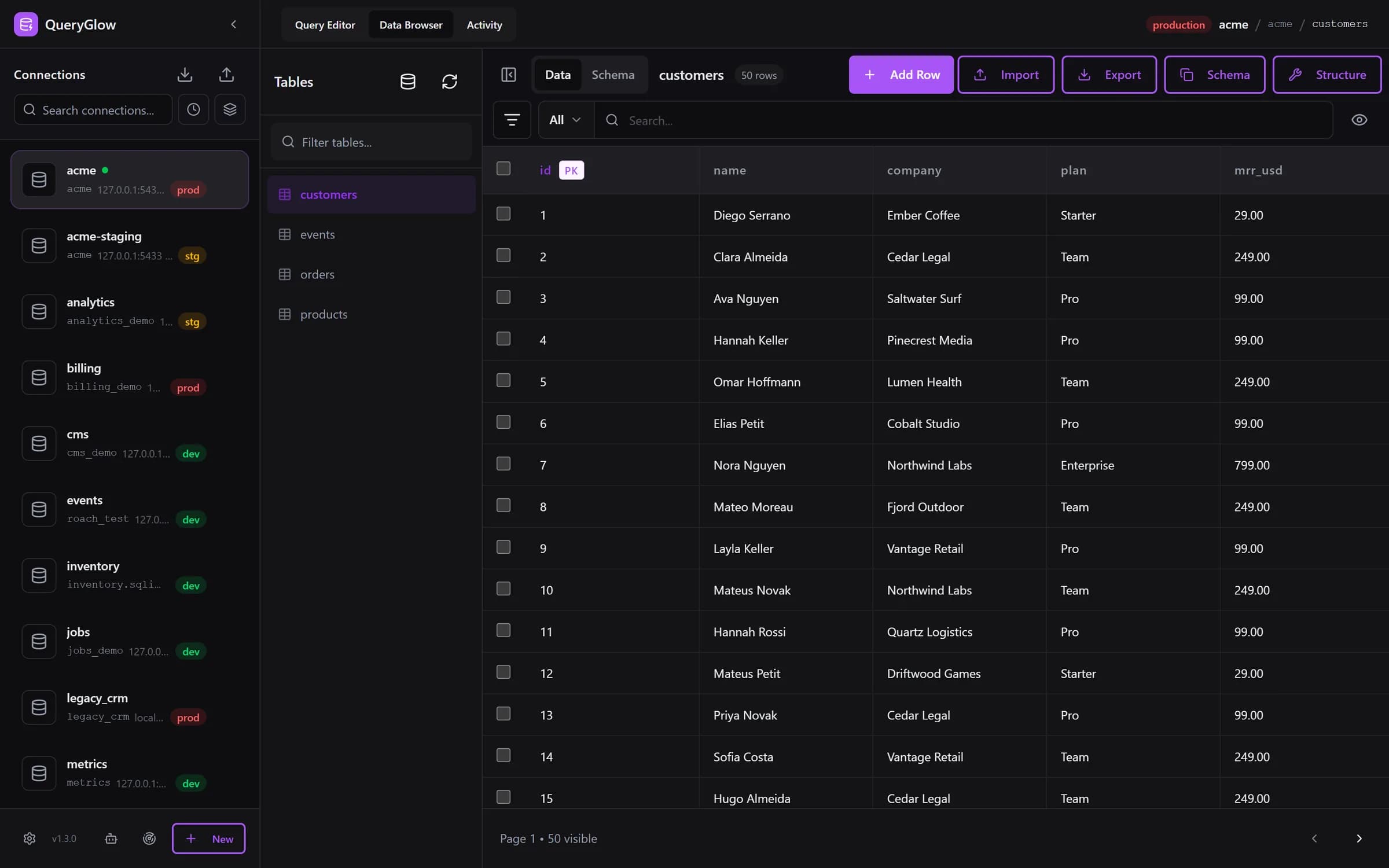
QueryGlow 1.3.0 on your own server, opened in the browser.
Every cloud tool is another place your credentials live. Another potential breach point. It's the same instinct that has teams self-hosting Supabase: your data on your servers, end to end.
Cloud database tools store your credentials on their servers. One breach, and your production database is exposed.
A hosted tool sits between you and your database, so your queries and results pass through infrastructure you do not run.
GDPR, HIPAA, SOC 2: every hosted tool is one more data processor in your compliance documentation.
Cloud tools can change pricing, terms, or shut down. Self-hosted means you control your tools forever.
| Aspect | Cloud Tools | QueryGlow (Self-Hosted) |
|---|---|---|
| Data Location | Their servers | Your servers only |
| Credential Storage | In their database | AES-256-GCM encrypted on your server |
| Telemetry | Varies by vendor | None. The app never phones home, not even for updates |
| GDPR Compliance | Another data processor to document | Rows stay on your server; outside parties are the optional AI call (schema only) and cdn.jsdelivr.net, which serves the SQL editor to browsers |
| Vendor Shutdown Risk | Lose access if they close | Source code included, perpetual 1.x license |
| Network Access | Needs a route from their cloud to your database | Runs inside your VPC |
| Updates | On the vendor's schedule | One command when you choose: backup first, automatic rollback |
| Pricing | Often per user per month | $79 once, your whole team on one install |
Cloud
Their servers
QueryGlow
Your servers only
Cloud
In their database
QueryGlow
AES-256-GCM encrypted on your server
Cloud
Varies by vendor
QueryGlow
None. The app never phones home, not even for updates
Cloud
Another data processor to document
QueryGlow
Rows stay on your server; outside parties are the optional AI call (schema only) and cdn.jsdelivr.net, which serves the SQL editor to browsers
Cloud
Lose access if they close
QueryGlow
Source code included, perpetual 1.x license
Cloud
Needs a route from their cloud to your database
QueryGlow
Runs inside your VPC
Cloud
On the vendor's schedule
QueryGlow
One command when you choose: backup first, automatic rollback
Cloud
Often per user per month
QueryGlow
$79 once, your whole team on one install
See it before you pay
Open the live demo (read-only sample database, AI switched off), no signup. If it fits, buy once and run it on your own server for your whole team.
Stripe checkout. You'll need a GitHub account for the repo invite. No refunds, so try the read-only demo first.
QueryGlow runs in Docker on a Linux server you control: any VPS (DigitalOcean, Hetzner, AWS) or your office server. You need Docker (512 MB RAM minimum, 1 GB recommended), a domain pointing at the server for HTTPS, and a non-root user with sudo.
git clone [email protected]:mxfschr/queryglow.git
cd queryglow
./queryglow install

# later, whenever you choose
./queryglow update
Clone the repository and run ./queryglow install. It sets up nginx, the HTTPS certificate, the login and the app on a Linux server that already has Docker with the compose plugin, or plugs into the nginx you already run.
./queryglow update backs up first, checks that the new version is serving and rolls back on its own if not. backup, restore and rollback keep your QueryGlow settings and data in backups you own. How updating works and what shipped in each release.
Connect to databases inside your VPC without opening public ports. QueryGlow runs inside your firewall.
We don't track your queries. We never see your schema. Your rows stay on your server; only the optional AI call sends the schema and your prompt to the provider you chose. Even the update check is a git fetch against your own remote, and only when you run it.
Restrict port 443 to your VPN or office IPs; the installer needs a public DNS name and port 80 open for the certificate. No telemetry, no phone home. The browser fetches the SQL editor from cdn.jsdelivr.net, so keep that host reachable.
Self-hosted is just the start. QueryGlow has multiple layers of protection.
Database passwords, SSH keys and AI keys entered in the app are encrypted at rest with AES-256-GCM, using a key only your server holds.
Self-hosted and web-based. Open your databases from any device with a browser, behind nginx Basic Auth over HTTPS. Your rows stay on your server.
Reach databases behind a bastion without opening ports. Host keys are pinned on first use; a server that presents a different key is refused, with both fingerprints shown.
SSL/TLS to your database, with an optional check of the server certificate against the public certificate authorities, per connection.
Ask AI sends your database type, table and column names with their types, and your prompt. Never rows.
Your own OpenAI, Anthropic or Google key, entered in the app and stored encrypted on your server, with a Test button. A key in .env still wins.
On a connection marked production, the Query Editor shows the statement and asks before any INSERT, UPDATE, DELETE or DDL runs. On by default.
AI agents get scoped tokens, read-only by default. Every call shows up in the Activity tab, and you can pause one token or all of them.
No analytics, no tracking, no phoning home. QueryGlow does not know when you use it, what you query, or who your users are.
Companies that can't or won't send database credentials to third-party clouds.
Healthcare, finance, government: anywhere compliance requires data control.
Restrict access to your VPN or office IPs. The installer needs a public DNS name and port 80 reachable so Let's Encrypt can issue and renew the certificate. No telemetry, no phone home. Your rows never leave your server. What does go out: the optional Ask AI call (schema and prompt), the browser loading the SQL editor from cdn.jsdelivr.net, certificate renewal with Let's Encrypt, and the git fetch when you run ./queryglow update.
Organizations that make data privacy a core value, not just a checkbox.
One license covers PostgreSQL, MySQL, MariaDB, SQLite and TimescaleDB, and distributed setups are covered too, with a CockroachDB GUI running on the same self-hosted deployment.
“fast and responsive”
“Beautiful interface and very intuitive.”
Try the live demo first: the real app on a sample database, read-only, AI switched off, no signup. If it clicks, grab a lifetime license for $79.
After you pay: a GitHub invite to the private repository, then ./queryglow install on your server. Every 1.x update is one ./queryglow update away.