
Quick Answer: DB Browser for SQLite is the best free SQLite GUI for most people. Open-source, cross-platform, and it does exactly what it says. DBeaver Community wins if SQLite is just one of many databases you touch, and QueryGlow ($79 once, self-hosted) is the pick if you want to browse and edit SQLite files from the browser, next to your PostgreSQL and MySQL connections.
SQLite is the most deployed database in the world, but it ships without any interface at all. Here is how the GUI options actually compare.
SQLite GUI Comparison Table
| Tool | Price | Type | Best For | Key Limitation |
|---|---|---|---|---|
| DB Browser for SQLite | Free | Desktop | SQLite-only work | No multi-database support |
| SQLiteStudio | Free | Desktop | Power users | SQLite-only |
| DBeaver | Free / from $113/yr | Desktop | Multi-database developers | Java desktop app |
| TablePlus | $99/device | Desktop | Native Mac feel | Per-device licensing |
| Beekeeper Studio | Free / from $9/mo | Desktop | Minimal UI | Focused on queries and data editing |
| QueryGlow | $79 one-time | Web (self-hosted) | Teams, browser access | File must sit in QueryGlow's data directory on the server |
Prices as of September 2026.
Top SQLite GUI Tools Reviewed
DB Browser for SQLite: Best Free Pick
The default answer, and honestly a good one. Free, open-source, runs on Windows, macOS, and Linux. Create, browse, and edit SQLite files with a spreadsheet-style interface. If your work is SQLite-only and local, it is hard to argue against free.
Pro: Free, faithful to the SQLite spec. Latest stable release 3.13.0 (August 2024).
Con: SQLite only. No AI, no server deployment, no shared access.
SQLiteStudio: Free, Open Source, Plugin-Based
Another free, open-source SQLite desktop manager with plugin support.
DBeaver: Best If SQLite Is One of Many
The free Community edition handles SQLite alongside 100+ other databases. If you already use DBeaver for PostgreSQL or MySQL, adding a SQLite file takes seconds. The trade-off: it is a Java desktop app, for what is often a tiny embedded database. Our DBeaver pricing and alternatives guide covers the editions in detail.
TablePlus: Best Native Desktop Feel
Native, and SQLite is one of its supported engines. The catch is the $99-per-device Basic license once you outgrow the limited free tier.
Beekeeper Studio: Best Modern Free UI
A free desktop option with SQLite support and tabbed editing. The open-source Community edition covers everyday work; paid tiers start at $9/mo.
QueryGlow: Web-Based SQLite Editor
QueryGlow is a self-hosted web app on a Linux server you run, so your SQLite file sits in QueryGlow's data directory on your server (the Docker volume at /app/data; existing files are copied in with docker cp) and you browse, query, and edit it from any browser. Inline cell editing, CSV import and export, schema-aware autocomplete, an EXPLAIN QUERY PLAN visualizer, and Ask AI, which writes SQL from plain English using your own OpenAI, Anthropic or Google key (entered in the app and stored encrypted on your server), with only the schema sent, never rows. Safe Mode blocks DROP TABLE, TRUNCATE, and DELETE or UPDATE without a WHERE clause by default. Preferences set how NULL looks, the date format and up to 500 rows per page. The same $79 install also covers PostgreSQL, MySQL, MariaDB, CockroachDB, and TimescaleDB, and it works as a self-hosted SQLite viewer and editor for the whole team on one shared URL.
Honest limitations: the visual schema editor cannot change a column type or reorder columns on SQLite (that needs a table rebuild, which it will not do behind your back), and there is no file upload. The database file has to sit on the server that runs QueryGlow, and a copied file is a snapshot: to see fresh data from another app's database, copy it again. There is no desktop app.
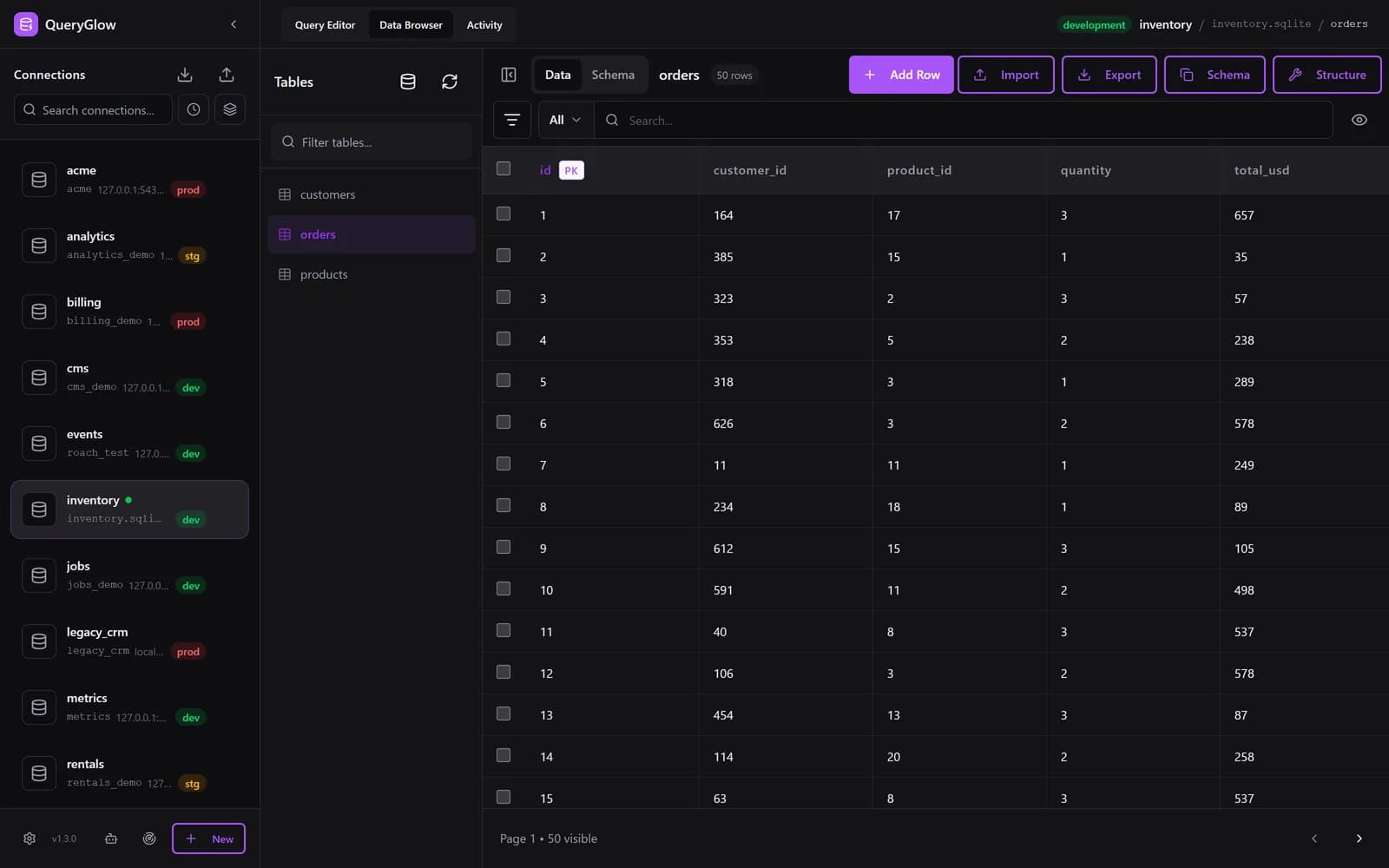
Want to edit SQLite from the browser?
QueryGlow browses, queries and edits SQLite databases that sit on your server, from any browser. Self-hosted, source code included, $79 once.
See the tourDesktop vs Web-Based SQLite Tools
Desktop tools open a local file directly, which is perfect for a database that lives on your laptop. The web-based approach wins when a SQLite database should be shared: a dataset the whole team works on, or a copy of a production app's database that teammates need to query. For a quick look at a local file, a read-only online SQLite viewer is enough; for actual editing on a server, a self-hosted GUI is the practical route.
Which SQLite GUI Should You Pick?
- •Local file, occasional browsing → DB Browser for SQLite (free)
- •Power features, still free → SQLiteStudio
- •SQLite plus many other databases → DBeaver Community
- •Native desktop polish, budget available → TablePlus
- •A shared SQLite database on a server, team access, AI SQL → QueryGlow ($79 once)
Try QueryGlow in the live demo first (the real app on a sample database, read-only, AI switched off, no signup).
Tags:
Built by an engineer. The app sends no telemetry.
Edit your SQLite data in the browser
Click a cell to edit it, import and export CSV, write SQL with autocomplete. Plus PostgreSQL, MySQL and 3 more engines. Self-hosted, $79 once.
“Beautiful interface and very intuitive.”
Jean-Francois, Mildor Violon, verified customer “I was looking at DBeaver and yours looked a little easier for what I was looking for.”
Mike, verified customer
Stripe checkout. You'll enter your GitHub username for the repo invite. No refunds, so try the read-only demo first.
$79 one-time. Self-hosted. No subscription.