
Quick Answer: DBeaver is the best free MySQL Workbench alternative for most developers. HeidiSQL is the small, free pick, and it now runs on Linux and macOS, not just Windows. For teams that want one shared, self-hosted web GUI instead of per-machine installs, QueryGlow ($79 one-time) is the pick. Full ranking and pricing below.
MySQL Workbench Alternatives Comparison Table 2026
| Tool | Price | Platforms | Open Source | Best For |
|---|---|---|---|---|
| DBeaver | Free / Lite $113/yr | Win, Mac, Linux | ✓ (CE) | Free multi-database all-rounder |
| Beekeeper Studio | Free / Indie $9/mo | Win, Mac, Linux | ✓ (CE) | Minimal querying |
| HeidiSQL | Free | Win, Linux, Mac | ✓ | Lightweight MySQL/MariaDB work |
| dbForge Studio for MySQL | Free Express edition; paid editions are subscriptions (see devart.com) | Windows | ✗ | Deep MySQL-only tooling |
| DbGate | Free / Premium $120/yr | Win, Mac, Linux, Web | ✓ (CE) | Open-source web access |
| TablePlus | $99 one-time / device | Win, Mac, Linux | ✗ | Native desktop app |
| QueryGlow | $79 one-time | Web (any browser) | ✗ | Self-hosted team access |
Prices as of September 2026.
Why People Look Beyond Workbench
First, the record: MySQL Workbench is not discontinued. Oracle replaced Workbench 8.0 with the rebuilt Workbench 26.7 in July 2026; 8.0 gets no new releases. Our MySQL Workbench download and versions guide tracks the current builds. Before that rebuild, a March 2026 MariaDB Foundation post on mariadb.org described Workbench as "clearly drifting away from day-to-day developer needs." The same post notes that some Workbench versions cannot connect to a MariaDB server at all, and Workbench is a desktop app with no shared web access. If MariaDB is your actual engine, our MariaDB GUI roundup covers tools that treat it as first-class.
The 7 Best MySQL Workbench Alternatives, Ranked
1. DBeaver
The default replacement. The free, open-source Community Edition covers MySQL, MariaDB, and 100+ other databases with solid ER diagrams and data export. Con: it's Java-based. Paid editions start at $113/yr (Lite).
2. Beekeeper Studio
The opposite philosophy: minimal and focused on queries. The free Community edition handles everyday querying; Indie is $9/mo billed annually. Con: it's a query tool, not an admin suite, with no visual schema designer or server administration to match Workbench.
3. HeidiSQL
Free, small, and long the favorite of MySQL pragmatists. The big news: it now runs on Windows, Linux and macOS. Native Linux builds shipped with 12.14 (Dec 2025), and the current release, 12.21 (Aug 2026), has a macOS build too. Con: no team sharing; our QueryGlow vs HeidiSQL comparison covers that gap in detail.
4. dbForge Studio for MySQL
The deepest MySQL-specific feature set here: schema/data compare, query profiler, debugger, test data generation. Cons: there is a free Express edition, but the paid editions are subscriptions (see devart.com), and it's Windows-native, running on macOS/Linux only via CrossOver or Wine.
5. DbGate
The open-source Community edition runs as a desktop app or as a self-hosted web app for one user via Docker, the closest free analog to a shared team GUI. Cons: AI features sit behind the Premium tier ($120/yr), and dbgate.io does not advertise a bring-your-own-key option; the web app for two or more people is Team Premium at $150/user/yr. Our DbGate review has the full tier breakdown.
6. TablePlus
A native desktop app on macOS, Windows and Linux. Basic is $99 one-time but licensed per device: three machines means three licenses. Cons: the free mode is capped at 2 open tabs, 2 windows and 2 advanced filters, and there's no web or team deployment. See QueryGlow vs TablePlus if the per-device model is the sticking point.
7. QueryGlow
Not the pick for everyone: it is the pick if your team wants Workbench-style access to MySQL and MariaDB without installing anything on each machine. A self-hosted MySQL GUI on a Linux server you run, opened in the browser at one team URL. Adding a server replaces Workbench's server connection: Find local servers checks the standard ports on the machine QueryGlow runs on, and Find databases on this server adds every schema your login can open in one step; the sidebar has search and groups connections by host. In the browser you click a cell in the Data Browser to edit it, get autocomplete that lists a table's columns with their types, and run EXPLAIN to see a visual plan that flags full table scans. The Structure dialog adds, renames, retypes, drops and drag-reorders columns (on MySQL and MariaDB alike) and shows the exact SQL before anything runs. Ask AI writes SQL with your own OpenAI, Anthropic or Google key and only ever sees your schema, never row data. Safe Mode blocks destructive statements by default, the Query Editor asks before any write on a connection marked production, and SSH tunnels pin the server's host key on first connect. Supports MySQL, MariaDB, PostgreSQL, SQLite, CockroachDB, and TimescaleDB.
$79 once, whole team, every server you run, source code included. The honest con: it needs a Linux server you run, and there is no desktop app; for offline, local-first work, pick HeidiSQL or TablePlus. Try the live demo first (the real app on a sample database, read-only, AI switched off, no signup).
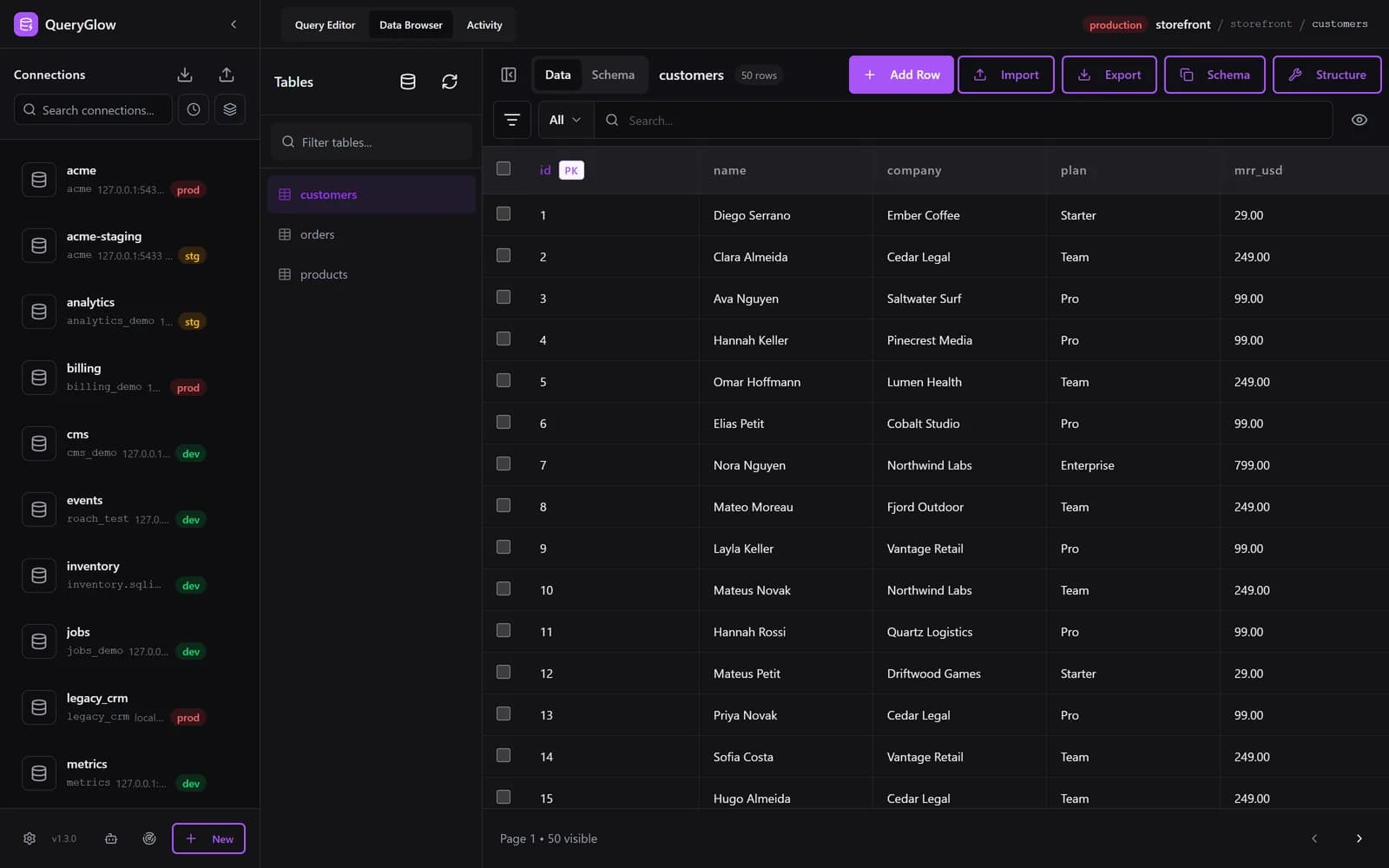
What if Workbench ran in your browser for the whole team?
QueryGlow is a self-hosted MySQL and MariaDB GUI your team opens from one URL. $79 once.
See the tourFree & Open-Source Alternatives
DBeaver Community, HeidiSQL, DbGate Community, and Beekeeper Studio's Community edition are all free and open-source. dbForge has a free Express edition but is not open source, and TablePlus only offers a limited free mode. QueryGlow is neither free nor open source: it's $79 once, with the source code included.
Mac, Windows & Linux
Every desktop tool here except dbForge runs on Windows, macOS and Linux, and HeidiSQL only recently joined that club. QueryGlow sidesteps the question entirely: it runs on your Linux server, and any OS with a browser gets the same UI.
Which Alternative Should You Pick?
- •Just want free and capable? → DBeaver.
- •Lightweight MySQL/MariaDB editor? → HeidiSQL.
- •Deep MySQL admin tooling on Windows? → dbForge Studio.
- •A whole team, one URL, one payment? → QueryGlow.
If you aren't specifically trying to get off Workbench and just want the general picture, our wider roundup of MySQL database software and GUI tools compares the same field without the Workbench framing.
Workbench earned its place as the free official tool, and 26.7 is a fresh start for it. Every tool above starts at $0 or under $100, so trying two of them costs an afternoon, not a budget line.
Tags:
Built by an engineer. The app sends no telemetry.
Replace Workbench once, for everyone
Add every database on a server in one step, change columns with the exact SQL shown first, and confirm writes on production before they run. Self-hosted, $79 once.
“Beautiful interface and very intuitive.”
Jean-Francois, Mildor Violon, verified customer “I was looking at DBeaver and yours looked a little easier for what I was looking for.”
Mike, verified customer
Stripe checkout. You'll enter your GitHub username for the repo invite. No refunds, so try the read-only demo first.
$79 one-time. Self-hosted. No subscription.