New in 1.3.0: Preferences, your own accent color, one-command updates

Open a URL. You're in your database.Self-hosted database GUI for Postgres, MySQL and four more.

Browse, query and edit PostgreSQL, MySQL, MariaDB, SQLite, CockroachDB and TimescaleDB in the browser, on a server you run. Nothing to install on anyone's laptop, no seats, no subscription. $79 once, source code included.

Try the live demo

Real app on a sample database, read-only, AI switched off, no signup.

“…once found, checked the demo, I instantly bought @QueryGlow” Oliver on X

https://db.your-company.com
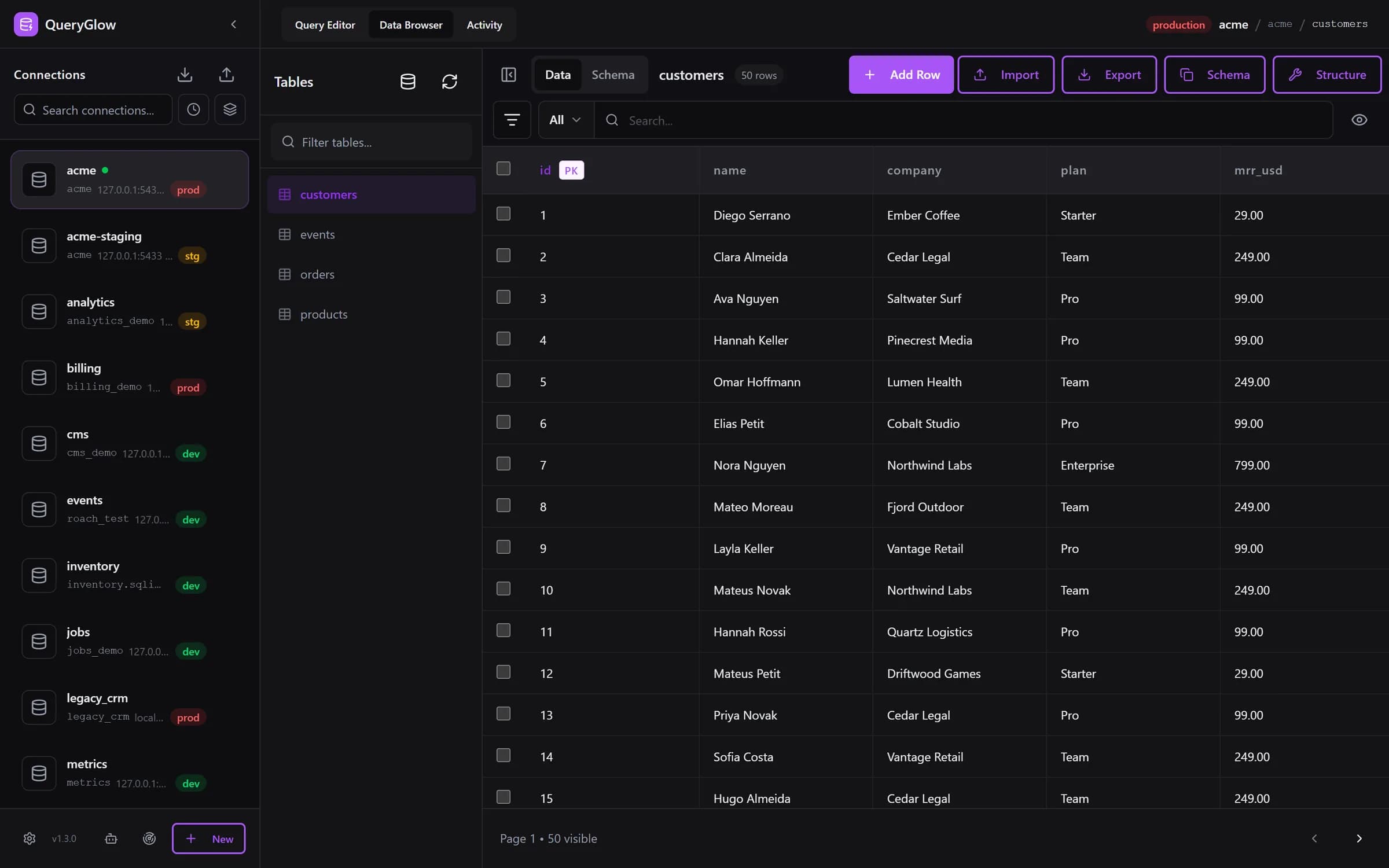
QueryGlow 1.3.0 Data Browser showing a customers table on a production PostgreSQL connection
Make it yours:

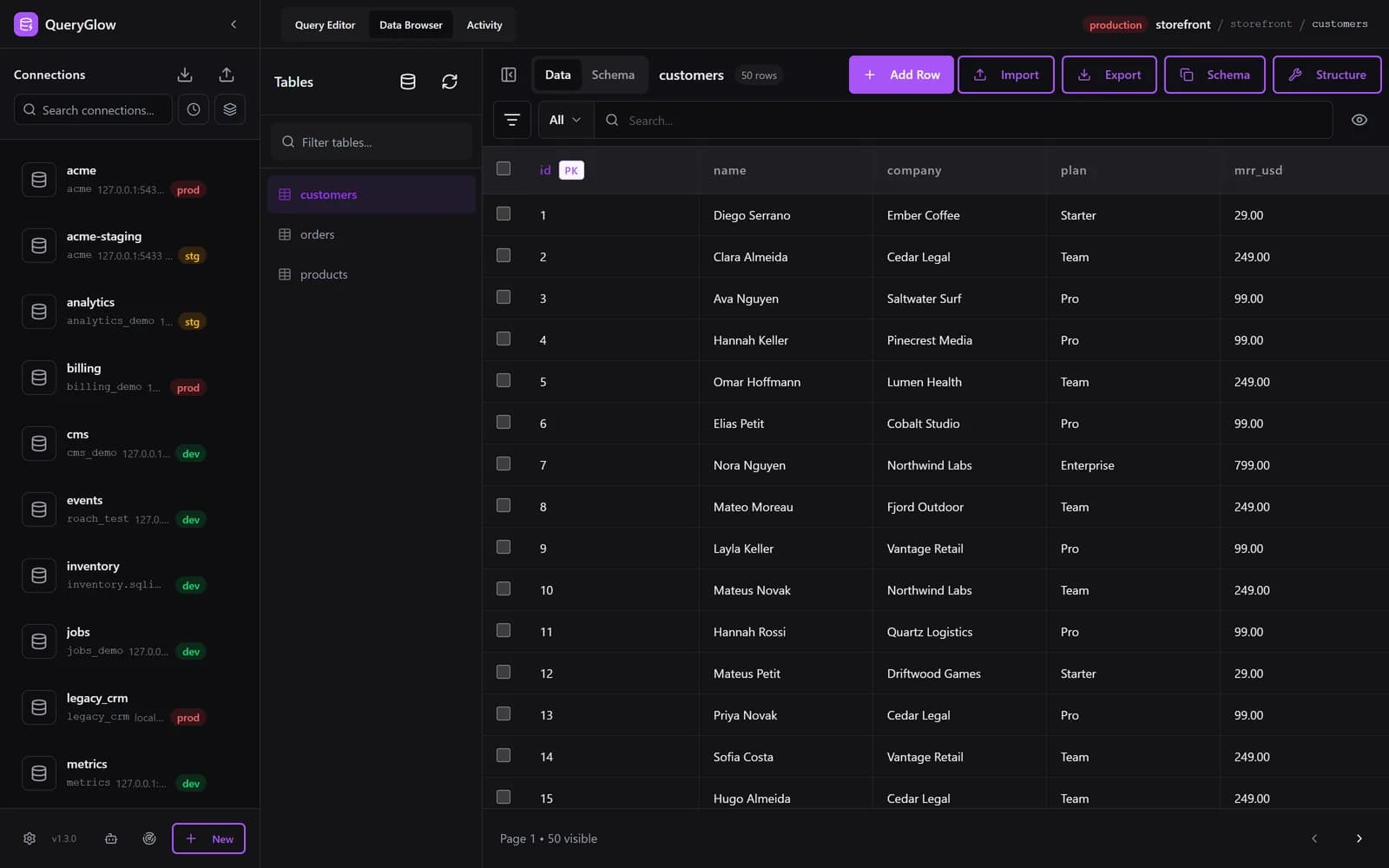
Real screenshots of QueryGlow 1.3.0. Pick your own accent, or any color, in Preferences.

  • “Beautiful interface and very intuitive.”
    Jean-Francois, Mildor Violon, verified customer
  • “I was looking at DBeaver and yours looked a little easier for what I was looking for.”
    Mike, verified customer
  • Runs on your server. No telemetry, no tracking.
  • AI sees your schema, never your rows.
  • Blocks DROP TABLE, TRUNCATE and DELETE without WHERE in the Query Editor by default.

The app

What you get when you open the URL

Real screens from QueryGlow 1.3.0 on a sample database. The live demo is the same app, read-only: you can browse, query and run EXPLAIN there, while edits, structure changes, Ask AI and Agent Access are switched off.

Browse and edit

  • Click a cell, change it, save. Add rows, edit several rows at once, delete with a typed confirmation on production.
  • Filter, search, sort, and page through up to 500 rows at a time.
  • Import CSV as insert, upsert or replace. Export a table or a result to CSV.
Browse it in the live demo (read-only)
https://db.your-company.com
QueryGlow Data Browser on a MySQL customers table

Customer story

One of our first customers, in his own words.

Jean-Francois runs an online music school and manages its database himself. He tried Adminer, TablePlus and the subscription tools, then ChatGPT recommended QueryGlow. A week after buying, he sent this 2:45 video.

  • “It's the simplest and the most beautiful interface that you can have.”
    Jean-Francois, Mildor Violon, verified customer
  • “You want to edit a cell, you click that cell, you edit.”
    Jean-Francois, Mildor Violon, verified customer
  • “The last database viewer and editor you will likely want to use.”
    Jean-Francois, Mildor Violon, verified customer

See the interface he's describing: try the live demo.

Or go straight to pricing, $79 once.

One price. Every server you run.

No seats, no subscription, no license keys. Pay once and get every 1.x update, like 1.3.0.

What per-user subscriptions cost every year: DBeaver Lite $113, DbGate Premium $120, Navicat Premium Enterprise $999.99. QueryGlow: $79 once for the whole team.

Lifetime license

Full source code, every server you run, your whole team, every 1.x update.

$79once
  • Data Browser, Query Editor, EXPLAIN and schema editing
  • PostgreSQL, MySQL, MariaDB, SQLite, CockroachDB, TimescaleDB
  • Ask AI with your own key: schema only, never rows
  • Safe Mode, production write check, SSH tunnels with host key pinning
  • Agent Access (MCP) with read-only tokens and an activity feed
  • ./queryglow install and update, with backups and automatic rollback
  • Full source code: read it, patch it, build it yourself
  • Client work on your own servers (a client's own install needs its own license)
  • “Quite frankly, for a one-time payment you really can't go wrong.”
    Jean-Francois, Mildor Violon, verified customer

Watch his video story (2:45)

Before you pay

  • Checkout runs on Stripe: card, PayPal or Amazon Pay. Stripe shows the final amount, including any tax, before you pay.
  • It asks for your GitHub username. The repository invite goes there and usually arrives within minutes.
  • No refunds: you get the full source code the moment you pay. Try the live demo first: the real app on a sample database, read-only, AI switched off, no signup.
  • You tick the terms, which include giving up the withdrawal right because access is immediate.
  • Prefer Bitcoin? Email [email protected].

What you need

A Linux server with Docker (512 MB RAM minimum, 1 GB recommended), a domain pointing at it for HTTPS, and a non-root user with sudo. ./queryglow install sets up the HTTPS certificate, the login and the app. Setup guide

Every 1.x update is included. See what shipped: Changelog
Competitor list prices per user per year, checked on the vendors' sites on 25 September 2026.

  • “They even reached out to me themselves to make sure that everything went really well with installation.”
    Jean-Francois, Mildor Violon, verified customer

Not sure yet? Open the live demo: the real app on a sample database, read-only, AI switched off, no signup.

Running in three steps

You host it. Here is everything that means.

  1. Step 1

    A server you run

    A Linux server with Docker (Ubuntu, Debian or similar): 512 MB RAM minimum, 1 GB recommended. Point a domain at it for HTTPS.

  2. Step 2

    One command

    ./queryglow install

    Sets up the HTTPS certificate, the login for your team and the app. It detects a fresh server or an existing nginx.

  3. Step 3

    Connect

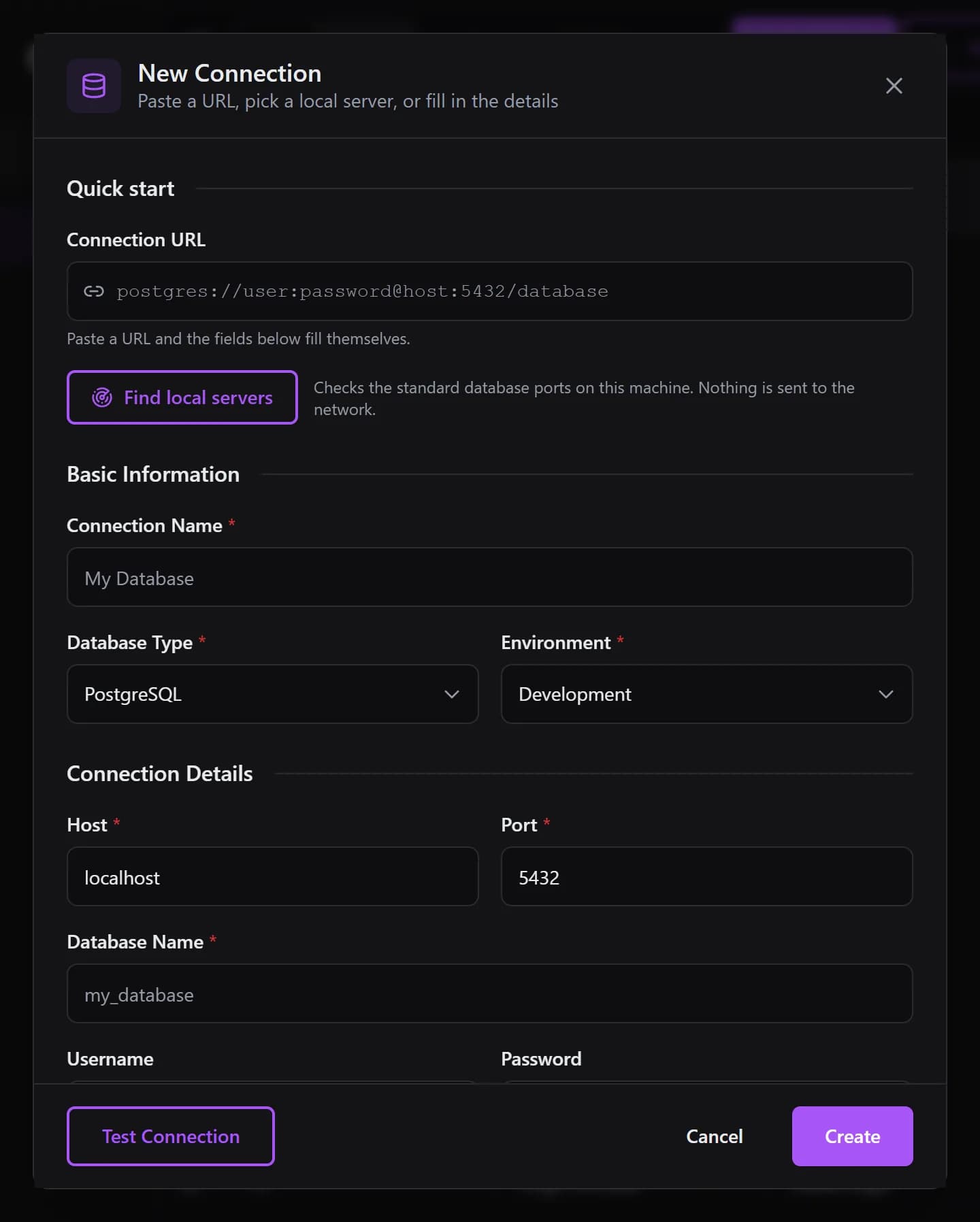
    Paste a connection URL, or let Find local servers check the standard ports on the machine. SSH tunnels reach databases behind a bastion.

New Connection dialog with a Connection URL field, the Find local servers button and the connection form
  • “The installation was really simple.”
    Jean-Francois, Mildor Violon, verified customer

Updating takes one command

./queryglow update backs up first, checks the nginx config it manages before anything restarts, keeps the running image, builds the new one, and checks that the new version is actually serving. If it is not, it rolls back on its own. ./queryglow doctor checks the host, backup, restore and rollback are there when you need them. QueryGlow itself never phones home: the update check is a git fetch on your server, only when you ask.

How updating works
deploy@your-server: ~/queryglow
$ ./queryglow update --checkInstalled: 1.2.1 (v1.2.1, 05d13c0) on branch mainAvailable: 1.3.0 (v1.3.0, 6060169) on origin/main→ Update available. Run: ./queryglow update $ ./queryglow update→ Backing up to backups/20260925-081057/ …→ Fast-forwarding main to 1.3.0 (v1.3.0, 6060169) ...→ Re-rendering nginx config for db.your-company.com (app port 3000)…→ Validating the rendered config…  config OK→ Building the new image (the running containers keep serving until it succeeds) ...→ Starting the new release ...→ Waiting for http://127.0.0.1:3000/api/health ...✓ Update complete: 1.3.0 (v1.3.0, 6060169). Backup: backups/20260925-081057

Coming from 1.2.x? Run ./update.sh once; it installs the queryglow command. How updating works

Your rows stay on your server

The parts of QueryGlow that decide what can leave, what can run, and who did what.

What can leave your server

Your serverNo telemetry, no tracking

QueryGlow

Docker, on your server

Your database

Postgres, MySQL and four more

Ask AI only: database type, table and column names with their types, your prompt. Never a row.

AI provider you chose

OpenAI, Anthropic or Google

your own key

Optional: agents you gave a token connect in and receive the rows their queries return, read-only by default

AI agents (MCP)

every call in the Activity tab

When you use Ask AI, QueryGlow sends your database type, table and column names with their types, and your prompt to the provider you chose, with your own key. Never rows. Agents you gave a token connect in and get what their token allows, read-only by default, and every call shows in the Activity tab. Use neither, and nothing from your database crosses the line.

Safe Mode

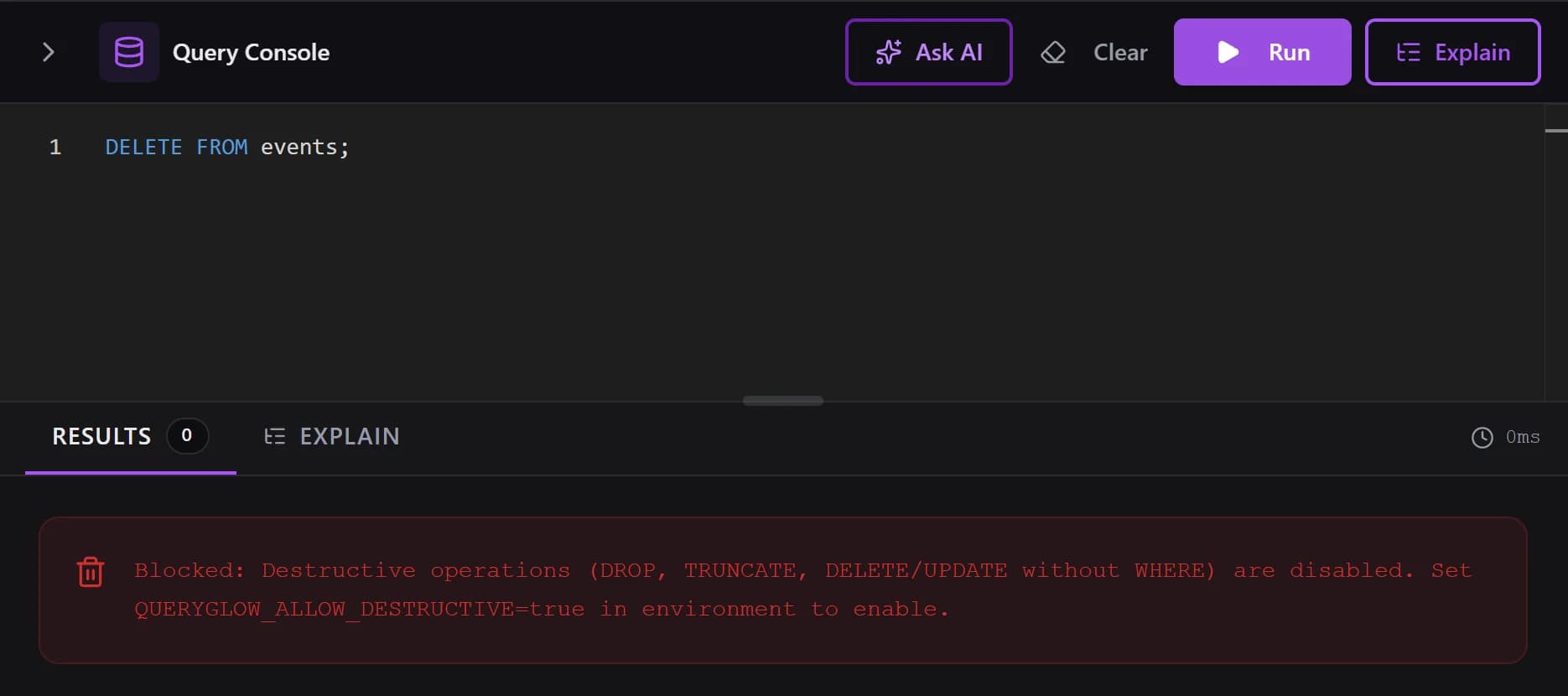
DROP DATABASE is always blocked. DROP TABLE, TRUNCATE and DELETE or UPDATE without WHERE are blocked by default.

Query Editor with DELETE FROM events; and the Safe Mode message that blocked it

Production write check

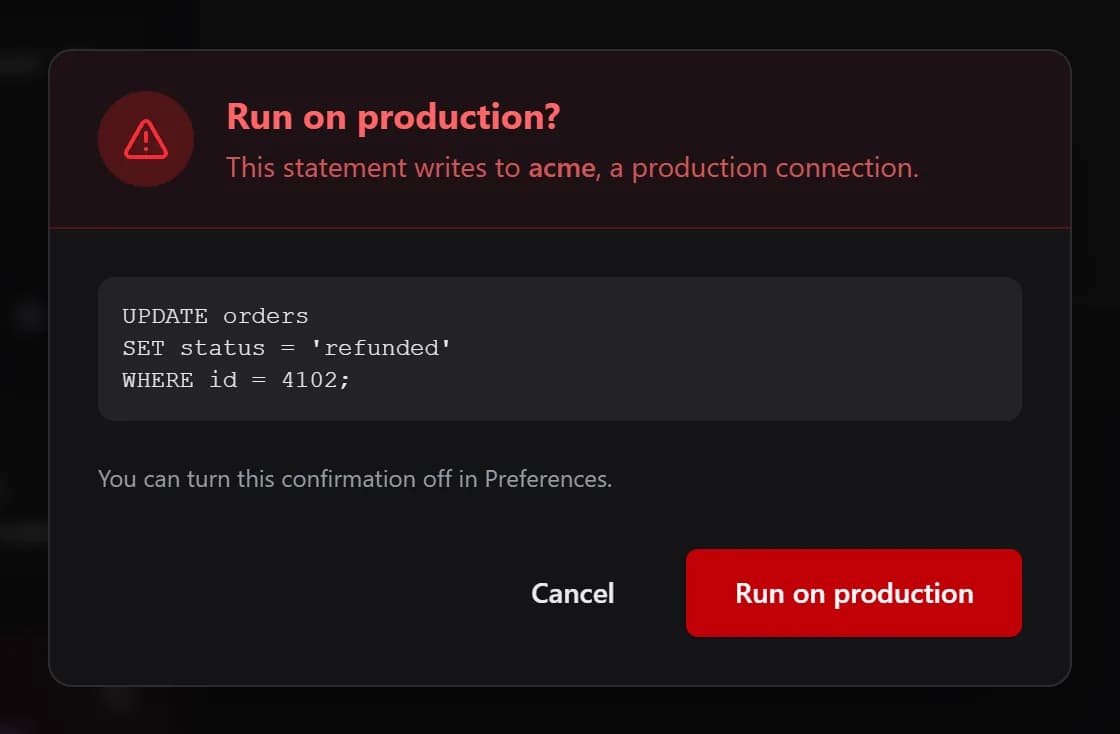
On a connection marked production, the Query Editor shows the statement and asks before any INSERT, UPDATE, DELETE or DDL runs. On by default; can be turned off in Preferences.

Run on production? dialog showing an UPDATE statement for a production connection, with Cancel and Run on production buttons

Credentials and hosts

Saved passwords are encrypted with AES-256-GCM. SSH host keys are pinned on first use, and a changed key is refused.

Agents on a leash

Agent tokens are read-only by default, enforced by the database, and every call is in the Activity tab.

How Agent Access works

Details: Security

Built with the people who bought it

QueryGlow shipped its first version in December 2025. Every 1.x release since then is included in the license, and many recent changes started as an email from a customer: pasting a connection URL, finding local servers, sidebar search, Preferences, the production write check and the update command.

  1. 1.3.0

    • One-command updates with a backup first and automatic rollbackasked for by a customer
    • Preferences: theme, accent color, time zone and formats, auto refresh, shortcutsasked for by a customer
    • Confirmation before writes on production connectionsasked for by a customer
  2. 1.2.1

    • Activity tab for every call an agent makesasked for by a customer
    • Find local servers and paste a connection URLasked for by a customer
    • Sidebar search, sort and group by hostasked for by a customer
  3. 1.2.0

    • Agent Access (MCP) with read-only tokens
    • Visual schema editing with the SQL shown first
    • Drag to reorder columns on MySQL and MariaDBasked for by a customer
  4. 1.1.0

    • EXPLAIN visualizer with index hints
    • Schema-aware SQL autocomplete
    • Opens your last connection on load
  5. 1.0.0

    • Data Browser with inline editing
    • Query Editor with history and saved queries
    • AI assistant with your own key

Full changelog

Already using a free tool?

If it does the job, keep it. QueryGlow is for when you want a web GUI your whole team opens from one URL, and you would rather pay once than per seat.

TypeExamplesWhere it runsWho uses one installHow you pay
Free desktop toolspgAdmin desktop, DBeaver Community, MySQL Workbench, HeidiSQLInstalled on each computerThe person at that computerFree
Free web panelsAdminer, phpMyAdmin, pgwebA server you runAnyone with the URLFree
Paid desktop clientsTablePlus, DataGrip, NavicatInstalled on each computerPer device or per userPer device, or per user per year
QueryGlowA server you runYour whole team, one login$79 once

pgAdmin can also run in server mode.

Max, creator of QueryGlow

Who builds QueryGlow

I'm Max, a solo developer from Germany. I built QueryGlow because I wanted my databases in a browser tab wherever I work, without a desktop app on every machine and without another subscription. I answer every email myself, usually within a day. You get the full source code, so your install never depends on me being around.

How it started

“I want Supabase-grade UI, but I DON'T want all the underlying tooling. Literally just the UI so I can inspect my DBs and do queries. […] This doesn't exist? Who's gonna create it? I'd pay for this on a lifetime deal.”

Simon Høiberg on X, November 2025

  • “You feel that they really care about their clients and the quality of their product.”
    Jean-Francois, Mildor Violon, verified customer

Questions before you buy

Short answers, with links to the details.

If a free tool does the job, keep it. QueryGlow is for when you want one web GUI that your whole team opens from a URL on a server you run, and you would rather pay once than per seat. The live demo shows you the interface before you decide. Details: pgAdmin vs QueryGlow, DBeaver vs QueryGlow and phpMyAdmin alternatives.
A Linux server with Docker (512 MB RAM minimum, 1 GB recommended), a domain pointing at it for HTTPS, and a non-root user with sudo. Clone the repository and run ./queryglow install: it sets up the HTTPS certificate, the login for your team and the app on a fresh server, or plugs into the nginx you already run. The setup guide walks through each step.
Checkout runs on Stripe and asks for your email, your GitHub username and a billing address; a business tax ID is optional. You pay by card, PayPal or Amazon Pay, and Stripe shows the final amount including any tax before you pay. The repository invite goes to your GitHub username and usually arrives within minutes. You also accept the terms, which include giving up the withdrawal right because access is immediate.
No. You get the full source code the moment you pay, and that cannot be taken back. That is why the live demo exists: the real app on a sample database, read-only, AI switched off, no signup. Take your time with it, and email [email protected] if a question is still open before you buy.
Every 1.x update is included. On your server, ./queryglow update backs up QueryGlow's own settings and data (not the databases it connects to), checks the nginx config it manages, builds the new release and checks that it is serving; if it is not, it rolls back to the previous release on its own. ./queryglow update --check only tells you whether a new release exists, and the app itself never checks for updates. A 2.x release may be a new purchase, as the license says. See what shipped so far in the changelog.
Yes. Your whole team uses the same install from one URL, behind one shared login (Basic Auth at the web server, asked once per browser). There are no per-user accounts and no roles, so everyone with the login has the same access. One license covers every server you run.
No. Ask AI sends your database type, table and column names with their types, and your prompt. Never rows. It uses your own OpenAI, Anthropic or Google key, entered in the app (stored encrypted on your server) or set in .env, and the SQL it writes waits in the editor until you click Run. Ask AI is optional, and it is switched off in the public demo.
Safe Mode, in the Query Editor and for agents, always blocks DROP DATABASE and server file or command execution. By default it also blocks DROP TABLE, TRUNCATE, dropping indexes, views, sequences and schemas, and DELETE or UPDATE without WHERE; setting QUERYGLOW_ALLOW_DESTRUCTIVE=true on the server lifts that tier. On a connection marked production, the Query Editor shows the statement and asks before any write (on by default; can be turned off in Preferences). Saved passwords, SSH keys and AI keys are encrypted with AES-256-GCM, SSH host keys are pinned on first use, and the app runs behind nginx with HTTPS and Basic Auth, as the security docs explain.
Six: PostgreSQL, MySQL, MariaDB, SQLite, CockroachDB and TimescaleDB. Connections to all of them sit side by side in one install. SQL Server and Oracle are not supported.
Yes. Run QueryGlow on your own infrastructure and use it for client projects, on every server you run. A client who wants their own installation needs their own license, and the source code is not passed on to clients. The details are in the license.
No. QueryGlow is sold under a commercial license with the full source code included. The GitHub repository is private, and buyers get read access to it, so you can read the code, patch it and build it yourself. Redistributing it is not allowed.
PayPal, yes: pick it on the Stripe checkout page, next to card and Amazon Pay. For Bitcoin, email [email protected] and you get the payment details by reply. After payment, send your GitHub username; the repository invite is sent by hand, so allow a few hours.

Open the demo. If it clicks, it's $79 once.

Try the live demo

Stripe checkout. You'll enter your GitHub username for the repo invite. No refunds, so try the read-only demo first.

Whole team, every server you run, source code included.