
Quick Answer: The best pgAdmin alternative depends on your setup. DBeaver wins for free multi-database support. QueryGlow is the pick for teams wanting self-hosted web access. DataGrip makes sense if you're already in the JetBrains ecosystem. Skip to the comparison table below for the full breakdown.
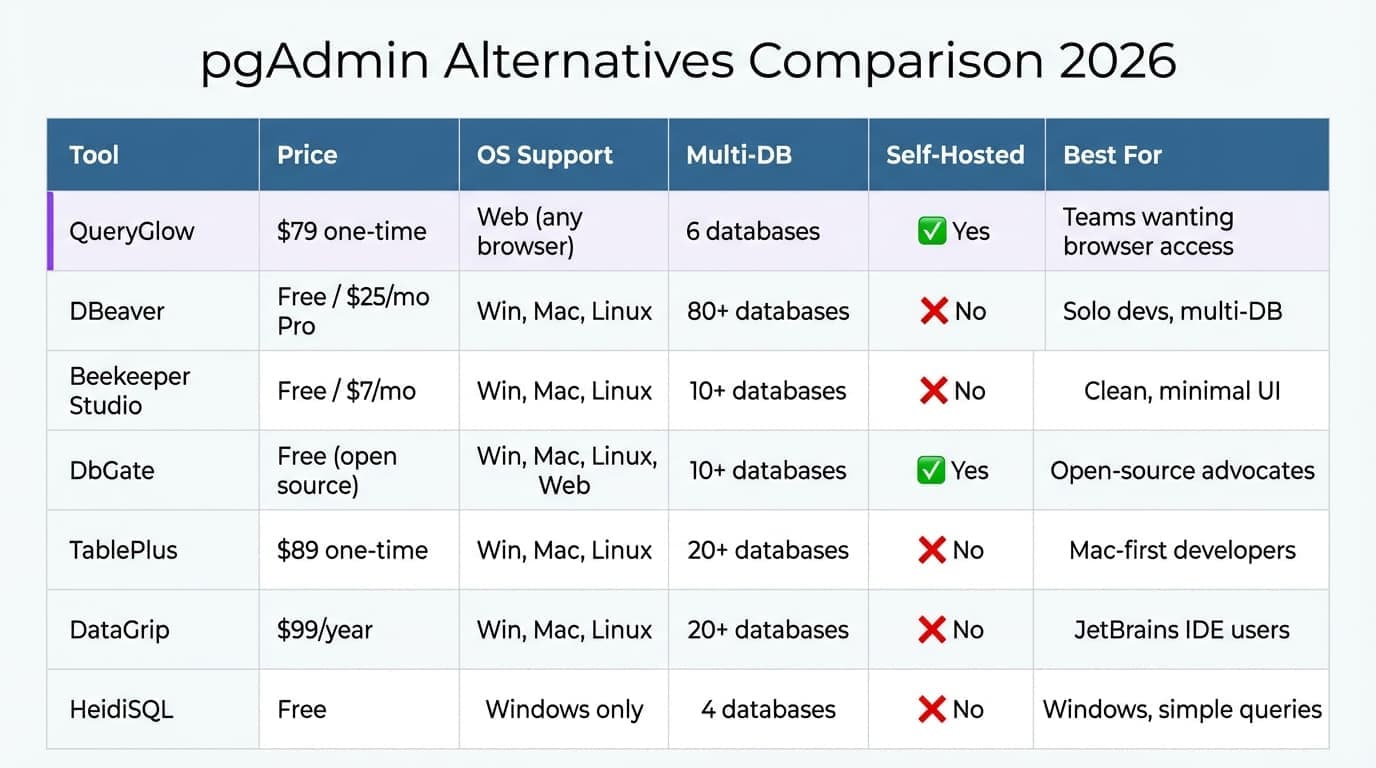
pgAdmin Alternatives Comparison Table 2026
| Tool | Price | OS Support | Multi-DB | Self-Hosted | Best For |
|---|---|---|---|---|---|
| QueryGlow | $79 one-time | Web (any browser) | 6 databases | ✓ Yes | Teams wanting browser access without SaaS |
| DBeaver | Free / from $113/yr | Win, Mac, Linux | 100+ databases | ✗ No | Solo devs needing multi-DB on a budget |
| Beekeeper Studio | Free / from $9/mo | Win, Mac, Linux | 10+ databases | ✗ No | Developers wanting a clean, minimal UI |
| DbGate | Free (open source) | Win, Mac, Linux, Web | 10+ databases | ✓ Yes | Open-source advocates |
| TablePlus | $99 one-time | Win, Mac, Linux | 20+ databases | ✗ No | Mac-first developers |
| DataGrip | $109/year | Win, Mac, Linux | 20+ databases | ✗ No | JetBrains IDE users |
| HeidiSQL | Free | Win, Linux, Mac | MySQL, MariaDB, Postgres, SQLite | ✗ No | Lightweight installs and quick queries |
Looking for a 1:1 pgAdmin alternative rather than a roundup? See the full QueryGlow vs pgAdmin comparison — a fast, self-hosted Postgres GUI with AI SQL and no 7-click slowness.
If you want to try pgAdmin first, follow our pgAdmin 4 setup guide for Docker, Ubuntu, and Windows installation. For teams working with Oracle database software, dedicated management tools become essential for navigating complex licensing environments.
Quick Verdict: Which Alternative Fits Your Workflow?
- •Budget-conscious solo dev? → DBeaver. Free tier handles most needs.
- •Team needing shared access? → QueryGlow. Deploy once, share a URL. Works as a web-based database GUI your whole team can access.
- •Already using IntelliJ/PyCharm? → DataGrip. Same interface, familiar shortcuts.
- •Just need something lightweight and free? → HeidiSQL. Fast, simple, and no longer Windows-only.
- •Want open-source you can audit? → DbGate. Full source on GitHub.
If your workflow extends beyond pgAdmin-style admin tools, the answer usually splits by platform: our roundup of the best database software for Mac covers the desktop end, and self-hosting Supabase Studio covers the browser end for teams already on Postgres.
Top 7 pgAdmin Alternatives (Brief Overview)
QueryGlow
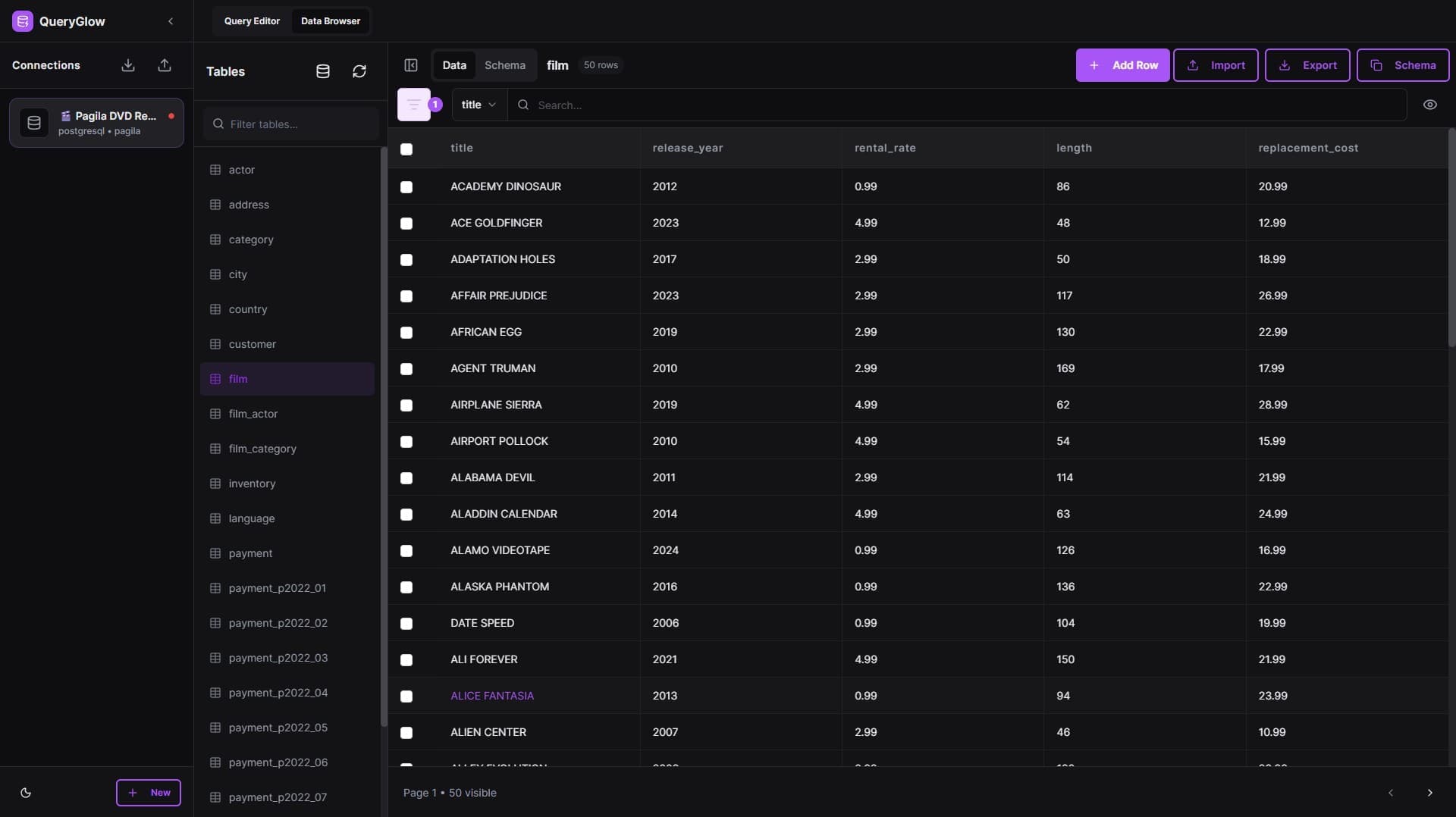
A self-hosted PostgreSQL GUI with a modern, browser-based UI. $79 one-time gets you unlimited deployments on servers you run and team access, no per-seat pricing. Supports 6 databases including MySQL and SQLite. Limitation: no desktop app; requires Docker deployment. See our QueryGlow vs DBeaver breakdown for a detailed comparison.
Try it in the live demo before you decide (real product, sample data, no signup).
DBeaver
The default free option for developers who need multi-database support. Community edition covers PostgreSQL, MySQL, SQLite, and dozens more — see pgAdmin vs DBeaver compared for the direct head-to-head. Java-based, so expect higher RAM usage. Paid editions (Lite from $113/yr) add NoSQL support and cloud features.
Beekeeper Studio
Clean, minimal interface that stays out of your way. Free tier is genuinely usable. Paid tiers (from $9/mo) add features like encrypted workspace sync and priority support. Good middle ground between pgAdmin's complexity and something too basic — our QueryGlow vs Beekeeper Studio comparison shows where a self-hosted web option fits instead.
DbGate
Fully open-source and self-hostable. Runs in browser or as desktop app, covers 18 engines including MongoDB and Redis, and the free Community edition is not a crippled trial. Less polished than commercial options but actively maintained. Our full DbGate review breaks down what Community actually limits and what Premium at $120/year unlocks; the GitHub repo has current development status.
TablePlus
Native app with strong Mac support. $99 one-time per device (the Basic license)—three laptops means three licenses. Fast, clean, and reliable. Limited free tier (2 tabs, 2 connections) lets you test before buying. If the per-device math is what gives you pause, the QueryGlow vs TablePlus comparison shows how a one-time web-based license stacks up.
DataGrip
JetBrains' database IDE. $109/year (free for non-commercial use) feels expensive until you factor in code completion, refactoring tools, and version control integration. Overkill for quick queries; worth it if databases are your primary work. If you're specifically weighing DataGrip against DBeaver, our DataGrip vs DBeaver head-to-head breaks down the real cost and feature trade-offs. See QueryGlow vs DataGrip for a cost comparison against the self-hosted alternative. Navicat is another premium option — see our Navicat features and pricing breakdown for a full cost analysis.
HeidiSQL
Free and surprisingly capable for simple work. Lightweight install, fast startup. Long a Windows-only tool, HeidiSQL added native Linux builds in 12.14 (Dec 2025) and macOS builds in 12.15 (Feb 2026), and it handles PostgreSQL, MySQL, MariaDB, and SQLite without fuss.
What does a modern pgAdmin alternative look like?
QueryGlow is web-based: open a URL, access your database from any device. Self-hosted, source code included, $79 once.
Why Developers Switch from pgAdmin
The most common complaints:
- •Slow with large result sets. Loading 10,000+ rows can freeze the UI for seconds.
- •Cluttered interface. Too many panels and options for running a simple SELECT.
- •No native multi-database support. pgAdmin only handles PostgreSQL. Managing MySQL alongside Postgres means another tool.
- •Web-app overhead. pgAdmin 4's browser-based architecture adds latency compared to native apps.
pgAdmin isn't bad software. It's comprehensive, free, and well-documented. But if you're here, you've probably hit one of these walls.
Free pgAdmin Alternatives
If the budget is $0, three tools on this list deliver without a paid upsell. DBeaver Community is the most capable free option — 100+ databases, a mature SQL editor, no feature timer. Beekeeper Studio's free tier is genuinely usable rather than a crippled trial; you only pay (from $9/mo) for workspace sync and team features. DbGate Community is free for both the desktop app and the Docker-deployed web version. pgAdmin itself is free too, of course — the reason to switch is speed and UI, not cost.
Open-Source pgAdmin Alternatives
If auditable code is a requirement, three picks qualify: DBeaver Community, DbGate Community, and Adminer. All three develop in the open on GitHub. Adminer is the one most lists forget: a single PHP file you drop on any web server, supporting PostgreSQL, MySQL, MariaDB, and more — and despite its age it's actively maintained, with v5.4.2 released in February 2026. It started life as a phpMyAdmin replacement, so if that is the tool you are really trying to get away from, our roundup of phpMyAdmin alternatives is the focused list. DBeaver has the deepest feature set of the three, Adminer the smallest footprint, and DbGate the cleanest web deployment via Docker. A fourth option worth knowing: pgweb, a single Go binary that serves a minimal Postgres web UI in seconds. It's PostgreSQL-only and deliberately barebones; our pgAdmin vs pgweb comparison covers where it fits and where it runs out of road.
pgAdmin Alternatives for Mac
On macOS, TablePlus is the standout — a fast native app that feels at home on a Mac, $99 one-time for the Basic license. Beekeeper Studio is the free-first pick with a clean, native-feeling UI, and DBeaver runs fine on Apple Silicon when you need its multi-database breadth (budget some RAM for the JVM). QueryGlow sidesteps the platform question entirely: it's self-hosted and runs in Safari, Chrome, or any other browser, so Mac, Windows, and Linux teammates all share the same URL.
Tags:
Built by an engineer. Zero telemetry. Zero tracking.
Found your pgAdmin replacement?
QueryGlow is web-based and self-hosted, source code included. Access your database from any device, your data stays on your infrastructure. $79 once, yours forever.
“It's the simplest and the most beautiful interface that you can have.”
$79 one-time. Self-hosted. No subscription.