
Quick Answer: For technical teams that want SQL-level control over client data without per-seat pricing, QueryGlow ($79 one-time) deploys as one Docker container, with no per-seat fees and no subscription. For non-technical teams wanting a free starting point, HubSpot CRM wins. For enterprises needing deep customization at scale, Salesforce remains the default — if you can stomach the implementation timeline.
Most "best of" comparisons hand you a feature grid and call it a day. They skip the numbers that actually matter: how long until your team is productive, what the software really costs after year one, and how painful it is to migrate your existing data.
This guide includes Implementation Effort Scores, 3-year TCO projections by team size, and migration timelines from common setups. The stuff other comparisons leave out because it might slow down your purchase.
Client Database Software Comparison Table
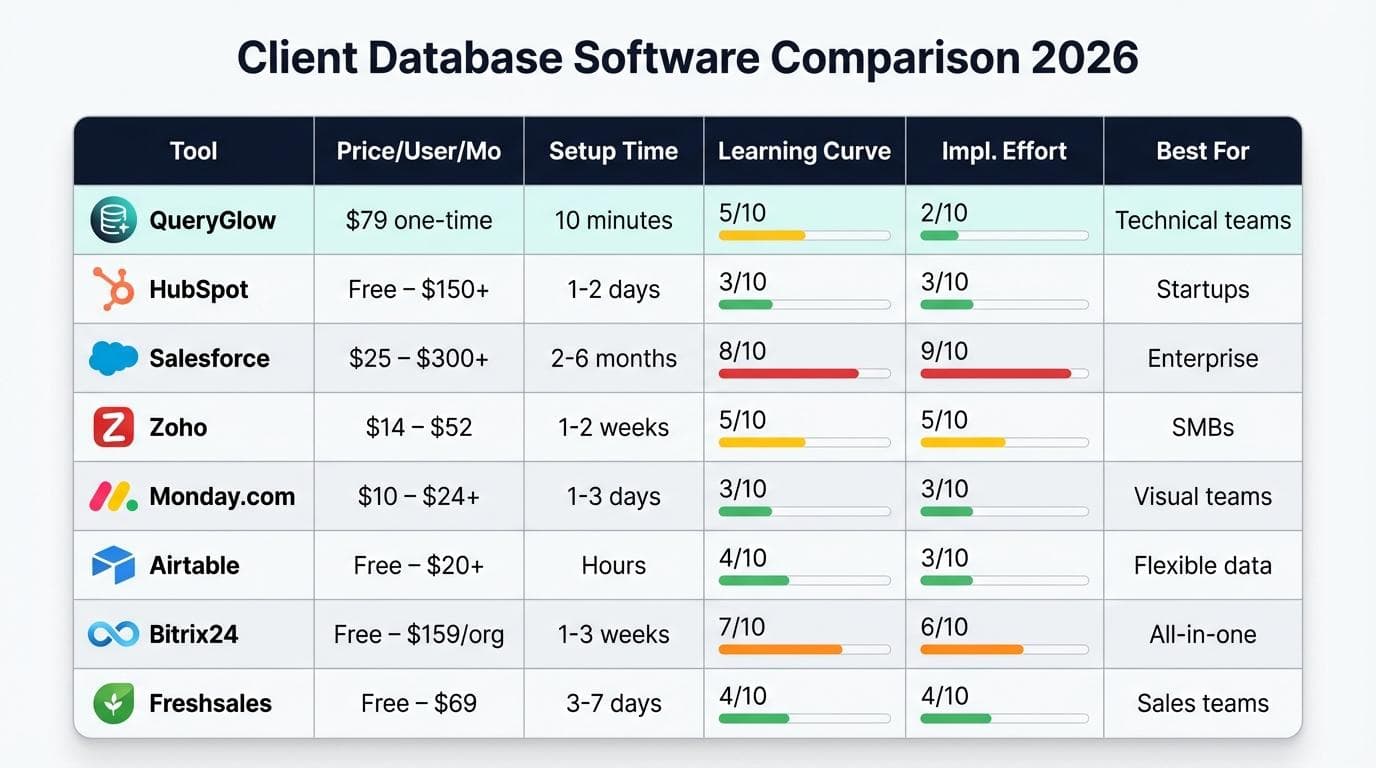
Pricing Tiers Breakdown
| Tool | Price/User/Month | Setup Time | Learning Curve (1-10) | Implementation Effort (1-10) | Best For |
|---|---|---|---|---|---|
| QueryGlow | $79 one-time (all users) | 10 minutes | 5 | 2 | Technical teams with SQL skills |
| HubSpot CRM | Free – $150+ | 1-2 days | 3 | 3 | Startups wanting free CRM |
| Salesforce | $25 – $300+ | 2-6 months | 8 | 9 | Enterprise with dedicated admins |
| Zoho CRM | $14 – $52 | 1-2 weeks | 5 | 5 | SMBs wanting value |
| Monday.com | $9 – $19+ | 1-3 days | 3 | 3 | Visual/project-oriented teams |
| Airtable | Free – $20+ | Hours | 4 | 3 | Flexible data modeling |
| Bitrix24 | Free – $199+/org | 1-3 weeks | 7 | 6 | All-in-one (CRM + project + comms) |
| Freshsales | Free – $59 | 3-7 days | 4 | 4 | Sales pipeline-focused teams |
Implementation Effort Scores
The Implementation Effort Score (1-10) factors in initial setup, data migration complexity, team training time, and integration work needed before your team sees real value. A score of 1 means you're running in under an hour. A 9 means you're probably hiring a consultant.
QueryGlow scores a 2 because it's a single Docker container. Run the deploy script, point it at your database, done. There's no schema design phase — your data is already in your database.
Salesforce scores a 9 because most implementations require a certified admin, custom object configuration, and a migration project that routinely takes months. That's not a criticism — it's the reality of enterprise-grade customization.
What Is Client Database Software?
Client database software is any tool that stores, organizes, and lets you query information about your clients — contact details, interaction history, project data, billing records. It's the system your team opens when someone asks "what's the status with that account?"
Client Database vs CRM: Key Differences
A CRM (Customer Relationship Management) system is a specific type of client database software that adds sales pipeline management, marketing automation, and communication tracking on top of raw data storage. Not every team needs that.
If you just need to store client records, run queries, and share access with your team, a lightweight client database tool does the job without the complexity. If you need deal tracking, email sequences, and forecasting, you need a full CRM. The database software market is projected to grow from $182.52 billion in 2024 to $207.37 billion, so there's no shortage of options in either category.
Top 8 Client Database Software Solutions Reviewed
QueryGlow: For Technical Teams
QueryGlow takes a different approach than traditional CRM-style client database tools. Instead of forcing your data into a predefined schema, it connects directly to your existing PostgreSQL, MySQL, MariaDB, SQLite, CockroachDB, or TimescaleDB databases and gives you a modern web UI to browse, query, and edit data.
If your team already stores client data in a relational database — and many technical teams do — QueryGlow skips the "import everything into our platform" step entirely. You get inline editing, advanced filtering with 9 operators, and AI-powered SQL generation (bring your own OpenAI, Claude, or Gemini API key — no markup fees). Safe Mode blocks dangerous queries like DROP TABLE and DELETE without a WHERE clause, so your junior devs won't accidentally nuke production data.
It's self-hosted via Docker, so your client data never touches a third-party server. That matters if you're handling sensitive client information under GDPR or internal compliance policies.
For teams that also need MySQL database software for direct database administration, QueryGlow covers both client data browsing and raw SQL work in one interface.
Pros: Web-based — open a URL from any device, no desktop app needed. Self-hosted with zero telemetry. $79 one-time (no per-seat fees). AI SQL generation with BYOK. Monaco Editor with schema-aware SQL autocomplete.
Cons: No built-in sales pipeline or email automation, requires basic SQL knowledge, single-credential auth model (no per-user logins)
Price: $79 USD, lifetime 1.x updates, unlimited users, unlimited servers you run
Implementation Time: 10 minutes
G2 Rating: New entrant — not yet rated
HubSpot CRM — Best Free Option for Startups
HubSpot's free tier is genuinely generous. You get contact management, deal tracking, email integration, and basic reporting without paying anything. For a startup with five people and no budget, it's hard to argue against starting here.
The catch is scale. Once you need custom reporting, workflow automation, or more than the basics, you're looking at $90-$150+/user/month on Professional and Enterprise tiers. That jump hits hard. As one HubSpot user noted on G2, the platform is easy to start with but costs add up fast as your needs grow.
Pros: Genuinely free tier, excellent onboarding, massive integration ecosystem, strong marketing tools
Cons: Expensive paid tiers, per-seat pricing scales poorly, data lives on HubSpot's servers
Price: Free – $150+/user/month
Implementation Time: 1-2 days (free), 2-4 weeks (enterprise)
Salesforce — Best for Enterprise Scale
Salesforce is the 800-pound gorilla for a reason. If you need complex approval workflows, custom objects modeled to your exact business process, and an app ecosystem that covers nearly every use case, nothing else comes close at enterprise scale.
But "enterprise scale" is the operative phrase. A typical Salesforce implementation takes 2-6 months with a dedicated admin or consulting partner. The learning curve is steep, the configuration options are overwhelming, and the pricing — once you add the modules you actually need — regularly surprises buyers who started with the $25/user base tier.
Pros: Unmatched customization depth, massive AppExchange ecosystem, proven at massive scale, strong reporting
Cons: Complex implementation, high total cost, steep learning curve, often requires certified admin
Price: $25 – $300+/user/month
Implementation Time: 2-6 months
Zoho CRM — Best Value for SMBs
Zoho hits a sweet spot for small and mid-sized businesses that need real CRM features without Salesforce-level complexity or pricing. The $14/user/month tier includes sales automation, custom fields, and basic workflow rules. The $52 tier adds AI predictions and advanced analytics.
The ecosystem advantage is real too — Zoho has 45+ integrated apps (invoicing, helpdesk, email marketing) that play nicely together. The downside is that the UI can feel dated compared to newer competitors, and some advanced features require higher-tier plans to unlock.
Pros: Competitive pricing, broad feature set at lower tiers, large integrated app ecosystem, good customization
Cons: UI feels cluttered, advanced features gated behind expensive tiers, slower customer support
Price: $14 – $52/user/month
Implementation Time: 1-2 weeks
Monday.com — Best for Visual Workflows
Monday.com isn't a traditional CRM, but its flexible board system handles client database management surprisingly well for teams that think visually. Color-coded statuses, Kanban views, and timeline charts make it easy to track client projects and relationships without the rigidity of a CRM schema.
It works best for agencies and project-based teams where client data lives alongside task management. Where it falls short: it lacks native sales pipeline features, email sequence automation, and deep reporting that dedicated CRMs offer.
Pros: Intuitive visual interface, flexible data structures, great for project + client tracking, fast setup
Cons: Not a true CRM, limited sales-specific features, gets expensive with automations add-on, per-seat pricing
Price: $9 – $19+/user/month
Implementation Time: 1-3 days
Airtable — Best for Flexible Data Structures
Airtable is a spreadsheet-database hybrid that lets you model client data exactly how you want. Link records across tables, create custom views, add attachments and rich fields — without writing SQL or hiring a database admin.
For teams whose client data doesn't fit a standard CRM schema (think: creative agencies tracking projects, deliverables, and client preferences in one system), Airtable is hard to beat. The limitation is scale. Performance degrades with large record counts, and the free tier caps at 1,000 records per base.
Pros: Extremely flexible data modeling, beautiful interface, strong API, rich field types (attachments, checkboxes, linked records)
Cons: Performance issues at scale, record limits on free tier, not purpose-built for sales workflows, pricing adds up with automations
Price: Free – $20+/user/month
Implementation Time: Hours to 1 day
Bitrix24 — Best All-in-One Solution
Bitrix24 tries to be everything: CRM, project management, team communication, HR tools, website builder. If you want one platform for your entire business instead of stitching together five different SaaS tools, it's worth evaluating.
The free tier supports unlimited users — rare for CRM tools. 86% of users report satisfaction on GetApp, which is solid for a tool this broad. The tradeoff is complexity. The interface is dense, the learning curve is real, and trying to use every module simultaneously often leads to a messy setup.
Pros: Unlimited free users, all-in-one platform, strong communication tools, good value at paid tiers
Cons: Overwhelming interface, steep learning curve, individual modules less polished than dedicated tools
Price: Free – $199+/organization/month
Implementation Time: 1-3 weeks
Freshsales — Best for Sales-Focused Teams
Freshsales (by Freshworks) is a CRM built specifically around the sales pipeline. AI-powered lead scoring, built-in phone and email, visual deal pipelines, and activity tracking — all focused on helping reps close deals faster.
If your primary use case for client database software is tracking sales interactions and moving deals through stages, Freshsales delivers a focused experience without the bloat of all-in-one platforms. It's less suited for teams that need project management or service delivery tracking alongside their client data.
Pros: Clean sales-focused UI, built-in phone/email, AI lead scoring, reasonable pricing, good mobile app
Cons: Limited project management features, fewer integrations than HubSpot/Salesforce, reporting could be deeper
Price: Free – $59/user/month
Implementation Time: 3-7 days
What if your whole team could access the database from one URL?
QueryGlow is web-based: share a URL with your team, no per-seat fees. Self-hosted on your infrastructure, source code included, $79 once.
Total Cost of Ownership: 3-Year Projection Calculator
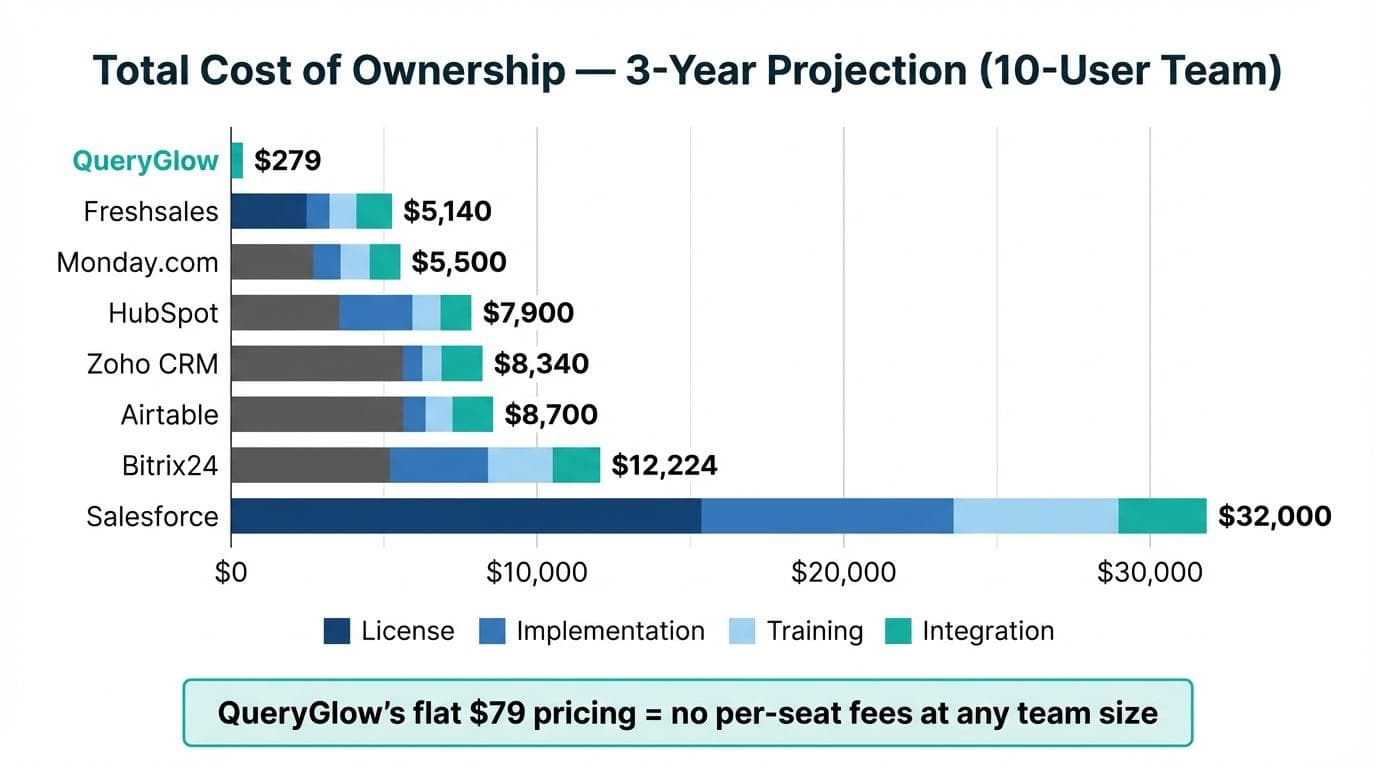
Most pricing pages show you the per-user monthly cost and stop there. That's like shopping for a car by looking only at the sticker price. The real cost includes implementation, training, integrations, and the ongoing per-seat fees that compound every month.
Hidden Costs Most Comparisons Ignore
Training time is money. A tool with a learning curve of 8/10 means weeks of reduced productivity across your team. Integration costs matter — connecting your client database to email, invoicing, and support tools often requires paid middleware or developer time. And migration from your current system (even if it's just spreadsheets) takes longer than vendors promise.
TCO by Company Size
10-User Team — 3-Year Total Cost:
| Tool | License (3yr) | Implementation | Training | Integration | Total |
|---|---|---|---|---|---|
| QueryGlow | $79 | $0 (self-deploy) | $200 (minimal) | $0 (direct DB) | $279 |
| HubSpot (Starter) | $5,400 | $500 | $800 | $1,200 | $7,900 |
| Salesforce (Starter Suite) | $9,000 | $15,000 | $5,000 | $3,000 | $32,000 |
| Zoho (Standard) | $5,040 | $1,000 | $1,500 | $800 | $8,340 |
| Monday.com | $3,600 | $300 | $600 | $1,000 | $5,500 |
| Airtable (Team) | $7,200 | $200 | $500 | $800 | $8,700 |
| Bitrix24 (Standard) | $3,564 | $2,000 | $3,000 | $1,500 | $10,064 |
| Freshsales (Growth) | $3,240 | $500 | $800 | $600 | $5,140 |
50-User Team — 3-Year Total Cost:
| Tool | License (3yr) | Implementation | Training | Integration | Total |
|---|---|---|---|---|---|
| QueryGlow | $79 | $0 | $500 | $0 | $579 |
| HubSpot (Starter) | $27,000 | $2,000 | $4,000 | $3,000 | $36,000 |
| Salesforce (Starter Suite) | $45,000 | $40,000 | $15,000 | $8,000 | $108,000 |
| Zoho (Standard) | $25,200 | $3,000 | $5,000 | $2,000 | $35,200 |
QueryGlow's flat $79 pricing creates an extreme cost advantage at scale because there are no per-seat fees. But this comparison has a caveat: QueryGlow is a database GUI, not a full CRM. If you need pipeline management, email sequences, and marketing automation, the per-seat CRM tools provide features QueryGlow doesn't attempt to replace.
200-User Team — 3-Year Total Cost:
At 200 users, per-seat SaaS pricing gets brutal. Salesforce Starter Suite runs ~$180,000 in licensing alone over three years — before implementation. HubSpot Starter hits $108,000. QueryGlow stays at $79, but at this team size you're almost certainly pairing it with a dedicated CRM for the sales team while using QueryGlow for direct database access among technical staff.
The honest play for large organizations: use a CRM for your sales and marketing teams, and QueryGlow for your engineering and data teams who need SQL-level access to client data.
Implementation Timeline Comparison
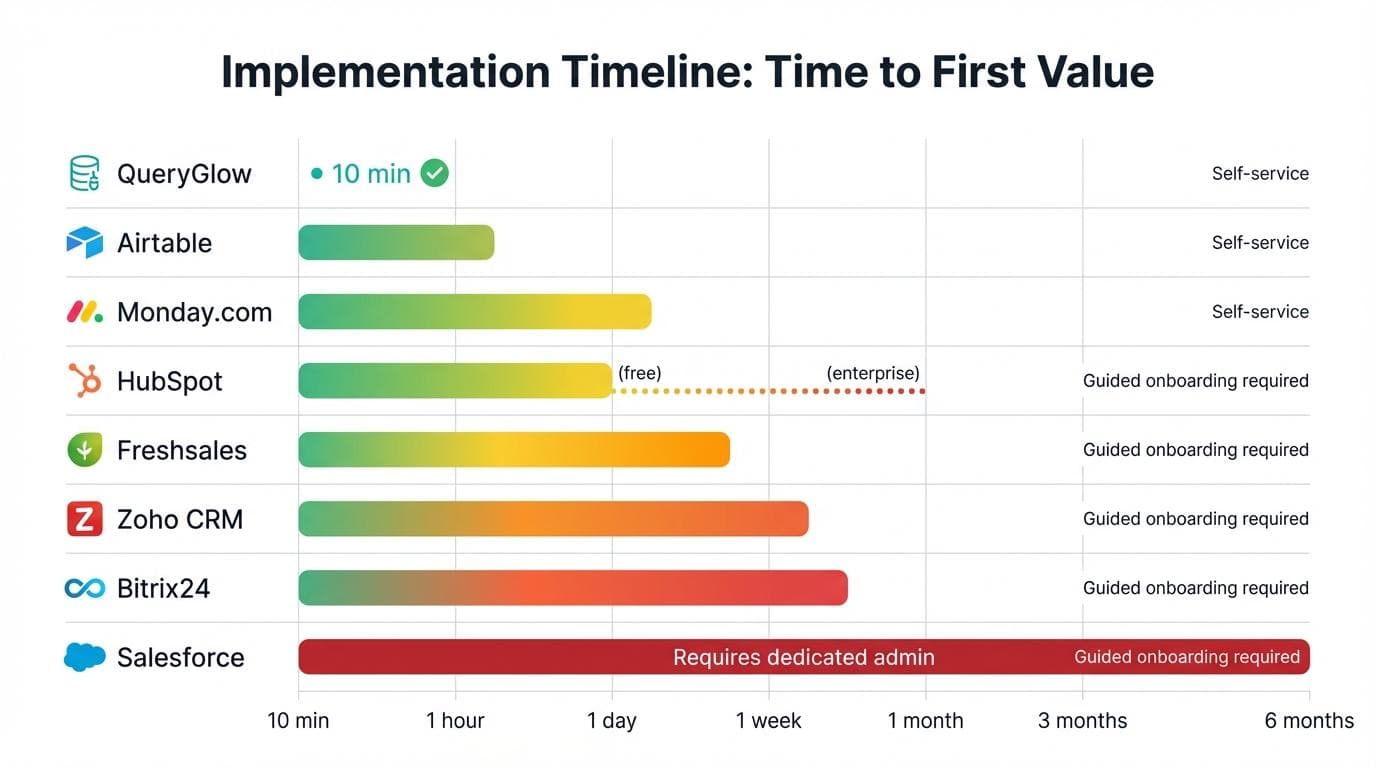
Self-Service vs Guided Onboarding
| Tool | Time to First Value | Self-Service? | Guided Onboarding Available? |
|---|---|---|---|
| QueryGlow | 10 minutes | Yes | Docs only |
| Airtable | 1-2 hours | Yes | Video tutorials |
| Monday.com | 1-3 days | Yes | Yes (paid plans) |
| HubSpot | 1-2 days (free) | Yes | Yes ($) |
| Freshsales | 3-7 days | Yes | Yes |
| Zoho CRM | 1-2 weeks | Partial | Yes |
| Bitrix24 | 1-3 weeks | Partial | Yes ($) |
| Salesforce | 2-6 months | No | Required |
"Time to first value" measures how long until your team is actively using the tool for real work — not just signed up, but actually managing client data in it.
Data Migration Effort by Tool
Migrating from spreadsheets? Most tools handle CSV imports well enough. Migrating from an existing CRM to another CRM? That's where timelines stretch.
The most underestimated migration cost is field mapping. Your old system's "Company Name" field might map to three different objects in Salesforce. Your custom fields probably won't transfer cleanly. And your historical activity data (emails, calls, notes) is often the hardest to move.
QueryGlow sidesteps this entirely if your client data is already in a relational database. There's no migration — you connect to your existing database and start working.
What Is the Best Database Client?
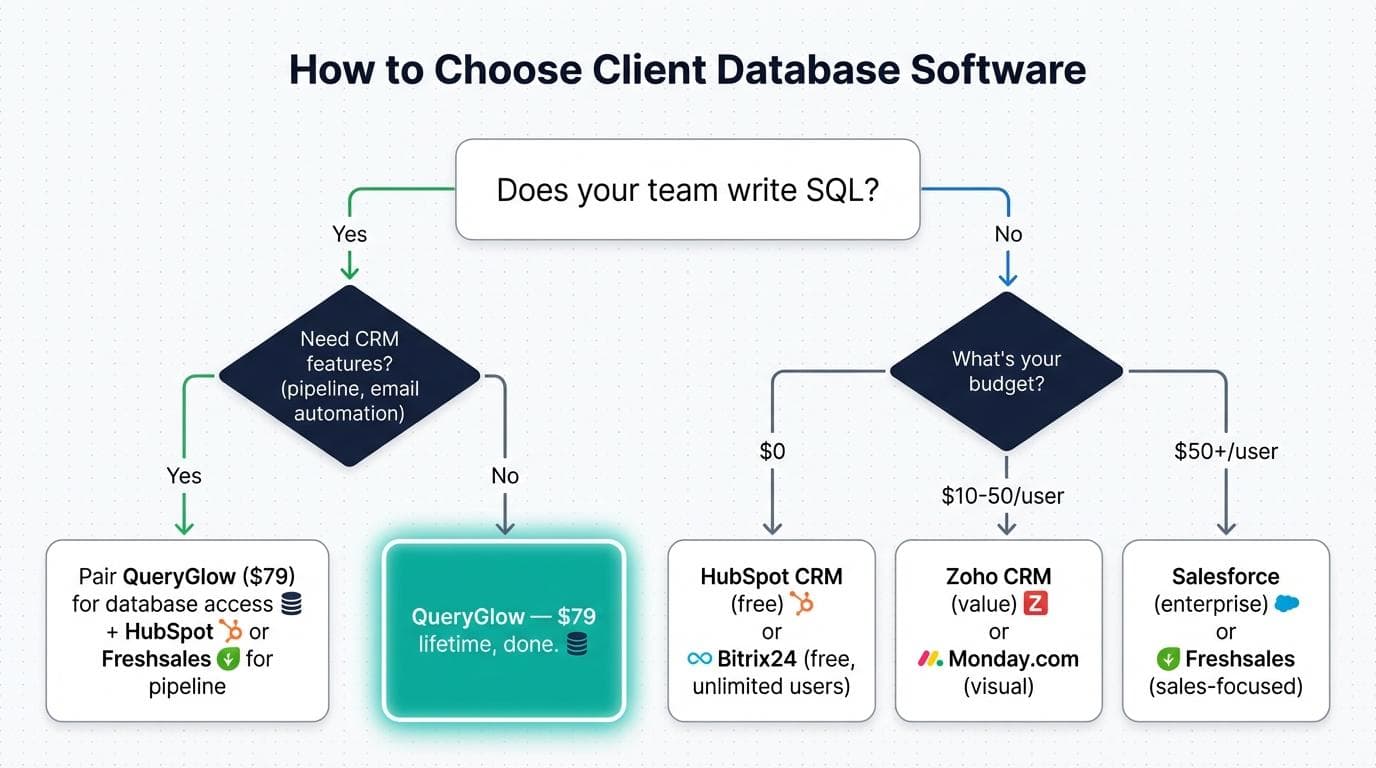
Quick Answer: The best database client depends on whether your team writes SQL or not. For technical teams that want direct database access with a modern UI, QueryGlow gives you SQL-level control at a one-time cost. For non-technical teams, HubSpot (free) or Monday.com (visual) gets you started fastest.
Here's a quick decision tree:
Does your team write SQL?
- •Yes — and you need CRM features (pipeline, email automation) → pair QueryGlow for database access with a CRM like HubSpot or Freshsales.
- •Yes — but no CRM features needed → QueryGlow handles everything at $79 lifetime.
- •No — budget $0 → HubSpot CRM (free tier) or Bitrix24 (free, unlimited users).
- •No — budget $10-50/user → Zoho CRM (value) or Monday.com (visual).
- •No — budget $50+/user → Salesforce (enterprise customization) or Freshsales (sales-focused).
How to Choose Client Database Software (Decision Framework)
By Team Size
Solo / 1-5 people: Start free. HubSpot's free tier or Airtable's free plan gives you room to grow without financial commitment. If your data is already in PostgreSQL or MySQL, QueryGlow at $79 costs less than two months of a $15-per-user plan for a three-person team.
5-50 people: This is where per-seat pricing starts to sting. A $15/user/month tool costs $9,000/year for a 50-person team. Look hard at flat-rate or tiered organization pricing (Bitrix24, QueryGlow) versus per-seat models.
50+ people: Enterprise agreements matter here. Negotiate. And be realistic about implementation: anything touching 50+ users needs a rollout plan, training schedule, and probably a dedicated admin.
By Technical Skill Level
Non-technical teams: HubSpot, Monday.com, or Freshsales. Drag-and-drop interfaces, no code required, guided setup wizards.
Mixed teams: Zoho CRM or Airtable. Enough customization for power users, approachable enough for everyone else.
Technical teams: QueryGlow or direct database tools. If your team thinks in SQL and your client data lives in a relational database, a CRM might add friction instead of removing it.
By Industry
Agencies: Monday.com (project tracking + client management) or QueryGlow (if you manage client databases directly).
SaaS startups: HubSpot (free to start, scales with you) or Freshsales (sales-focused from day one).
Consulting/professional services: Zoho CRM (good value, broad feature set) or Salesforce (if you need deep customization).
Healthcare/finance (compliance-heavy): Self-hosted solutions like QueryGlow give you data sovereignty. SaaS tools require careful evaluation of their data processing agreements.
Checklist — questions to ask before buying:
- •How many users need access in the next 12 months? → Calculate per-seat cost at that number
- •Does your team write SQL? → If yes, consider database-first tools like QueryGlow
- •Where does your client data currently live? → Spreadsheets, existing CRM, or relational database?
- •Do you need sales pipeline features? → If no, you might not need a full CRM
- •What's your compliance situation? → Regulated industries may need self-hosted options
- •What integrations are non-negotiable? → Check each tool's integration list before committing
- •What's your realistic training budget (time + money)? → Factor this into TCO
Red flags to watch in demos:
- •Vendor won't share pricing without a sales call
- •"Easy migration" claims without specifics on timeline or field mapping
- •Per-seat pricing that excludes add-ons you'll obviously need
- •No self-service trial — if they won't let you test it, ask why
Client Database Software FAQ
What are client databases?
A client database is any structured system that stores information about your clients — names, contact details, project history, billing data, communication logs. It can be as simple as a spreadsheet or as complex as a multi-table relational database. The term usually implies something more organized than scattered files, with the ability to search, filter, and report on client information.
What is a good program to keep track of clients?
It depends on your team's technical skill and budget. HubSpot CRM is the best free option for non-technical teams. Zoho CRM offers the most features per dollar for SMBs. QueryGlow is ideal for technical teams who already store client data in SQL databases and want a modern interface without recurring costs. 94% of customers expect a seamless experience across interactions, so whatever tool you choose needs to keep your team aligned on client status.
Can I migrate from spreadsheets to client database software?
Yes, every tool on this list supports CSV import. Realistic timeline: basic migration (contacts and companies) takes a few hours. Complex migration (with deal history, custom fields, and activity logs) takes 1-2 weeks depending on the tool and data volume. Budget a day for data cleanup before you import anything — your spreadsheet probably has duplicates, inconsistent formatting, and blank fields that need fixing first.
Is self-hosted client database software more secure?
Self-hosted tools like QueryGlow give you full control over where data is stored and who can access it. Your client data never leaves your infrastructure. That said, self-hosting means you're responsible for security patches, backups, and access control. For teams with the technical chops to manage a server, self-hosted is more secure by default because the attack surface is smaller. For non-technical teams, a reputable SaaS provider with SOC 2 compliance may be the safer practical choice.
What's the difference between client database software and a spreadsheet?
Spreadsheets work fine for under 100 clients with simple data. Beyond that, you run into problems: no relational data linking (connecting a client to their projects, invoices, and communications), no concurrent multi-user editing without conflicts, no audit trail, and no built-in automation. Client database software solves all of these.
Next Steps: Try It Yourself
Try QueryGlow: If your team stores client data in PostgreSQL, MySQL, or any of the six supported databases, try the QueryGlow live demo, then deploy it on your own infrastructure in under 10 minutes. $79 one-time, no per-seat fees, self-hosted.
Tags:
Built by an engineer. Zero telemetry. Zero tracking.
Share a URL. Your whole team is in.
QueryGlow is web-based and self-hosted, source code included. No per-seat fees, no desktop app to install. Your data stays on your infrastructure. $79 once.
“It's the simplest and the most beautiful interface that you can have.”
$79 one-time. Self-hosted. No subscription.