
Quick Answer: phpMyAdmin works only with MySQL and MariaDB, so there is no phpMyAdmin for PostgreSQL. The classic counterpart is phpPgAdmin. Most teams today run pgAdmin 4 in server mode or Adminer, both free, or a self-hosted web GUI such as QueryGlow ($79 once) when several people share access.
If you moved from MySQL to PostgreSQL and miss opening your database in a browser tab, these are the web interfaces that do the phpMyAdmin job for Postgres.
Does phpMyAdmin work with PostgreSQL?
No. phpMyAdmin is built for MySQL and MariaDB: its documentation lists MySQL 5.5 or newer and MariaDB 5.5 or newer as the supported databases.
7 web interfaces for PostgreSQL compared
All seven open in a browser and work with PostgreSQL.
| Tool | Runs as | Price | Latest release |
|---|---|---|---|
| phpPgAdmin | PHP web app | Free (GPL 2) | 7.13.0 (November 2020) |
| pgAdmin 4 | Desktop app, or web app in server mode | Free | 9.18 (September 2026) |
| Adminer | Single PHP file | Free | 6.1.2 (October 2026) |
| pgweb | Single Go binary with a browser UI | Free (MIT) | 0.17.0 (November 2025) |
| CloudBeaver Community | Java web server, Docker image | Free (Apache 2.0) | 26.2.2 (October 2026) |
| DbGate | Web app in Docker, or desktop app | Community free, Premium $12 a month | 7.3.2 (October 2026) |
| QueryGlow | Web app on your Linux server (Docker) | $79 once, whole team | 1.3.1 (September 2026) |
phpPgAdmin
phpPgAdmin is a PHP web app for administering PostgreSQL. Its latest release is 7.13.0 from November 2020; the repository is not archived, but it was last updated in July 2024. For a new install, pick a tool with current releases.
pgAdmin 4 in server mode
pgAdmin 4 is the free, open source management tool for PostgreSQL. It runs as a desktop app or in server mode, served as a web application your team reaches from a browser. Version 9.18 came out on September 17, 2026. From the pgAdmin container docs (change the email and password first):
docker run -p 80:80 \
    -e '[email protected]' \
    -e 'PGADMIN_DEFAULT_PASSWORD=SuperSecret' \
    -d dpage/pgadmin4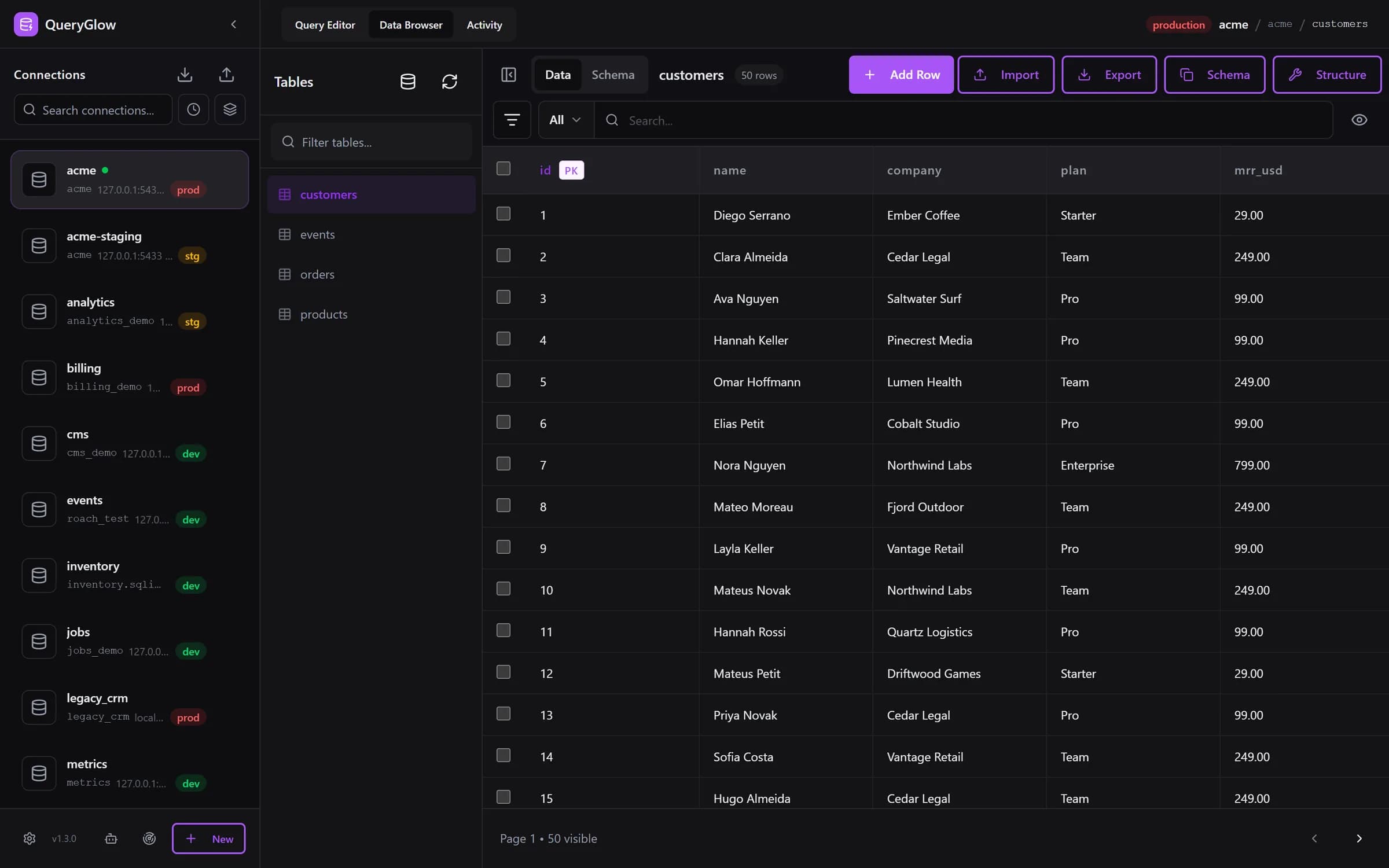
Curious what a web-based database GUI looks like?
QueryGlow runs in your browser from a server you run. Browse, query and edit PostgreSQL, MySQL, SQLite and 3 more engines. $79 once for the whole team.
See the tourAdminer
Adminer is database management in a single PHP file for MySQL, MariaDB, PostgreSQL, SQLite, MS SQL and Oracle. Put the file on a PHP web server and open it, much like phpMyAdmin. Version 6.1.2 came out in October 2026. The Adminer site recommends allowing only listed IP addresses or password protecting it in your web server.
pgweb
pgweb is a web-based database explorer for PostgreSQL, a single Go binary with zero dependencies for Mac, Linux and Windows. It runs SQL queries, keeps a query history and exports to CSV, JSON or XML. Version 0.17.0 came out in November 2025.
CloudBeaver Community
CloudBeaver is the web edition from the DBeaver team: a Java server with a web interface, free under Apache 2.0, with PostgreSQL among its drivers. Version 26.2.2 came out on October 5, 2026. From the CloudBeaver wiki:
docker run --name cloudbeaver --rm -ti -p 8978:8978 -v /var/cloudbeaver/workspace:/opt/cloudbeaver/workspace dbeaver/cloudbeaver:latestDbGate
DbGate runs as a web app in Docker or as a desktop app for Windows, Linux and Mac, and covers PostgreSQL next to MySQL, SQL Server, MongoDB and more. Community is free; Premium costs $12 a month or $120 a year. Version 7.3.2 came out in October 2026. The DbGate docs send Community users to Docker Hub, which gives this line (replace the host port placeholder):
docker run -it --name dbgate-instance --restart always -p <port on host>:3000 dbgate/dbgateOur DbGate review covers the editions in detail.
QueryGlow
QueryGlow is a self-hosted database GUI your team opens in the browser. You install it once on a Linux server with Docker (./queryglow install sets up the app, HTTPS and a password), and everyone with the password opens the same URL. It covers PostgreSQL, TimescaleDB and CockroachDB plus MySQL, MariaDB and SQLite, and Safe Mode blocks destructive SQL by default. It costs $79 once for the whole team and every server you run, source code included; there is no free tier and no trial build. Honest limits: you need a Linux server you run, there are no per-user accounts (one shared login at the web server), and on PostgreSQL the table list covers the public schema. Try the live demo: the real app on a sample database, read-only, AI switched off, no signup.
Which one should you pick?
- •Free and made only for PostgreSQL: pgAdmin 4 in server mode.
- •The closest feel to phpMyAdmin: Adminer.
- •A quick browser UI for one developer: pgweb.
- •Many database engines in one web UI: CloudBeaver or DbGate.
- •A team on one install with a safety guard and a one-time price: QueryGlow.
For desktop and command line options as well, see the best PostgreSQL client comparison.
Try QueryGlow: a self-hosted database GUI your team opens in the browser, $79 once for the whole team. Try the live demo (read-only, AI switched off, no signup).
Tags:
Built by an engineer. The app sends no telemetry.
Your database, without the dependencies.
QueryGlow is web-based and self-hosted, source code included. Open a URL from any device, your rows never leave your server. $79 once.
“Beautiful interface and very intuitive.”
Jean-Francois, Mildor Violon, verified customer “I was looking at DBeaver and yours looked a little easier for what I was looking for.”
Mike, verified customer
Stripe checkout. You'll enter your GitHub username for the repo invite. No refunds, so try the read-only demo first.
$79 one-time. Self-hosted. No subscription.