
Quick Answer: The quickest like-for-like swap is Adminer: free, actively maintained, and a single PHP file. CloudBeaver is DBeaver's free web edition, and QueryGlow ($79 once, self-hosted via Docker) is the paid pick for teams who want one web GUI for everyone. Prefer desktop? Start with HeidiSQL or Beekeeper Studio.
Pick by what you need:
- •Need the smallest free swap: Adminer, a single PHP file.
- •Need a free self-hosted web GUI: CloudBeaver.
- •Need one web GUI your whole team opens in a browser, paid once: QueryGlow ($79 once, installed on a server you run, one shared URL behind one password).
- •Need open source in the browser or on the desktop: DbGate Community.
- •Need 100+ databases in one desktop app: DBeaver.
- •Need a lightweight free desktop client: HeidiSQL.
- •Need a minimal desktop client focused on queries: Beekeeper Studio.
phpMyAdmin Alternatives Compared
| Tool | Price | Web or Desktop | Best For |
|---|---|---|---|
| Adminer | Free (Apache/GPL 2) | Web | Drop-in phpMyAdmin replacement |
| CloudBeaver | Free (Apache 2.0) | Web | Free self-hosted web GUI |
| QueryGlow | $79 one-time | Web | Teams sharing one self-hosted web GUI |
| DbGate | Free (Community) | Web + Desktop | Open-source flexibility |
| DBeaver | Free / Lite $113/yr | Desktop | Multi-database power users |
| HeidiSQL | Free | Desktop | Lightweight everyday queries |
| Beekeeper Studio | Free / Indie $9/mo | Desktop | Minimal UI focused on queries |
Prices as of September 2026.
Web-Based vs Desktop: Decide This First
phpMyAdmin's biggest feature is being reachable from any browser. If that's why you use it, stay web-based: Adminer, CloudBeaver, DbGate (in web mode), and QueryGlow all run as a self-hosted database GUI on your own server, exactly like phpMyAdmin does.
HeidiSQL, DBeaver, and Beekeeper Studio are desktop MySQL GUI tools. They suit solo work, but every teammate installs, configures, and stores credentials separately, the exact friction a shared web GUI avoids. If your starting point is MySQL Workbench rather than phpMyAdmin, our MySQL Workbench alternatives roundup covers that switch.
Adminer vs phpMyAdmin
Both are free PHP web apps you host yourself. The differences, as of September 2026:
- •Install: Adminer is one PHP file (about 400 to 550 kB, depending on the build); phpMyAdmin is a full PHP application with its own configuration.
- •Engines: phpMyAdmin is designed for MySQL and MariaDB; Adminer also covers PostgreSQL, SQLite, MS SQL and Oracle.
- •AI: Adminer offers an official plugin that generates queries with Google Gemini.
- •Exposure: keep either one behind a password or an IP allowlist; Adminer's own docs recommend exactly that.
If you want the smallest possible swap for MySQL, Adminer is it. If a team shares the GUI, the web options below add more around it.
Looking beyond phpMyAdmin? Keep the shared URL.
QueryGlow is a self-hosted MySQL and MariaDB GUI your team opens from one URL. $79 once.
See the tourThe 7 Alternatives
Adminer
A single PHP file (about 400 to 550 kB) that replaces phpMyAdmin's entire install. Version 6.1.1 shipped in September 2026, so it's actively maintained; ignore old claims to the contrary. The catch is exposure: outdated, publicly exposed Adminer copies have been abused to steal credentials, and Adminer's own docs recommend IP allowlisting or password-protecting access. Keep it behind HTTP auth and update promptly.
CloudBeaver
DBeaver's free, Apache-2.0-licensed web edition. Self-host it via Docker and you get a serious browser GUI from a team that's been building database tools for over a decade. The Community edition includes AI Chat (OpenAI, Copilot), and at $0 it's hard to argue with.
QueryGlow
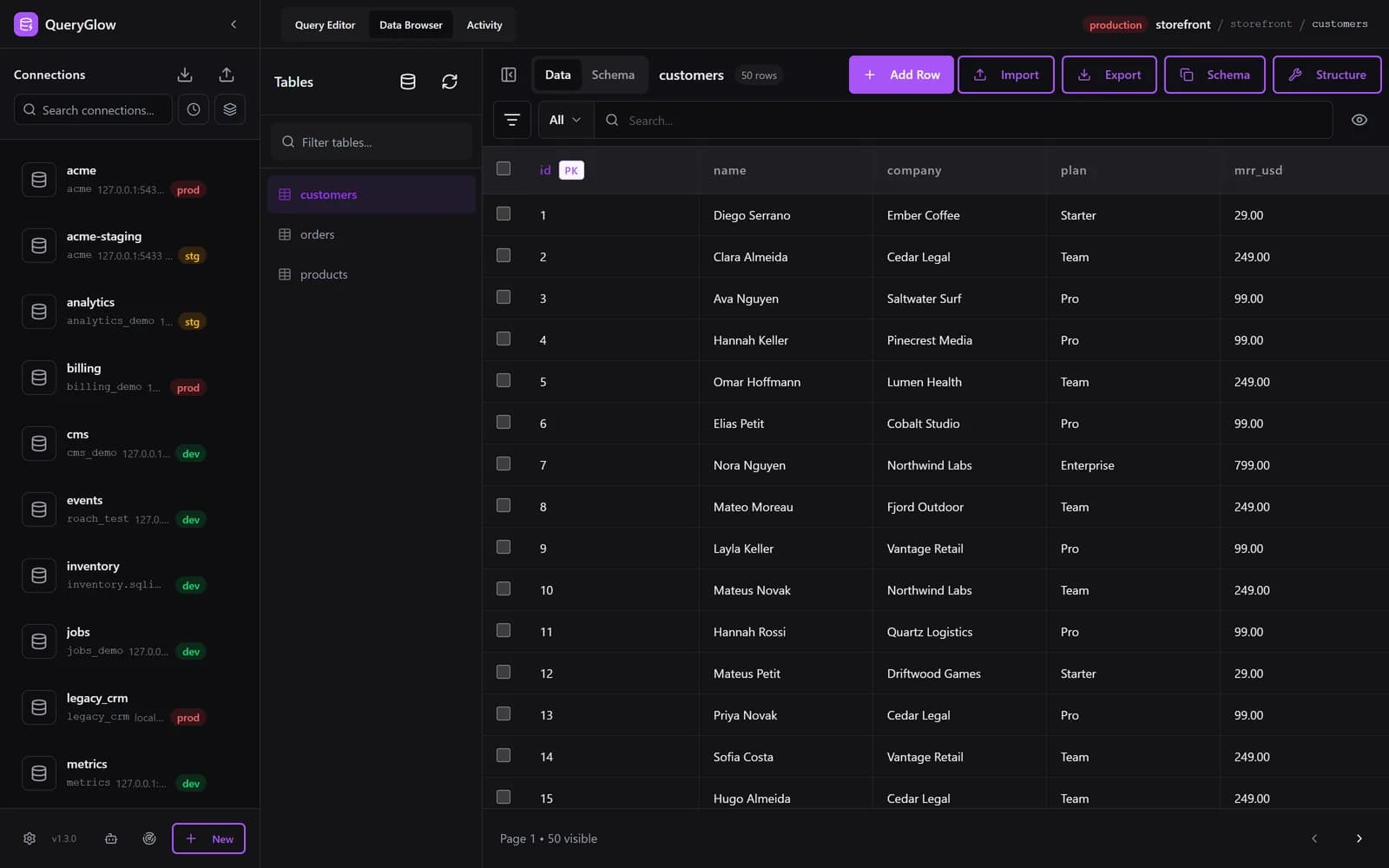
QueryGlow is for teams who want phpMyAdmin's browser access to MySQL, MariaDB and PostgreSQL on a server they run, with one install for everyone: the whole team opens the same URL in a browser, and nothing gets installed on anyone's laptop.
Oliver was looking for a replacement for Adminer and phpMyAdmin. He found QueryGlow, tried the demo and bought it.
“…once found, checked the demo, I instantly bought @QueryGlow”
Oliver on X
One install command (./queryglow install) sets up the app, HTTPS and a password on a Linux server with Docker. phpMyAdmin shows every database of a server in one tree; in QueryGlow each database is a connection, so Find databases on this server adds all of them from one login in one step, and the sidebar can group them by host, with search and sort. In the browser you click a cell in the Data Browser to edit it (JSON cells show as JSON text), page through up to 500 rows at a time, and change columns in the Structure dialog (add, rename, retype, drop, and on MySQL/MariaDB drag to reorder), which shows the exact SQL before it runs. Safe Mode blocks destructive statements by default, the Query Editor asks before any write on a connection marked production, SSH tunnels pin the server's host key on first connect, and stored credentials are encrypted with AES-256-GCM. Six engines (PostgreSQL, MySQL, MariaDB, SQLite, CockroachDB, TimescaleDB), so it doubles as a MariaDB GUI when your stack isn't pure MySQL.
$79 once, whole team, every server you run, source code included. The honest con: it's paid, and it needs a Linux server you run; there is no desktop app. You can try the live demo before deciding (the real app on a sample database, read-only, AI switched off, no signup).
DbGate
The free Community edition runs in your browser via Docker or as a desktop app; the free web build is for one user, and multi-user web access is Team Premium. Honest caveat: the AI features sit in the paid Premium tier, and dbgate.io does not advertise a bring-your-own-key option.
DBeaver
The desktop all-rounder: 100+ databases and AI Chat in the free Community edition, paid tiers from $113/yr (Lite). It is a Java desktop app.
HeidiSQL
Free, and now on Windows, Linux and macOS: Linux builds landed in 12.14 (December 2025), and the current release, 12.21 (August 2026), ships a macOS build too. Good for quick MySQL/MariaDB sessions; no web access, no team story.
Beekeeper Studio
A minimal desktop client. The free Community edition covers everyday work; Indie is $9/mo (billed annually) and Pro $14/mo. Desktop-only, so no phpMyAdmin-style shared URL for the team.
The Docker Deployment Note
phpMyAdmin itself, Adminer, CloudBeaver and DbGate ship official Docker images and are each one docker run away. If your phpMyAdmin lives in a docker-compose file today, switching to Adminer, CloudBeaver or DbGate is a five-line edit, not a migration project. QueryGlow, a Docker database GUI you install next to your stack, runs on Docker Compose too, just without a public image: after buying you clone its private repository and run ./queryglow install, which builds the image and sets up HTTPS and the password. Later, ./queryglow update backs up first and rolls back on its own if the new version does not come up, and ./queryglow update --check only reports whether a newer release exists. That matters for the exposure problem above: keeping a web GUI current is one command. Pick Adminer for minimalism, CloudBeaver for free depth, and QueryGlow if you want one GUI for the whole team without a subscription.
Tags:
Built by an engineer. The app sends no telemetry.
Keep the shared URL. Try it in the live demo.
Every database on a server added in one step, HTTPS and a password set up by the installer, one-command updates with rollback. Self-hosted, $79 once.
“Beautiful interface and very intuitive.”
Jean-Francois, Mildor Violon, verified customer “I was looking at DBeaver and yours looked a little easier for what I was looking for.”
Mike, verified customer
Stripe checkout. You'll enter your GitHub username for the repo invite. No refunds, so try the read-only demo first.
$79 one-time. Self-hosted. No subscription.